🚀 Key Takeaways
- The market for developers offers highly customizable options like the Keychron K2 V2 and Ducky One 3, alongside ergonomic and premium choices such as the Logitech MX Mechanical Mini and HHKB Professional HYBRID Type-S.
- Key features enhancing developer productivity include hot-swappable PCBs for personalized switch experiences, robust multi-device Bluetooth connectivity for seamless switching, and long battery life up to 72 hours typing or 10 months with backlighting off.
- Choosing the ideal keyboard depends on specific developer needs, ranging from the silent Topre switches and efficiency-focused layout of the HHKB, to the smart illumination and low-profile ergonomics of the Logitech, or the deep customization and build quality offered by Ducky and Keychron.
For developers, a keyboard isn't just an input device; it's a critical extension of their thought process, demanding precision, comfort, and reliability.
The right mechanical keyboard can significantly boost productivity, reduce fatigue, and make long coding sessions genuinely enjoyable.
With a diverse array of switches, layouts, and connectivity options available, finding the perfect match requires careful consideration of both technical specifications and personal preferences.
This guide dives deep into some of the best mechanical keyboards tailored for development work, dissecting their core features, performance merits, and what makes each unique.
We've analyzed top contenders, from compact wireless powerhouses to robust wired workhorses, to help you navigate the landscape and find a keyboard that not only meets your professional demands but also enhances your daily coding experience.
Expect insights into crucial aspects like switch types, keycap materials, connectivity versatility, and essential features that impact a developer's workflow.
Whether you prioritize extreme portability, multi-device functionality, a specific tactile feel, or robust build quality, our in-depth look will highlight the strengths that set each keyboard apart.
Prepare to discover your next essential tool, designed to transform your interaction with code into a more tactile, responsive, and ultimately, more productive experience.
1. Quick Picks: Top 3 Recommendations
🔹 HHKB Professional HYBRID Type-S
This keyboard is for the purist who values precision and silence above all else.
Its standout features are the Silent Topre Electrostatic Capacitive Switches for supreme tactility and an ergonomic, compact layout designed for programming and long-form writing.
User sentiment is a strong 4.6 out of 5 stars.
🔹 Logitech MX Mechanical
A perfect blend of modern productivity features and ergonomic comfort.
It differentiates itself with smart, auto-adjusting backlighting and comfortable low-profile keys for a better typing posture.
Users rate it an impressive 4.4 out of 5 stars.
🔹 Keychron K2 V2
The ideal choice for those who want versatility and customization.
Its key advantages are a hot-swappable design allowing for personalized switch changes and a unique Mac layout that is also fully compatible with Windows.
The community feedback is a solid 4.4 out of 5 stars.
2. The Ultimate Comparison Table
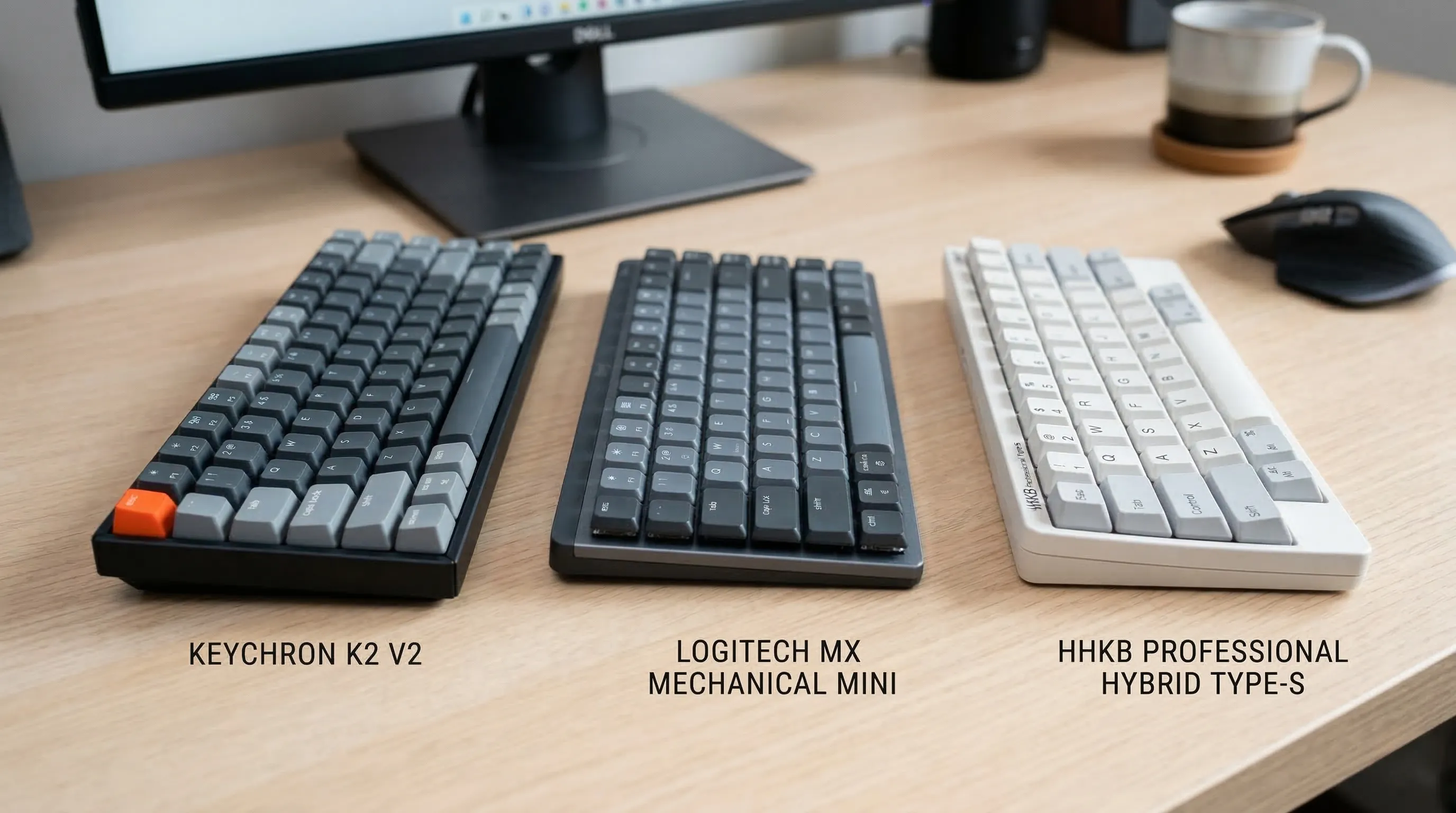
| Feature | Keychron K2 V2 | Ducky One 3 |
Logitech MX Mechanical |
HHKB Professional HYBRID Type-S |
|---|---|---|---|---|
| Brand | Keychron | Ducky | Logitech | HHKB |
| Model Name | K2 V2 | Ducky One 3 TKL wired keyboard | MX Mechanical Mini Master | HHKB Professional HYBRID Type-S |
| Layout Type | 75% layout | None | Low-profile, compact form factor (Mini) | Compact |
| Key Count | 84 | 87 | 60 | 60 |
| Switch Type | Keychron Super mechanical Brown | Tactile (Cherry MX Brown) | Clicky mechanical | Silent Topre Electrostatic Capacitive Switches |
| Hot Swappable | True | True | None | None |
| Connectivity Type | Wireless & Wired | Wired | Wireless | Wireless & Wired |
| Multi-Device Support | Up to 3 devices | None | Up to 3 devices | Up to 4 devices |
| Battery Life | 72 hours (typing) 7 days (normal use) |
N/A (Wired) | 15 days (backlight on) 10 months (backlight off) |
Not Specified |
| Keycaps | Material: ABS Type: Double-shot |
Material: PBT Type: Thick Double Shot seamless |
None | Material: PBT Type: Sculpted, durable, shine-resistant |
| Backlighting | Color Support: Single Color Features: White LED backlight |
Color Support: RGB | Color Support: Single Color Features: Smart illumination |
Color Support: Single Color |
| Compatibility (OS) | Mac, Windows | PC | Nearly any operating system | Microsoft Windows, Apple mac |
| User Sentiment | 4.4/5 (233 reviews) | 4.4/5 (23 reviews) | 4.4/5 (860 reviews) | 4.6/5 (112 reviews) |
| Enclosure Material | Acrylonitrile Butadiene Styrene | Plastic | Plastic parts include certified post consumer recycled plastic | Polybutylene Terephthalate |
| Weight | 0.9 Kilograms | 908 Grams | 1.8 Pounds | 1.2 Pounds |
3. In-depth Product Analysis:
A. Keychron K2 V2: The Technical Breakdown
The Keychron K2 V2 features a compact 75% layout with 84 keys.
It supports both Keychron Super mechanical Brown and Gateron G Pro mechanical Brown switches and is fully hot-swappable.
Connectivity is versatile, offering both Wireless & Wired modes via a reliable Broadcom Bluetooth 5.5 chipset or USB Type-C.
It can connect to up to 3 devices simultaneously.
The keyboard is powered by a massive 4000 mAh battery, providing up to 72 hours of typing or 7 days of normal use.
It comes with double-shot ABS keycaps and a Single Color White LED backlight with static or flashing modes.
The enclosure is made of Acrylonitrile Butadiene Styrene, and it weighs 0.9 Kilograms.
For gamers, it offers N-key rollover (NKRO) in wired mode and 6KRO in wireless mode.
It is fully compatible with both Mac and Windows operating systems.
- A Compact Powerhouse for Mac and Windows
The compact 75% layout saves desk space while retaining essential function keys.
Being hot-swappable means you can personalize your typing experience by changing switches without any soldering.
Its unique Mac layout is a huge plus for Apple users, and it includes extra keycaps for seamless compatibility with Windows.
The ability to connect with up to 3 devices makes switching between your laptop, tablet, and phone effortless.
With one of the largest batteries in a mechanical keyboard at 4000 mAh, you can work for days without needing a recharge.
The pre-installed tactile Keychron Super mechanical Brown switches offer a satisfying typing feel with a lifespan of up to 50 million keystrokes. - The User Consensus: Versatile and Reliable
Garnering a solid 4.4 out of 5 stars from 233 reviews, users appreciate its cross-platform functionality and robust build.
It holds a respectable Best Sellers Rank at #196 in Mac Gaming Keyboards, highlighting its popularity within the Apple ecosystem.
The package includes a USB Cable, Keycap Puller, and Additional Keycaps, providing everything you need to get started.


B. Ducky One 3: Engineering Deep Dive
The Ducky One 3 is a TKL keyboard with 87 keys and features tactile Cherry MX Brown switches.
It is fully hot-swappable, utilizing exclusive Kailh yellow hotswap sockets on a dual-layer PCB.
This is a purely Wired keyboard, connecting via a detachable braided USB-C cable.
Keycaps are premium, thick PBT Double Shot seamless material for superior durability.
The enclosure is made of Plastic and the unit weighs 908 Grams.
It incorporates Ducky's QUACK Mechanics design philosophy, which includes dual-layer high-grade silicone and EVA foam sound dampeners.
Additional features include V2 stabilizers, a remapped macro layout, and 3 level adjustable feet.
- The Enthusiast's Choice for Typing Feel
Ducky's QUACK Mechanics philosophy is all about delivering a superior acoustic and tactile experience, with foam dampeners minimizing unwanted noise.
The use of exclusive Kailh yellow hotswap sockets on a dual-layer PCB ensures reliability and allows for easy switch customization.
Thick PBT Double Shot seamless keycaps feel premium to the touch and are highly resistant to the shine that develops over time.
The improved V2 stabilizers provide a consistent feel across larger keys like the spacebar and enter key.
Convenience is enhanced with 3 level adjustable feet for ergonomic comfort and a detachable braided USB-C cable for easy transport. - Community Acclaim: Built to Last
With a rating of 4.4 out of 5 stars from 23 reviews, this keyboard is a well-regarded choice for those who prioritize build quality and typing sound.
Its Best Sellers Rank of #801 in PC Gaming Keyboards shows it is a strong contender in the enthusiast market.
The keyboard comes with a 1 year limited repair warranty, backing its premium construction.

C. Logitech MX Mechanical Mini: Specs at a Glance
This is a low-profile, compact keyboard with 60 keys featuring Clicky mechanical Logitech Romer-G Tactile switches.
It is a Wireless keyboard that connects via Bluetooth Low Energy or the included Logi Bolt receiver to up to 3 devices.
The backlighting is a Single Color with Smart illumination, where keys light up on approach and auto-adjust to ambient light.
Battery life is impressive, lasting up to 15 days with backlighting on or up to 10 months with it off, and it features USB-C quick charging.
The enclosure includes certified post-consumer recycled plastic (47% for the Graphite model).
It weighs 1.8 Pounds and offers deep customization of Fn keys and backlighting effects via the Logi Options+ software.
- The Pinnacle of Productivity and Style
The low-profile keys offer a more ergonomic typing posture, reducing wrist strain during long work sessions.
Smart illumination is a game-changer, saving battery life and providing light only when you need it.
Seamlessly control multiple computers with Flow cross-computer control and pair with nearly any operating system on up to 3 devices.
The extensive battery life, combined with USB-C quick charging, means you'll rarely be caught without power.
Logitech's commitment to sustainability is evident in its use of certified post consumer recycled plastic.
The Clicky mechanical switches provide gratifying, audible feedback for a confident and precise typing experience. - Market Leader: The Professional's Verdict
Dominating the market with a Best Sellers Rank of #21 in Computer Keyboards, the MX Mechanical is a proven performer.
It has an excellent user rating of 4.4 out of 5 stars from a substantial 860 reviews.
The package is comprehensive, including the keyboard, a Logi Bolt Receiver, a USB Cable, and User Documentation.

🛍️ Logitech MX Mechanical
Check the latest price and availability on Amazon.
👉 View on AmazonD. HHKB Professional HYBRID Type-S: The Coder's Companion
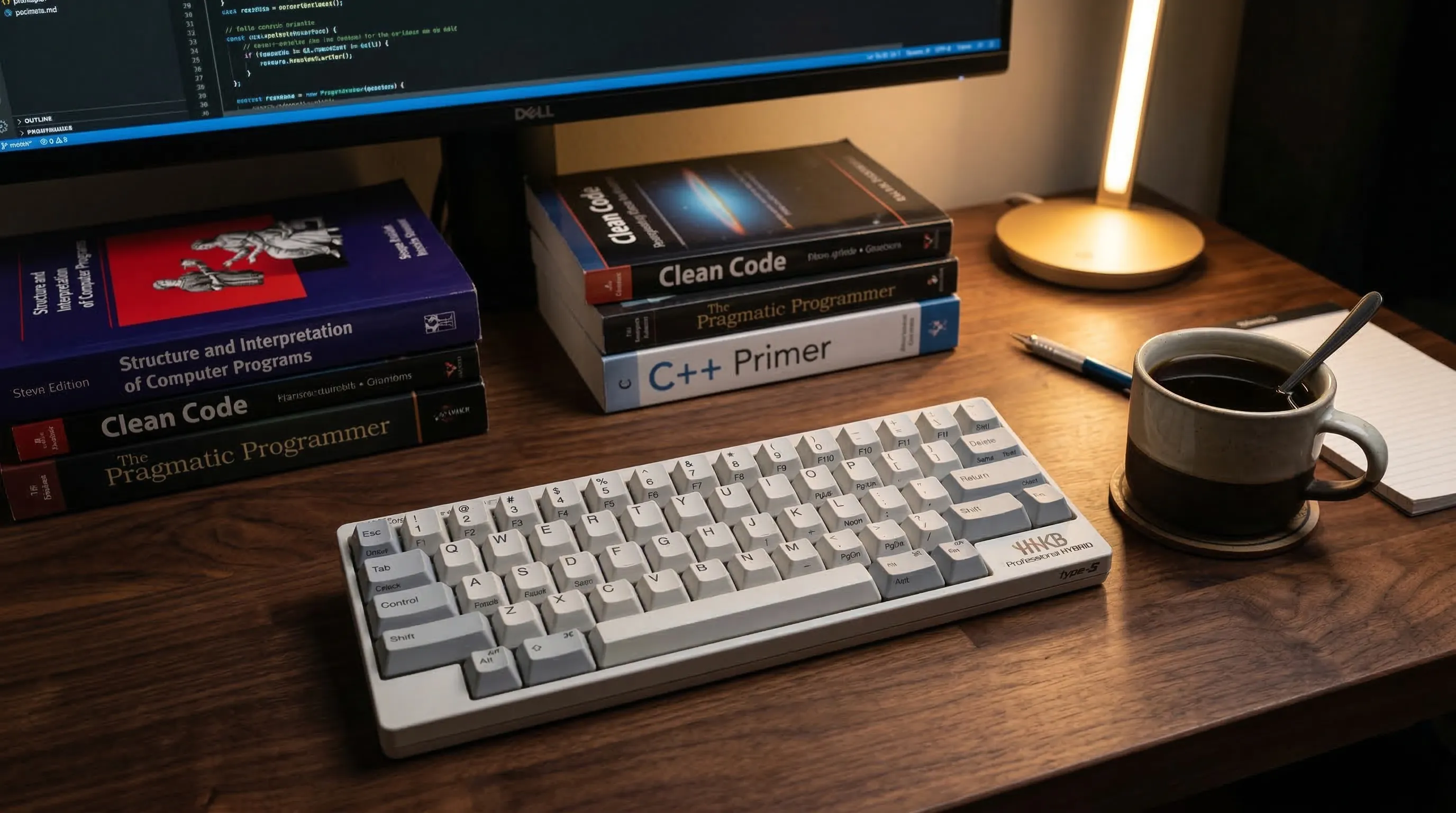
This keyboard features a compact 60-key layout with legendary silent Topre Electrostatic Capacitive Switches.
Connectivity is dual-mode, supporting both wired USB (Type-C) and Bluetooth multi-pairing for up to 4 devices.
Keycaps are high-quality, sculpted, and shine-resistant PBT material.
It is designed for professionals, weighing just 1.2 Pounds and made from Polybutylene Terephthalate.
Customization is powerful, allowing users to create Keymap settings saved directly in the HHKB and use DIP Switches to change modes for different OS.
It is compatible with Microsoft Windows, Apple mac, and various mobile devices.
- Ergonomics and Efficiency, Perfected
The silent Topre switches are the main attraction, offering supreme tactility and precision without key chatter, making it ideal for quiet environments.
Its compact 60-key layout is highly ergonomic, designed to minimize finger movement and maximize typing efficiency for programmers and writers.
The ability to save Keymap settings directly to the keyboard's memory means your custom layout travels with you to any device.
Instantly switch between up to 4 paired devices with simple keyboard shortcuts, boosting your multi-tasking workflow.
The durable, shine-resistant PBT keycaps have a sculpted profile that cradles your fingertips for enhanced comfort during extended use. - A Niche Icon: The Enthusiast Rating
Held in high regard by its dedicated user base, the HHKB boasts an impressive 4.6 out of 5 stars from 112 reviews.
As a premium, specialized tool, it ranks #230 in Computer Keyboards, reflecting its status as a top choice for serious typists.
The keyboard comes with a generous 2 Years, Advance Exchange warranty, demonstrating the manufacturer's confidence in its product.

🛍️ HHKB Professional HYBRID Type-S
Check the latest price and availability on Amazon.
👉 View on Amazon
4. The Golden Standards: How We Picked Them
🔹 Deconstructing the Modern Keyboard
Our evaluation begins with the foundational elements that define a keyboard's identity and function.
We scrutinize the Layout Type, weighing the space-saving benefits of a compact design against the productivity advantages of a full-size board.
The core typing feel is assessed through Switch Type variations, including the satisfying bump of tactile switches, the audible feedback of clicky ones, and the office-friendly quietness of silent options.
We examine the Keycaps material, prioritizing the superior durability and shine-resistance of PBT over the more common ABS.
A crucial feature for enthusiasts, Hot-Swappable functionality, is a key criterion, as it allows for solder-free switch customization.
Finally, we analyze Connectivity options, looking for the versatility of combined Wireless/Wired support, the latest Bluetooth version, and robust Multi-device support.
🔹 Translating Specs into User Experience
Technical specifications are meaningless without understanding their real-world impact.
Flexible Connectivity that allows a user to instantly switch between devices is a massive boost to workflow efficiency.
For wireless models, Battery life considerations are paramount; a keyboard must be a reliable tool, not a constant source of charging anxiety.
Seamless Compatibility across various operating systems and devices ensures a hassle-free experience right out of the box.
The ability to customize with Hot-Swappable sockets means the keyboard can evolve with a user's preferences over time.
The choice between different switch and layout types directly shapes the daily interaction, making it comfortable, efficient, and enjoyable for specific tasks like gaming or coding.
🔹 The Human Element and Value-Added Features
A great keyboard is more than the sum of its parts; it's about how it performs in the hands of users.
This is why we treat User_Sentiment as a critical measure of overall satisfaction and long-term reliability.
Real-world feedback often reveals nuances that a spec sheet cannot.
Furthermore, we look for Additional_Features that provide tangible value and elevate the user experience.
Thoughtful inclusions like integrated sound dampeners for superior acoustics, powerful customization software for macros and lighting, or an advanced ergonomic design for comfort are often the deciding factors that separate a good product from a truly exceptional one.
5. Expert Buying Guide
🔹 The Physical Feel: Layout, Switches, and Keycaps
The physical size, or Layout Type, is your first major decision, dictating desk footprint and key availability.
Full-size layouts include a number pad, while Tenkeyless (TKL) versions remove it for a more compact form, and even smaller 75% or 60% layouts condense keys to save maximum space at the cost of dedicated function or arrow keys.
Your choice of Switch Type defines the entire typing experience.
Linear switches offer a smooth, consistent press from top to bottom, favored for gaming.
Tactile switches provide a noticeable "bump" midway through the press, confirming actuation without a loud noise.
Clicky switches add an audible click to the tactile bump, offering the most distinct feedback.
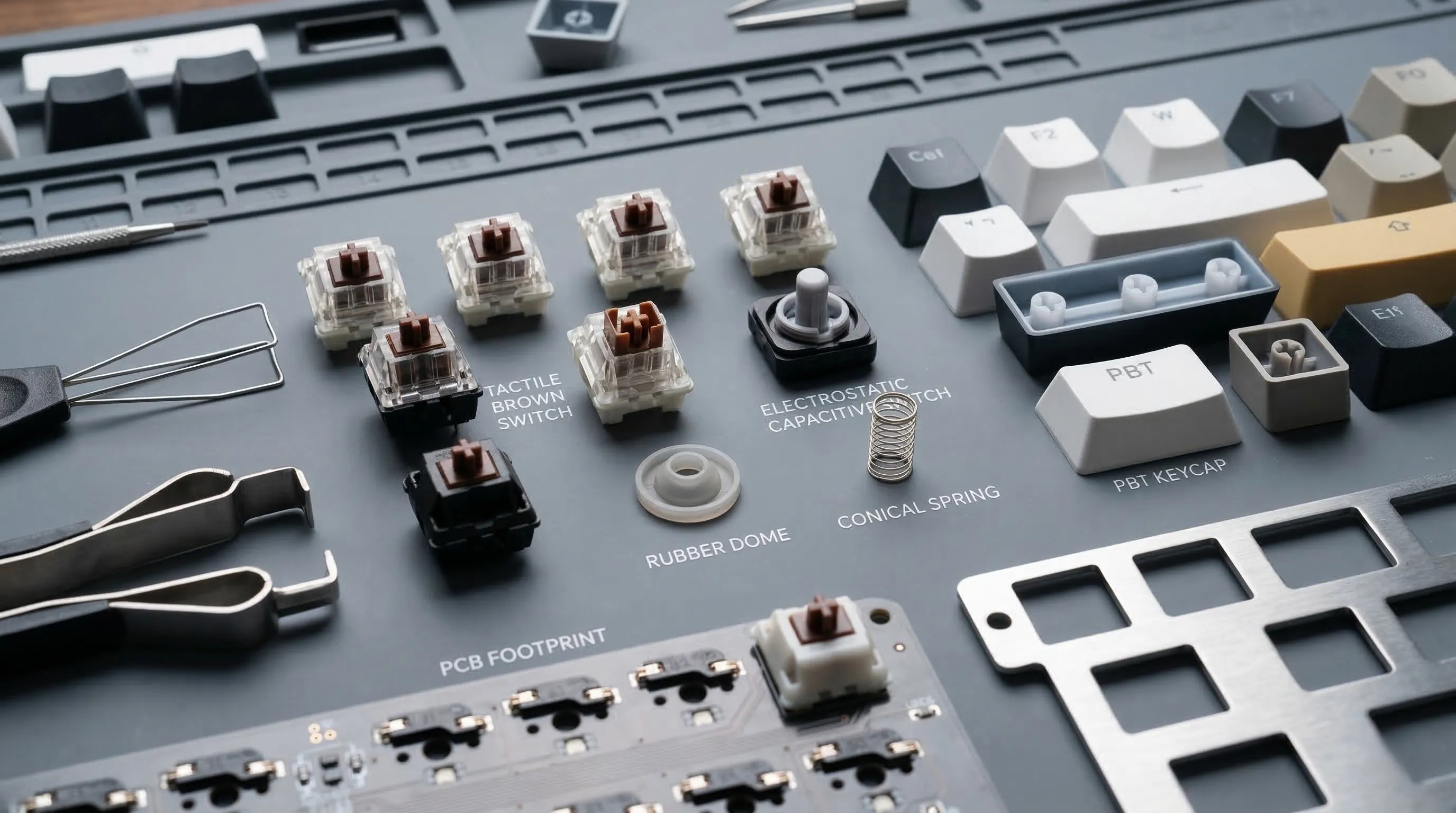
Unique options like Topre switches use an electrostatic capacitive mechanism for a highly regarded, distinct tactile feel unlike traditional mechanical designs.
It is crucial to try different switches, as personal preference is paramount.
Finally, Keycaps are the touchpoints for your fingers, with material and construction being key.
Most are made from either ABS plastic, which is common but can develop a shine over time, or more durable, texture-retaining PBT plastic.
Double-shot injection molding fuses two pieces of plastic together, creating legends that are physically part of the keycap and can never wear off.
🔹 The Digital Engine: Internals and Illumination
The ability to customize is a hallmark of mechanical keyboards, and a Hot-Swappable PCB is a game-changer.
This feature allows you to pull out and replace switches without any soldering, offering incredible freedom to experiment with different switch types and ensuring longevity by making it easy to replace a single faulty switch.
Connectivity is a crucial consideration for modern workflows.
A wired connection, typically via USB-C, offers maximum reliability and zero latency.
Wireless connectivity via Bluetooth provides a clean, cable-free setup, but introduces potential latency and the need to manage battery life; look for the latest Bluetooth versions for the best performance.
For users with multiple computers or devices, multi-device support is essential, allowing you to switch seamlessly between a laptop, tablet, and phone.
Backlighting ranges from practical to purely aesthetic.
Options include single-color illumination, often in white, or full RGB for complete color customization.
More advanced systems feature smart illumination that can automatically adjust brightness based on ambient lighting or even activate when your hands approach the keyboard.
Rollover determines how many keys can be pressed at once and still be registered correctly.
N-key rollover (NKRO), common in wired mode, means every single keypress will be registered, which is vital for extremely fast typists and gamers.
In wireless modes, 6KRO is a common standard, which is more than sufficient for the vast majority of use cases.
🔹 The Ecosystem: Compatibility and Cross-Platform Use
Ensuring broad Compatibility is critical for a seamless experience across all your hardware.
Always verify native support for your primary operating systems, whether it's Mac or Windows, as this impacts function keys and media controls.
Many keyboards designed for cross-platform use will include extra keycaps with OS-specific legends.
Consider your entire device ecosystem, as a single keyboard that works with your desktop PC, laptop, tablet, and smartphone streamlines your workflow significantly.
This is where features like multi-device Bluetooth pairing and physical switches to change OS modes become incredibly valuable, transforming the keyboard into a central hub for all your typing needs.
6. Practical Maintenance & Care Tips
🔹 The Routine Refresh
Always begin by unplugging your keyboard to prevent accidental keystrokes or electrical damage.
For weekly upkeep, use a can of compressed air to dislodge dust and debris from between the keys, holding it at an angle.
Follow up with a soft-bristled brush or a microfiber cloth to gently wipe the surfaces of the keycaps and the keyboard case.
A slightly dampened cloth with water or a mild cleaning solution can be used on the case, but ensure no liquid drips between the switches.
🔹 The Deep-Dive Decontamination
For a more thorough cleaning, carefully remove the keycaps using a keycap puller to avoid damaging them or the switches.

Soak the keycaps in warm, soapy water, then scrub them gently with a small brush before letting them air dry completely.
With the keycaps off, use compressed air again to clear out the now-exposed plate, followed by a brush or cotton swabs dipped in isopropyl alcohol to clean any stubborn grime around the switches.
Never pour any liquid directly onto the keyboard's internal plate or switches.
🔹 Component & Cable Care
To preserve the life of your switches, avoid spills at all costs, as liquid can cause shorts or internal corrosion.
If a switch becomes sticky or unresponsive, a single drop of specialized switch cleaner can sometimes resolve the issue, but this should be done with extreme caution.
Proper cable management is also crucial for preventing strain on the keyboard's USB port and the cable connector itself.
Use cable ties or routing channels to avoid sharp bends or yanking, which can lead to connection issues over time.
7. Frequently Asked Questions
🔹 What does 'hot-swappable' actually mean?
A hot-swappable keyboard allows you to change the mechanical switches underneath the keycaps without any soldering.
This means you can easily personalize the typing feel of each key by simply pulling out the old switch and plugging in a new one.
It's a popular feature for enthusiasts who want to experiment with different switch types, such as linear, tactile, or clicky, to create a customized experience.
🔹 What's the difference between PBT and ABS keycaps?
The main difference is the type of plastic used.
ABS (Acrylonitrile Butadiene Styrene) is a very common and smooth plastic that can develop a shiny look from finger oils over extended use.
PBT (Polybutylene Terephthalate) is a more durable and often slightly textured material that is highly resistant to shine, making the keycaps look new for much longer.
PBT keycaps are generally considered a more premium option due to their longevity and feel.
🔹 Why are mechanical keyboards so expensive?
Mechanical keyboards command a higher price due to their complex construction and higher-quality components.
Each key has its own individual mechanical switch, which is more costly to manufacture than the single rubber membrane sheet found in typical keyboards.
Premium materials like PBT plastic for keycaps, advanced printed circuit boards (PCBs), and features like sound dampening foam also add to the cost.
Finally, advanced functionalities such as wireless multi-device connectivity and sophisticated backlighting contribute to the overall price.
🔹 What is NKRO / 6KRO?
This refers to a keyboard's "rollover" capability, which is its ability to correctly register multiple keystrokes pressed at once.
NKRO, or N-key rollover, means the keyboard can register every single keypress simultaneously, which is a feature often found in wired modes and is crucial for extremely fast typists and competitive gamers.
6KRO, or 6-key rollover, means it can accurately register up to six keys pressed at the same time, which is a common standard for wireless modes and is more than sufficient for general typing and most gaming scenarios.
🔹 Is a wireless connection better than wired?
Neither is strictly "better," as they serve different priorities.
A wireless connection offers a cleaner desk setup without cables and the convenience of connecting to multiple devices like laptops, tablets, and phones.
A wired connection provides a guaranteed stable, zero-latency signal and can support features like full N-key rollover, making it the preferred choice for situations where input speed is critical.
The best choice depends entirely on whether you prioritize flexibility and a tidy workspace or absolute input reliability.
🔹 What keyboard layout should I choose?
The layout refers to the physical size and arrangement of the keys.
A full-size layout includes the number pad, function row, and navigation cluster.
More compact layouts, like 75% or 60%, remove certain keys like the number pad to save desk space and minimize hand movement.
Choosing a layout is a personal preference based on how you use your keyboard and what keys are essential for your workflow or gaming habits.
8. Final Verdict: Which One is Your Perfect Match?
🔹 For the All-Rounder: Customization & Versatility
If your desk serves as both an office and a creative space, the Keychron K2 V2 is your ideal companion.
It masterfully balances performance and personalization, making it perfect for the user who loves to switch between Mac and Windows, work and light gaming.
The core benefit is its hot-swappable nature, allowing you to tailor the typing feel without any soldering.
With its compact 75% layout, reliable multi-device Bluetooth, and exceptional battery life, it’s the ultimate jack-of-all-trades keyboard that doesn’t compromise on quality.
🔹 For the Productivity Pro: Sleek Design & Smart Workflow
For those who prioritize a clean aesthetic and seamless efficiency, the Logitech MX Mechanical stands out.
This keyboard is engineered for the modern professional who needs to effortlessly switch between multiple computers and operating systems.
Its signature features are the comfortable low-profile keys and smart backlighting that adapts to your environment, creating an uncluttered and ergonomic workspace.
Pairing this with its long battery life and quick-charging capabilities, it’s the definitive choice for maximizing productivity with a touch of sophistication.
🔹 For the Typing Purist: Unrivaled Feel & Efficiency
When the act of typing itself is paramount, nothing compares to the HHKB Professional HYBRID Type-S.
This keyboard is built for serious programmers, writers, and keyboard enthusiasts who demand precision and an unparalleled tactile experience.
Its legendary Silent Topre switches provide a smooth, satisfying feel that minimizes fatigue during long coding or writing sessions.
The minimalist, ergonomic 60-key layout is designed for maximum efficiency, making it the purist's choice for a truly sublime and focused typing journey.
9. 💡 Tech Talk: Making Sense of the Jargon
- Hot-Swappable PCB: Imagine your keyboard's switches are like LEGO bricks. A hot-swappable PCB means you can easily pull out one "brick" (switch) and snap in a new one without needing any special tools or soldering. This lets you personalize your typing feel instantly.
- N-key rollover (NKRO): Think of your keyboard as a choir. With NKRO, every single singer (key press) is heard, no matter how many sing at once. This means you can press multiple keys simultaneously, and the computer will register all of them perfectly, preventing missed inputs for fast typists or gamers.
- Topre Electrostatic Capacitive Switches: These switches are like a silent, cushioned trampoline for your fingers. Instead of metal contacts, they use a spring and a dome that senses your press without actually touching, giving a unique, super smooth, and satisfying tactile bump without the loud click of traditional mechanical switches.
🎁 Special Prime Offers
Find the perfect Amazon Prime plan that fits your lifestyle and budget.
Standard Prime
Elevate your shopping experience. Fast, free delivery and exclusive streaming
30-Day Free TrialPrime Student
Student life just got better. Get 6 months of Prime for $0 and 5% cash back.
6 Months for $0


