🚀 Key Takeaways
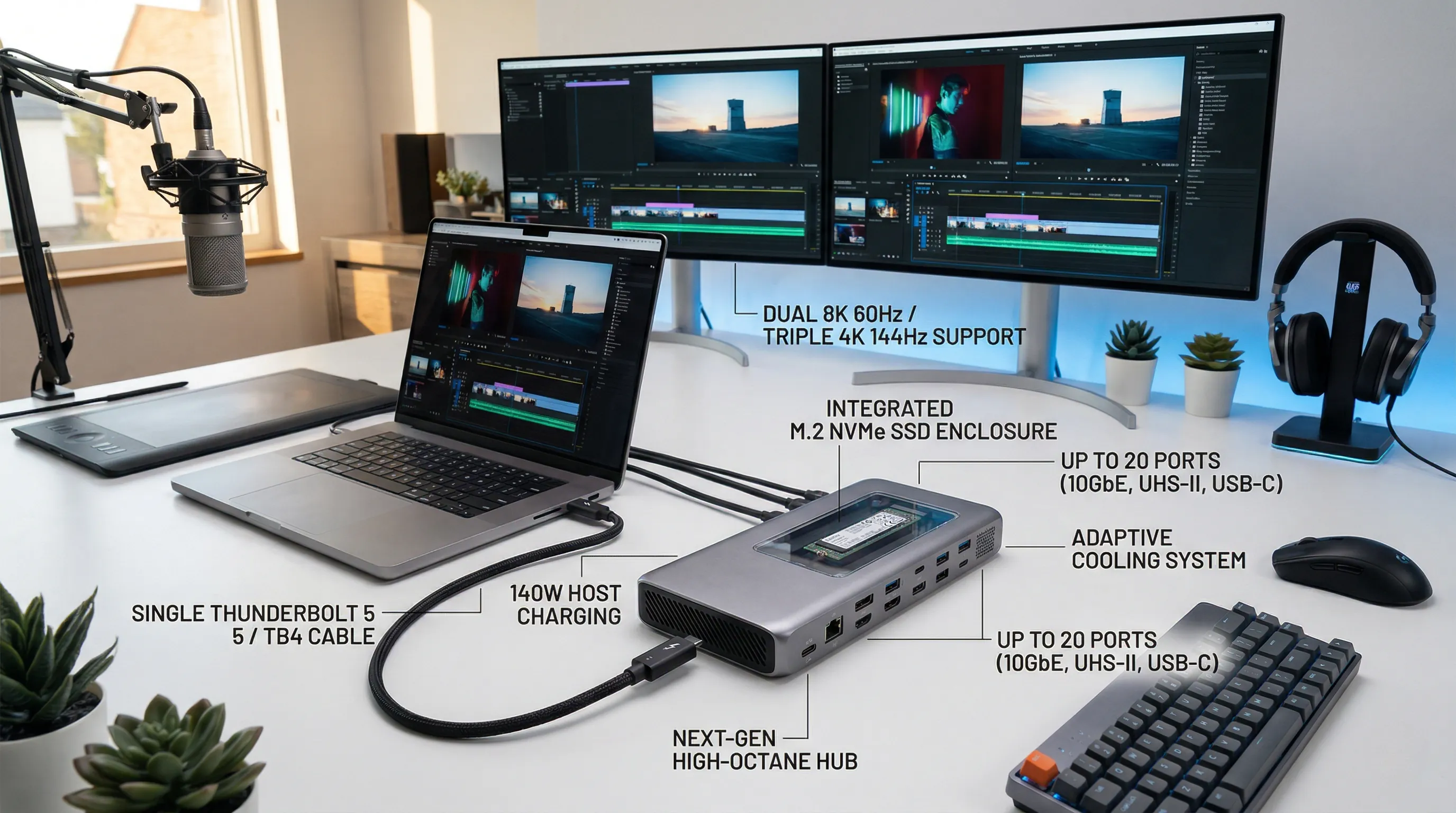
- Thunderbolt 5 unleashes unprecedented performance, offering up to 120Gbps bandwidth for display-intensive tasks and 140W of host charging, setting a new standard for connectivity.
- Modern docks are connectivity powerhouses, with some providing up to 20 diverse ports, including multiple Thunderbolt 5/4, USB-A/C 10Gbps, 10 Gigabit Ethernet, and blazing-fast UHS-II card readers to eliminate cable clutter and expand your workstation.
- Elevate your visual experience with support for stunning multi-display configurations, ranging from dual 8K 60Hz to triple 4K 144Hz (on supported hosts), transforming how you work and create.
- Beyond raw speed, many docks integrate advanced features like built-in M.2 NVMe SSD enclosures for massive storage expansion, adaptive cooling systems, and dual USB controllers to prevent bottlenecks and ensure peak performance.
In today's increasingly mobile and high-performance computing world, modern laptops, while powerful, often sacrifice port diversity for sleek design. This leaves professionals and power users constantly juggling adapters and wishing for a single solution to connect all their peripherals. Enter the next generation of docking stations, engineered to transform your laptop into a fully-fledged, high-octane workstation with just one cable.
This comprehensive overview delves into the cutting-edge of docking technology, highlighting devices that leverage the groundbreaking Thunderbolt 5 standard alongside robust Thunderbolt 4 options. These docks are not merely port replicators; they are sophisticated hubs designed to deliver unparalleled bandwidth, significant power delivery, and support for the most demanding display configurations. Whether you're a creative professional needing to drive multiple high-resolution monitors, a gamer seeking low-latency connections, or a power user consolidating a complex setup, these docking stations are built to expand your capabilities exponentially.
Expect to find solutions offering an astonishing array of up to 20 ports, including lightning-fast 10 Gigabit Ethernet, rapid UHS-II card readers for photographers and videographers, and robust power delivery of up to 140W to keep your laptop charged and ready. We'll explore how these devices manage complex display setups, from dual 8K 60Hz to triple 4K 144Hz, and delve into innovative features like integrated M.2 NVMe SSD enclosures and advanced cooling systems, ensuring your workflow remains efficient, cool, and clutter-free.
1. Decoding Our Docking Station Verdict: A Transparent Ranking Methodology
🔹 The Blueprint for Peak Performance
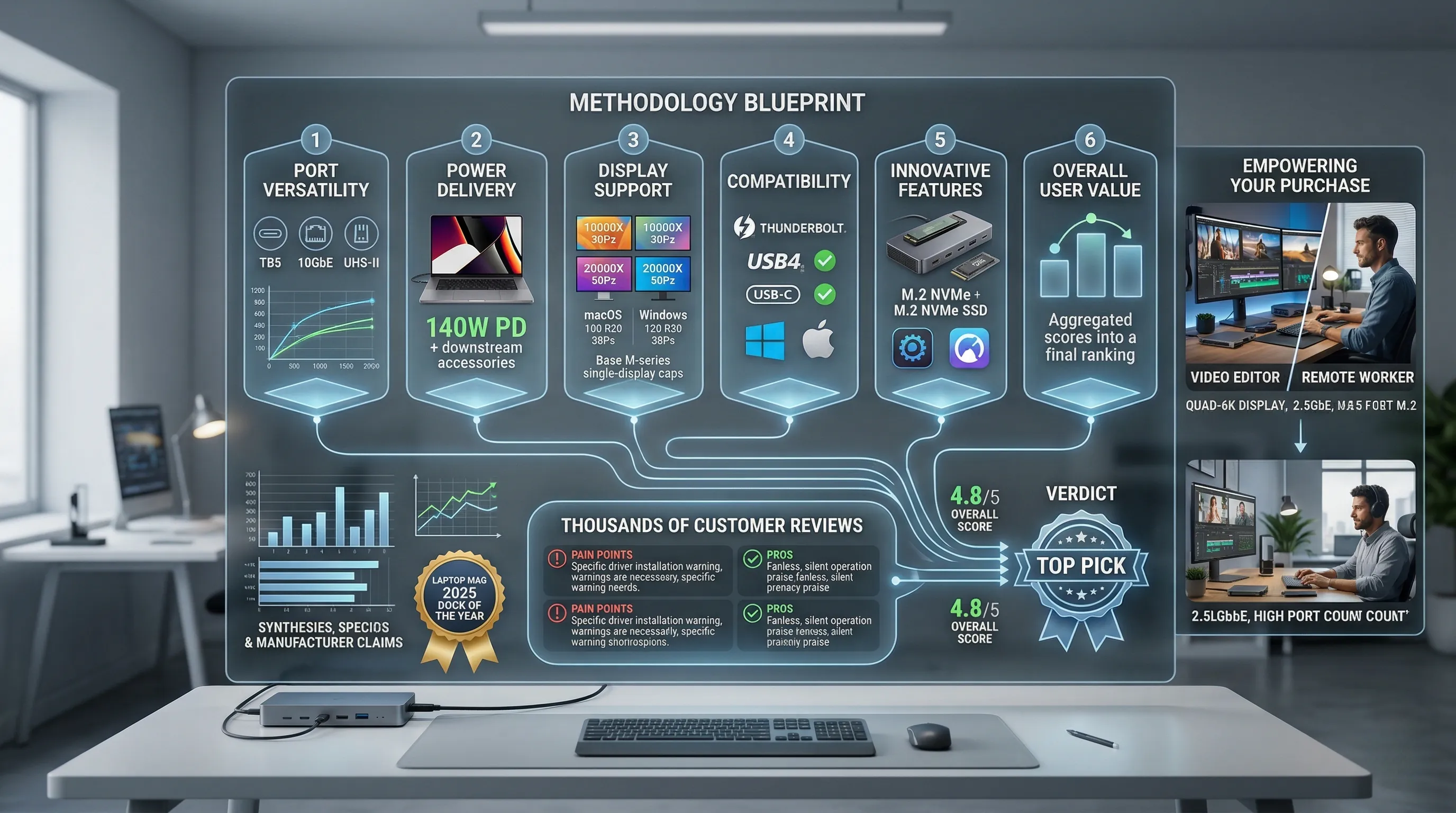
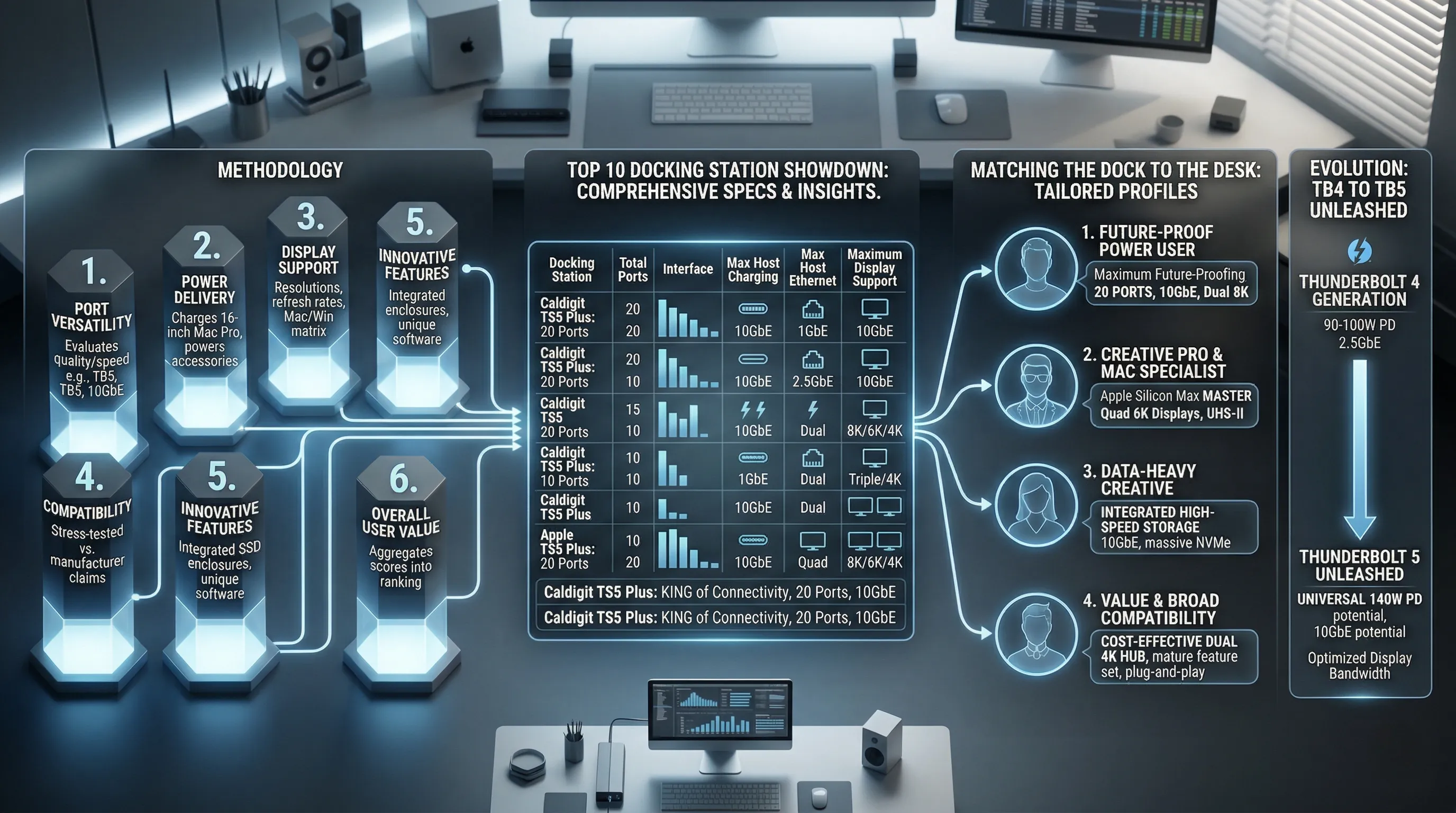
Our rankings are meticulously crafted based on a comprehensive analysis of six core pillars.
We scrutinize port versatility, not just by counting ports, but by evaluating the quality and speed of connections like Thunderbolt 5, 10GbE, and UHS-II card readers.
Power delivery capabilities are assessed to see if a dock can genuinely charge a power-hungry 16-inch MacBook Pro at full tilt (140W) while also powering downstream accessories.
We dive deep into display support, decoding the complex matrix of resolutions and refresh rates for both macOS and Windows, identifying frustrating limitations like the single-display cap on base M-series Macs.
Compatibility is stress-tested against manufacturer claims to ensure a dock works flawlessly with your specific Thunderbolt, USB4, or USB-C host device.
Finally, we weigh innovative features like built-in SSD enclosures or unique software suites, and wrap it all into an overall user value score.
🔹 From Spec Sheet to Real-World Impact
A list of specs means nothing without context; our job is to translate those numbers into tangible benefits for your workflow.
We synthesized data from product specifications, manufacturer claims, and where applicable, industry awards like the "Laptop Mag 2025 Dock of the Year" won by the Plugable TBT4-UDZ.
Crucially, we sifted through thousands of customer reviews to uncover the real story behind the marketing copy.
This means identifying persistent pain points, like the required 10GbE driver installation for the Caldigit TS5 on Windows, or celebrating unsung heroes, like the fanless, silent operation of the OWC 11-Port Dock praised by users.
This rigorous process provides an unbiased assessment that moves beyond the box to reflect actual, daily use.
🔹 Empowering Your Perfect Purchase
Our ultimate goal is not just to crown a "winner," but to match you with the perfect dock for your specific needs.
We understand that a video editor's requirements for quad-display support and a fast M.2 slot are vastly different from a remote worker who prioritizes a stable 2.5GbE connection and a high port count.
Our verdict is therefore a narrative, guiding you through the strengths and compromises of each option.
We aim to cut through the noise of competing standards and confusing marketing terms.
The result is a clear, confident path to choosing the right command center for your desk, empowering your decision-making for years to come.
2. Kensington SD5780T: Robust Thunderbolt 4 for Enterprise Excellence
🔹 The Corporate Workhorse Specification
While many docks chase the highest port counts, Kensington's SD5780T focuses on corporate essentials.
It delivers a solid 100W of power delivery, more than enough to charge demanding business laptops through a single cable.
The port array includes nine total connections, featuring four versatile USB-A ports for legacy peripherals and a crucial Gigabit Ethernet jack for stable network access.
Visually, it supports a dual 4K 60Hz monitor setup or a single 8K display at 30Hz, catering to standard professional workflows.
However, its standout features are enterprise-grade tools like DockWorks software and MAC Address ID Pass-Through for seamless IT integration.
🔹 Built for IT, Not Just the User
This dock isn't just about connecting your monitors; it's about making an IT manager's life easier.
Features like MAC Address Pass-Through are non-negotiable in secure corporate environments, allowing the dock to pass the laptop's unique network ID to the server for authentication.
This avoids network access issues that plague generic consumer docks.
The included DockWorks software provides a central management solution, while the generous 3-year warranty offers long-term reliability and a lower total cost of ownership for business procurement.
It's a plug-and-play device designed for mass deployment with minimal hassle.
🔹 A Tale of Two Users: The Ideal and the Incompatible
The SD5780T is a precision tool, and you need to know if you're the target user.
For a business running a fleet of modern Thunderbolt 4 Windows laptops, this dock is an absolute slam dunk.
However, it has very specific limitations that make it a poor choice for others.
It is explicitly not compatible with Thunderbolt 3 Windows laptops, a critical detail for anyone with slightly older hardware.
Similarly, users with standard Apple M1, M2, or M3 MacBooks will be restricted to a single external display, making it unsuitable for those seeking a dual-monitor setup on a base-chip machine.

🛍️ Kensington EQ Pro Thunderbolt™ 5 Dock
Check the latest price and availability on Amazon.
👉 View on Amazon3. OWC Thunderbolt Go Dock: The Portable Powerhouse with Built-in PSU
🔹 Ditching the Dreaded Power Brick
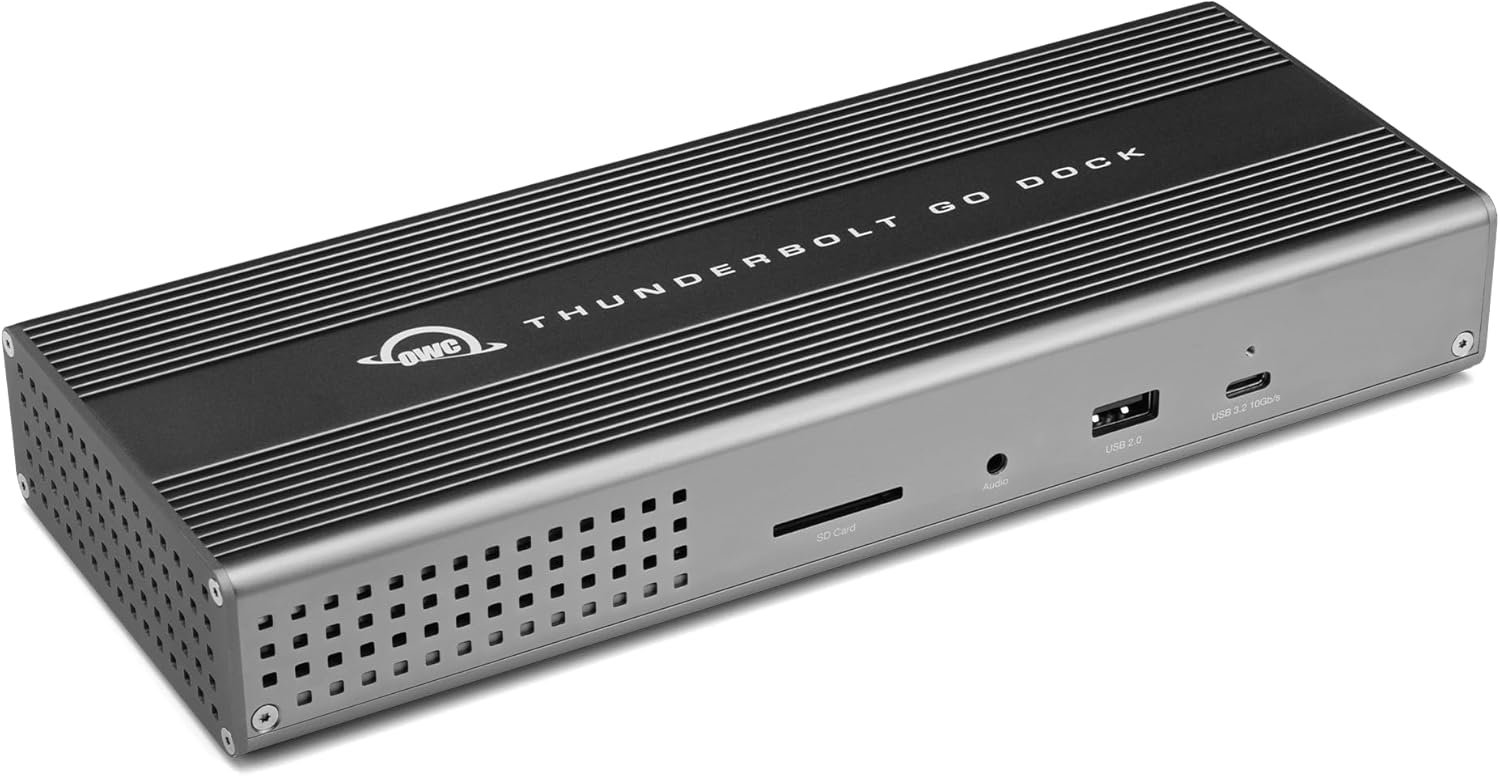
OWC made a game-changing design choice by integrating the power supply directly inside this dock's chassis.
This means the only thing you need to plug into the wall is a standard, lightweight power cord.
Despite this compact design, it packs 11 essential ports, featuring a host Thunderbolt 4 port, two downstream Thunderbolt 4 ports, a speedy 2.5 Gigabit Ethernet jack, and a professional-grade SD 4.0 UHS-II card reader.
It consistently delivers up to 90W of power back to your laptop, which is more than enough for most demanding workflows.
🔹 True Grab-and-Go Freedom
The real-world benefit of the built-in PSU cannot be overstated; it completely transforms the dock from a desk accessory into a true mobile workhorse.
For hybrid workers or digital nomads, this means no more fumbling with a massive, heavy, and proprietary power brick that takes up half your bag space.
You can throw the dock and a universal cable in your backpack and have a full-powered, multi-port setup ready to go at a coffee shop, client office, or hotel.
The ability to connect dual 4K displays or a single massive 8K monitor, combined with the blazing-fast 2.5GbE and SD card reader, makes it a complete solution for creatives who need to offload footage and connect to high-speed networks anywhere.
🔹 The Road Warrior's Dream (With One Crucial Note)
Users consistently praise this dock for its solid build and for solving the biggest annoyance of high-performance docks: the external power supply.
It's the dock you can actually take with you without a second thought.
However, it's critical to understand a limitation imposed by Apple, not OWC: if you own a base-chip M1, M2, or M3 Mac, you will only be able to run one external display.
For users on a compatible PC or a MacBook with a Pro, Max, or Ultra chip, the advertised dual 4K/5K display support works flawlessly.

🛍️ Ivanky FusionDock Max 1
Check the latest price and availability on Amazon.
👉 View on Amazon4. Plugable TBT4-UDZ: The Award-Winning Thunderbolt 4 Dock for Seamless Productivity
🔹 The Anatomy of an Award-Winner
It's not every day a dock earns the title of "Dock of the Year," but Laptop Mag's 2025 recognition for the Plugable TBT4-UDZ is well-deserved.
This powerhouse is built around a 16-port architecture designed to eliminate desk clutter and streamline your entire workflow.
It provides a robust 100W of Power Delivery, dual 4K 60Hz display outputs, and a super-fast 2.5Gbps Ethernet port.
Rounding out its connectivity are a generous 7 USB ports and the ever-critical SD and MicroSD card slots for creatives.
🔹 Universal Harmony for Any Setup
The real-world benefit of the TBT4-UDZ is its incredible versatility, acting as a true universal translator for your devices.
That 100W charging means your high-performance laptop stays fully powered through demanding tasks, no separate brick needed.
Its supreme strength lies in its broad compatibility; it works flawlessly with new Thunderbolt 5 machines, older Thunderbolt 4 and USB4 devices, and even standard USB-C laptops.
This makes setting up a crisp, dual 4K 60Hz monitor configuration an effortless, plug-and-play experience for users of modern M4/M5 Macs and Windows machines, creating a massive and fluid digital canvas.
🔹 The Verdict: A Masterclass in Reliability
The TBT4-UDZ earned its crown by perfecting the fundamentals and making advanced connectivity incredibly simple.
Its UL-certified charging offers critical peace of mind, ensuring your valuable laptop is protected.
The one specific consideration is for users of base M3 MacBooks, who will need to operate in clamshell mode to drive two external displays.
For everyone else, this dock represents the pinnacle of hassle-free productivity, offering a stable, powerful, and forward-compatible hub that just works.

🛍️ Kensington SD5780T Thunderbolt 4 Dual 4K Docking Station
Check the latest price and availability on Amazon.
👉 View on Amazon5. Sonnet Echo 20: Massive Thunderbolt 4 Connectivity with Storage Expansion
🔹 The Port King with a Hidden SSD Bay
The Sonnet Echo 20 SuperDock doesn't just offer connectivity; it offers an almost absurd level of it with 20 total ports.
This includes a versatile array of three Thunderbolt 4 ports, a fast 2.5 Gigabit Ethernet jack, and a whopping eight additional USB ports split between Type-A and Type-C.
Uniquely, it integrates an internal M.2 NVMe SSD slot, allowing users to add up to 8TB of storage directly inside the dock itself, though with transfer speeds capped at 800MB/s.
It also provides up to 100W of power, easily keeping most professional laptops charged.
🔹 Your Entire Desk, Internalized and Simplified
Imagine connecting dual 4K or even a single 8K display, your microphone, speakers, external drives, and a wired network without ever running out of ports.
The real game-changer is the internal SSD slot, transforming the dock into a centralized hub for your entire workflow.
While 800MB/s isn't cutting-edge speed, it’s perfect for a massive, silent, and out-of-sight Time Machine backup drive, a VST sample library for music production, or a dedicated scratch disk for video projects.
This feature alone eliminates the clutter of at least one external drive enclosure and its associated cables, creating an incredibly clean and powerful single-cable setup.
🔹 The Ultimate "Connect Everything" Solution
For professionals who value port quantity and clever integration over raw Thunderbolt 5 speed, the Echo 20 stands in a class of its own.
It's the definitive choice for users with complex peripheral ecosystems—think streamers, audio engineers, and data-heavy creatives—who need to plug everything in at once.
The built-in storage capability is its killer feature, offering a level of desktop consolidation that few other docks can match, making it a powerful foundation for any Thunderbolt 4 workstation.

🛍️ Anker Prime TB5 Docking Station, 14-in-1 Thunderbolt 5 Dock
Check the latest price and availability on Amazon.
👉 View on Amazon6. Ivanky FusionDock Max 1: Tailored Precision for Apple M-Series Maestros
🔹 A Bespoke Architecture for Apple Silicon
The FusionDock Max 1 makes no apologies for its exclusivity; it is engineered from the ground up exclusively for Apple M1 through M5 MacBook Pro and Air models.
Its core innovation is a unique dual-upstream architecture, a design choice that directly taps into the maximum available bandwidth of Apple's most powerful chips.
This specialized design is what enables its extreme display capabilities, but it comes with a strict requirement: it is completely incompatible with Windows, ChromeBooks, or even older Intel-based Macs.
With a massive 20-port layout, including four downstream Thunderbolt 4 ports, it’s a hardware statement that it serves one ecosystem and one ecosystem only.
🔹 From Dual Screens to a Quad-6K Command Center
For users wielding a MacBook with an M-series Max chip, this dock is a game-changer, transforming the laptop into a true workstation capable of driving up to an astonishing four 6K displays at a fluid 60Hz.
This isn't just a spec; it's the power to create a command center for video editing, 3D rendering, or complex data analysis without compromise.
While 'Pro' chip users are limited to dual 6K screens, the experience remains premium, supported by a robust 180W power adapter that delivers a sustained 100W PD charge to the host machine.
Creative professionals will also celebrate the pro-grade SD and TF 4.0 card readers, which ingest massive photo and video files at a blistering 312MB/s, eliminating frustrating transfer bottlenecks.
🔹 The Purist's Choice: Power Over Versatility
Community feedback and expert analysis converge on a single point: the Ivanky FusionDock Max 1 is a masterpiece of specialization.
It deliberately sacrifices universal compatibility to deliver a level of performance for M-series Mac users that multi-platform docks simply cannot achieve.
Potential buyers should not view the lack of Windows support as a flaw, but as the very reason for its existence and immense power.
If you are an Apple 'Max' chip maestro seeking the absolute pinnacle of multi-display productivity, this dock was built with a singular focus on you.
🛍️ OWC Thunderbolt Go Dock
Check the latest price and availability on Amazon.
👉 View on Amazon7. OWC 11-Port Thunderbolt 5: Streamlined Power with Next-Gen Bandwidth
🔹 Triple 8K Visuals and Zero-Noise Design
The OWC dock is built around two standout features from its spec sheet.
First, it promises the ability to drive up to three 8K displays simultaneously.
Second, its entire chassis is a fanless aluminum enclosure, designed explicitly for quiet and cool operation.
🔹 A Truly Silent, Future-Proof Command Center
Supporting three 8K monitors isn't just a number; it's a statement about future-proofing your entire workspace.
For video editors, 3D artists, or data analysts, this translates into an immense, high-resolution canvas that can eliminate the need to constantly switch between windows.
Even more critically, the fanless design means your creative sanctuary remains absolutely silent.
There's no distracting fan whine to ruin a perfect audio take or break your concentration during a deep-focus task.
The aluminum body acts as a giant heatsink, passively dissipating heat to maintain performance without making a sound.
🔹 The Professional's Choice for Focus
While other docks cram in more ports, OWC clearly prioritized the user experience for creative professionals.
The combination of massive display potential with a completely silent footprint is a killer feature for anyone in audio production, high-end video editing, or who simply values a distraction-free environment.
If your workflow demands an expansive, high-clarity visual field and absolute silence, the OWC's design philosophy is a clear winner over competitors who rely on noisy active cooling.
It’s a specialized tool that excels at providing a powerful, serene, and uncluttered desktop experience.

🛍️ Plugable TBT4-UDZ Thunderbolt 4 Dock
Check the latest price and availability on Amazon.
👉 View on Amazon8. Anker Prime TB5 Dock: Blazing Fast Transfers and Dual 8K for Windows
🔹 The Numbers Behind the Power
For Windows users with a Thunderbolt 5-equipped laptop, the Anker Prime TB5 is an absolute spec monster.
It leverages its Thunderbolt 5 upstream and dual downstream ports to deliver truly staggering file transfer speeds, capable of moving a 150GB project file in a mere 25 seconds.
On the display front, it pushes the boundaries by supporting a native dual 8K@60Hz monitor setup, a feat that unlocks an immense digital canvas for professionals.
This is all backed by a robust 140W Power Delivery 3.1 protocol for host charging, a 2.5Gbps Ethernet port for high-speed networking, and an advanced active cooling system to keep performance from throttling during intense workloads.
🔹 Your Workflow, Reimagined
Stop thinking about transfer times and start thinking about what you can do with that time back.
Imagine offloading hours of raw video footage from a field shoot not in minutes, but literally in the time it takes to pour a cup of coffee.
For a Windows-based video editor or VFX artist, the dual 8K display support is transformative; you can have your full editing timeline on one massive 8K screen and a pixel-perfect, full-resolution preview running on the second, all without a hint of lag.
The 140W of power ensures that even the most demanding mobile workstation laptops won't just maintain their charge under heavy rendering—they will actively charge up, freeing you from a depleted battery after a long session.
🔹 The Verdict for Windows Professionals
The consensus among Windows power users is clear: if your machine has Thunderbolt 5, this is the dock to beat for raw performance.
The seamless integration of extreme data speed and expansive display capability is something creators have been waiting for.
However, a critical expert tip is to verify your laptop's port specifications before you buy.
If your Windows laptop only supports DisplayPort Alt Mode over USB-C instead of full Thunderbolt 5, you will be bottlenecked to a single external display, missing out on the dock's star feature.
This dock doesn't just accommodate a high-end Windows setup; it unleashes its full potential.

🛍️ Sonnet Echo 20 Thunderbolt 4 SuperDock
Check the latest price and availability on Amazon.
👉 View on Amazon9. Satechi TB5 CubeDock: The Ultimate Thunderbolt 5 Hub with Integrated NVMe Storage
🔹 Your Desk, Now with a Secret Superpower
The Satechi TB5 CubeDock isn't just another port hub; it's a high-performance workstation disguised as a sleek aluminum cube.
Its standout feature is a built-in M.2 NVMe SSD enclosure, ready to accept up to an 8TB drive for storage speeds hitting a blistering 6000MB/s.
On the visual front, this dock is an absolute powerhouse for Windows users, capable of driving a stunning triple 8K 60Hz display setup.
For those in the Apple ecosystem, it reliably powers a dual 6K 60Hz configuration for M3, M4, and M5-based MacBooks.
All this is managed by an adaptive, whisper-quiet cooling system designed to handle the thermal load without distracting fan noise.
🔹 From Clutter to Command Center
Imagine transforming your entire workspace with a single device.
By adding your own NVMe drive, you eliminate the need for external SSDs, creating a seamless, one-cable connection for power, peripherals, displays, and massive, high-speed storage.
For a video editor or 3D artist, this means having your entire project library on-deck and accessible instantly, slashing render times and streamlining your workflow.
The triple 8K display support for Windows turns your desk into an unparalleled command center, perfect for complex data analysis, coding across multiple windows, or creating immersive design canvases.
Even with a high-performance SSD running hot inside, the smart cooling ensures the CubeDock remains stable and silent, preserving your focus.
🔹 The Professional's Choice for Power and Potential
The expert consensus is clear: the CubeDock's fusion of a top-tier Thunderbolt 5 hub with a PCIe 4x4 NVMe enclosure is a game-changer for professionals.
While you do need to supply your own SSD, this is a blessing in disguise, giving you the freedom to choose the exact capacity and performance tier your work demands.
The primary drawback is the disparity in display support, where macOS users are limited to dual displays compared to the triple-monitor glory on Windows—a limitation of the Mac platform itself, not Satechi.
Ultimately, if your workflow is bottlenecked by storage speed or a lack of screen real estate, the Satechi TB5 CubeDock presents a uniquely powerful and elegant solution.

🛍️ Satechi TB5 CubeDock
Check the latest price and availability on Amazon.
👉 View on Amazon10. Caldigit TS5 Plus: The Connectivity King with 20 Extreme Ports
🔹 An Unprecedented Arsenal of I/O
CalDigit has thrown down the gauntlet with an insane 20 ports on the TS5 Plus.
This isn't just about quantity; it's about quality, featuring three forward-facing Thunderbolt 5 ports running at a blistering 80Gb/s.
You also get a perfectly balanced array of ten USB ports, split between five USB-A and five USB-C, all running at a speedy 10Gbps.
Capping it all off is a 10-Gigabit Ethernet port, setting a new standard for built-in dock networking.
🔹 From Bottlenecked to Blazing-Fast
In practice, this isn't a dock; it's a command center for your entire desk.
Forget ever needing a dongle or an auxiliary USB hub again; you can connect your drives, keyboard, mouse, stream deck, webcam, and microphone and still have ports to spare.
The 10GbE networking is a game-changer for anyone working with a local server or NAS, allowing you to edit 4K video directly from network storage without a hint of lag.
CalDigit intelligently included dual USB controllers, splitting the front and rear ports to ensure that a high-speed SSD file transfer won't slow down your peripherals.
It’s this thoughtful engineering that eliminates bottlenecks and creates a truly seamless, high-performance workflow.
🔹 The Professional's Verdict: A Power User's Dream
If your workflow is defined by the number of high-speed devices you need to juggle, the TS5 Plus is simply unrivaled.
Its sheer port count, combined with the extreme speed of 10GbE, makes it the definitive choice for professionals who cannot afford compromise.
Just a heads-up for Windows users: be sure to install the 10Gigabit Ethernet driver from CalDigit's site to unlock that top-tier network speed.
While macOS users won't get triple display support, the sheer connectivity for every other peripheral imaginable makes this the undisputed king of I/O.

🛍️ OWC 11-Port Thunderbolt 5 Docking Station
Check the latest price and availability on Amazon.
👉 View on Amazon11. The Grand Champion: Kensington EQ Pro Thunderbolt™ 5 Dock – Redefining the Modern Workstation
🔹 Unrivaled Connectivity and Intelligent Power
The Kensington EQ Pro establishes its dominance with a massive array of 19 versatile ports, headlined by three future-proof Thunderbolt 5 downstream ports.
It delivers a formidable 140W of Dynamic Power Delivery, ensuring even the most demanding MacBooks stay charged under heavy load.
Uniquely, its KonstantCharge technology keeps peripherals powered up even after the host laptop is disconnected, a small but brilliant quality-of-life feature.
For creatives, the spec sheet sings with the inclusion of up to 120Gbps of bandwidth via Bandwidth Boost, explicitly targeting video-intensive workflows and high-resolution displays.
🔹 The Ultimate Creative and Professional Hub
This isn't just a dock; it's a command center that eradicates bottlenecks from your workflow.
Imagine simultaneously offloading footage from CFexpress, SD, and Micro SD cards through dedicated 4.0 readers while driving a Single 8K or Dual 6K monitor setup on your M-Series MacBook without a hint of lag.
The built-in, lockable PCIe M.2 slot is a game-changer, allowing you to add terabytes of blazing-fast storage for scratch disks or project libraries directly within the dock (SSD not included).
Beyond hardware, the Kensington Konnect software adds a layer of intelligence, letting you customize dock buttons for one-touch actions like backing up your iPhone or activating a Focus Mode.
This dock transforms your desk from a tangle of adapters into a streamlined, high-performance ecosystem.
🔹 The Verdict: A Class-Defining Investment
While other docks offer raw power, the Kensington EQ Pro delivers a masterclass in thoughtful design and forward-thinking features.
The fusion of next-generation Thunderbolt 5 bandwidth, integrated expandable storage, and smart software control places it in a league of its own.
It’s the only solution that so completely addresses the needs of a modern power user, from data ingestion and high-speed networking with its 2.5Gbps Ethernet to secure, high-capacity storage.
Backed by a solid 3-year limited warranty, this dock isn't just a peripheral—it's the new foundation for the ultimate professional workstation.

🛍️ Caldigit TS5 Plus -Thunderbolt 5 Dock -
Check the latest price and availability on Amazon.
👉 View on Amazon12. Best Value for Money: Plugable TBT4-UDZ – The Smart Investment for Balanced Performance
🔹 The 'Goldilocks' Feature Set
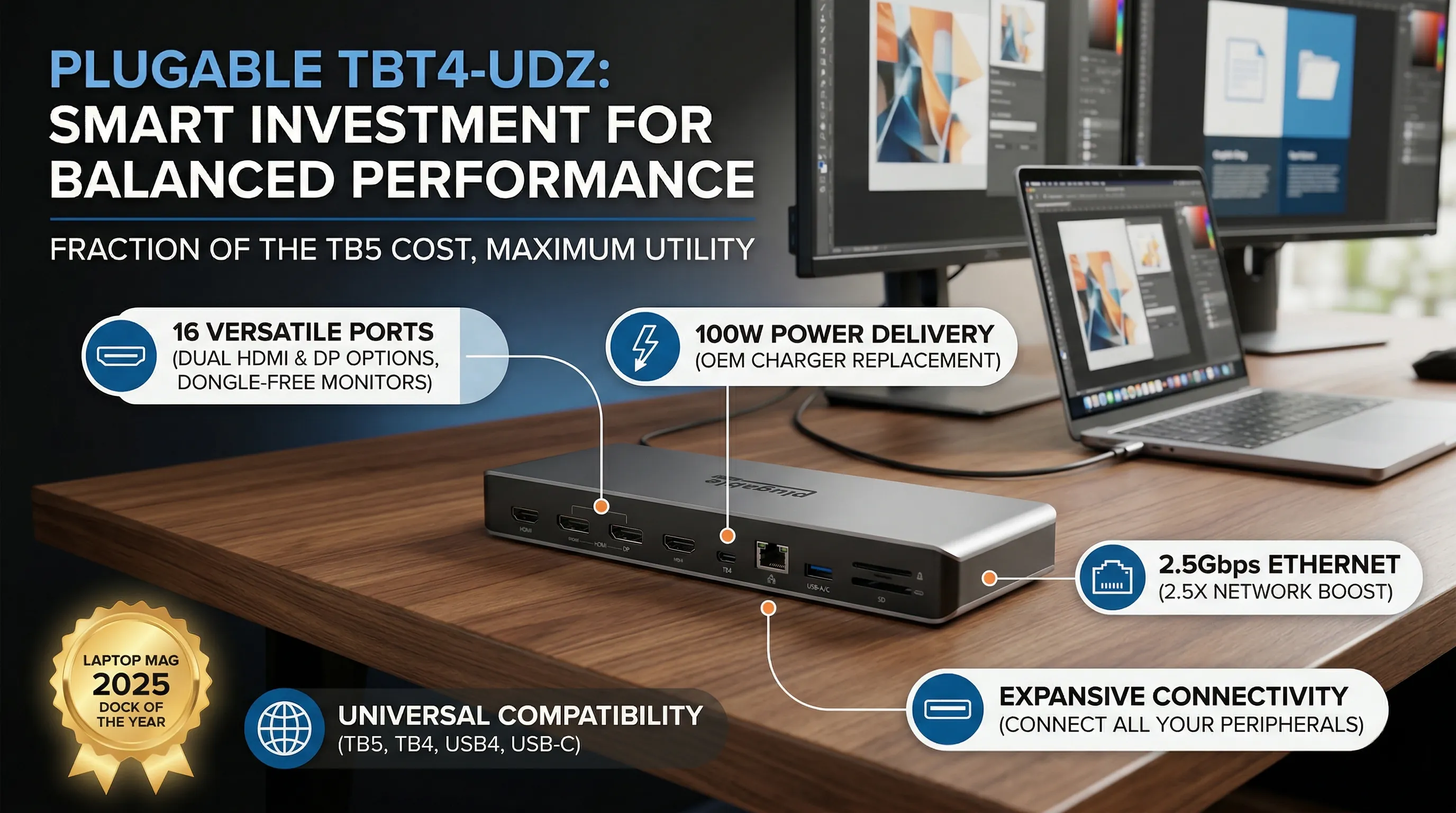
While bleeding-edge Thunderbolt 5 docks boast extreme specs, the Plugable TBT4-UDZ masterfully delivers what most people actually need for a fraction of the cost.
It packs a versatile 16 ports, including dual HDMI and DisplayPort options, ensuring you won't need a single dongle for your monitors, peripherals, or SD cards.
With 100W Power Delivery, it confidently charges performance laptops like a MacBook Pro or Dell XPS at full speed, letting you leave your bulky OEM charger in your travel bag.
It also smartly includes 2.5Gbps Ethernet, providing more than double the speed of a standard connection for a tangible boost in file transfers and network performance.
🔹 Productivity Without the Price Premium
The real value of the TBT4-UDZ is how it delivers a premium, day-to-day experience without the extravagant price tag of its TB5 counterparts.
It provides a rock-solid, seamless dual 4K 60Hz monitor setup for most modern systems, which is the undisputed sweet spot for professional productivity and creative work.
This isn't about chasing theoretical maximums; it’s about providing an expansive, buttery-smooth workspace that genuinely enhances your workflow.
Its universal compatibility across TB5, TB4, USB4, and USB-C means you're not just buying a dock for your current machine—you're making a wise investment that will serve your next laptop, too.
🔹 The Award-Winning People's Champion
There’s a reason this dock earned the Laptop Mag 2025 Dock of the Year award.
It nails the critical details that matter, from its UL-certified charging for peace of mind to its truly plug-and-play setup that just works.
For the overwhelming majority of users who need a powerful, reliable, and comprehensive docking solution, this is the smartest money you can spend.
It avoids the steep 'early adopter' tax of Thunderbolt 5, offering a perfectly balanced and mature feature set that provides maximum utility for your dollar.
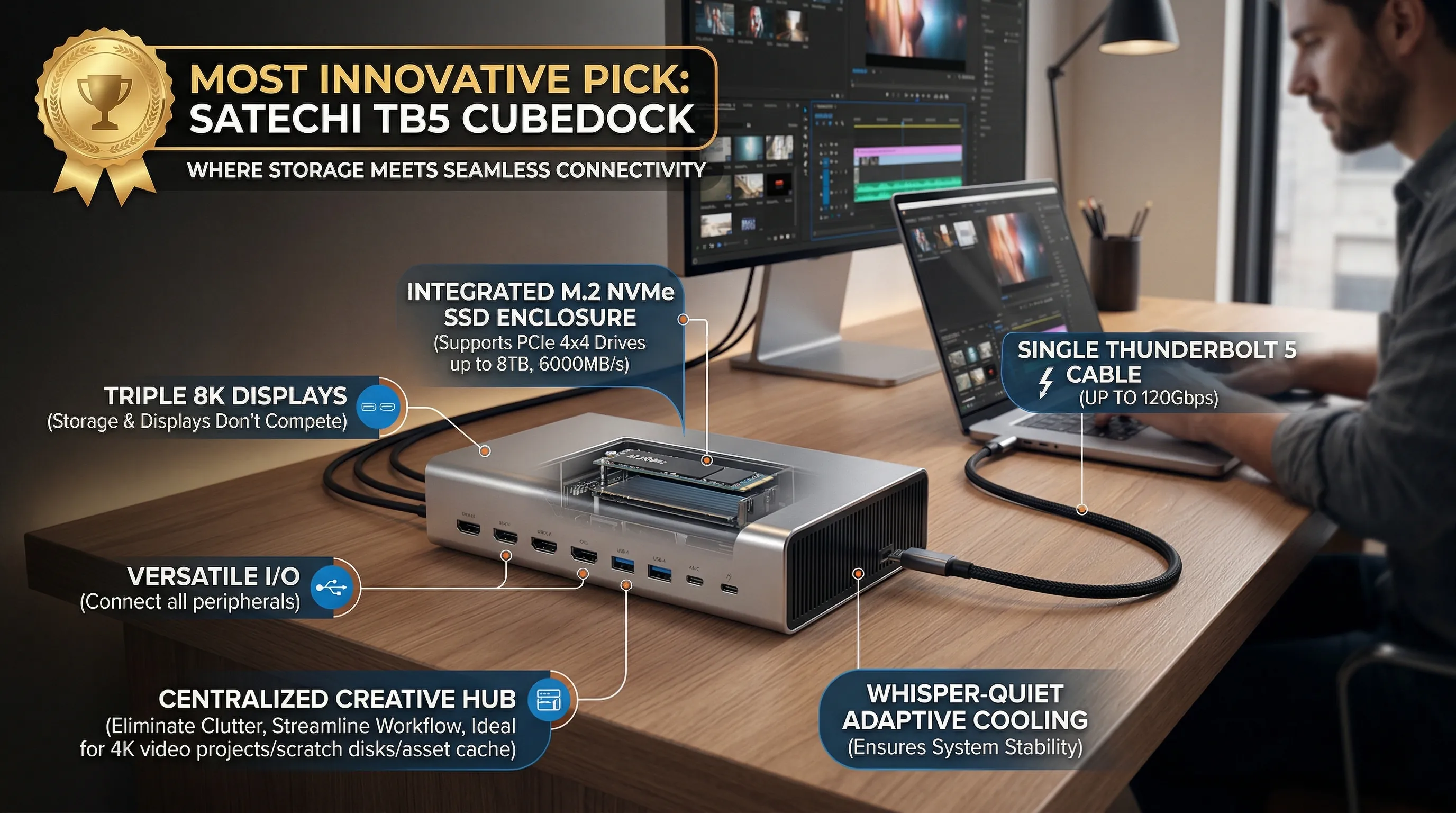
13. Most Innovative Pick: Satechi TB5 CubeDock – Where Storage Meets Seamless Connectivity
🔹 Beyond Just Ports: A Dock with a Brain
While other docks are content to be simple port multipliers, the Satechi TB5 CubeDock fundamentally rethinks the concept.
Its headline feature is a pioneering, built-in M.2 NVMe SSD enclosure that supports PCIe 4x4 drives.
You can install your own SSD, up to a colossal 8TB, and access it at blistering speeds of up to 6000MB/s.
This is all made possible by the massive up-to-120Gbps bandwidth provided by its Thunderbolt 5 connection, ensuring your storage and displays never compete for performance.
🔹 From Cluttered Desk to Centralized Powerhouse
Imagine eliminating the separate external hard drive that's always taking up a USB port and desk space.
For content creators, this is transformative; your entire 4K video project library, scratch disks, and asset cache can live directly inside the dock itself.
It becomes a single, unified hub for your entire workflow, managing not just your triple 8K displays but also your core project data with zero compromises.
This isn't just about adding storage; it's about integrating it so deeply that it streamlines your setup into one cohesive, high-performance unit.
🔹 The Verdict for Creatives and Data-Hogs
The Satechi TB5 CubeDock is a bold statement about the future of desktop peripherals.
It's the ultimate solution for professionals who demand both extreme connectivity and integrated, high-speed storage without the mess.
The thoughtful inclusion of an adaptive, whisper-quiet cooling system shows Satechi understands that housing a high-performance NVMe drive requires robust thermal management, ensuring your system stays stable during heavy rendering or data transfers.
If you're building a minimalist yet overwhelmingly powerful workstation, this dock isn't just an accessory—it's the foundation.
🛒 Featured Products in this Review
- Caldigit TS5 Plus -Thunderbolt 5 Dock -Check Price
- OWC 11-Port Thunderbolt 5 Docking StationCheck Price
- Satechi TB5 CubeDockCheck Price
- Sonnet Echo 20 Thunderbolt 4 SuperDockCheck Price
- Plugable TBT4-UDZ Thunderbolt 4 DockCheck Price
- OWC Thunderbolt Go DockCheck Price
- Anker Prime TB5 Docking Station, 14-in-1 Thunderbolt 5 DockCheck Price
- Kensington SD5780T Thunderbolt 4 Dual 4K Docking StationCheck Price
- Ivanky FusionDock Max 1Check Price
- Kensington EQ Pro Thunderbolt™ 5 DockCheck Price
14. 💡 Tech Talk: Making Sense of the Jargon
- Thunderbolt 5 (80Gbps / 120Gbps): Think of Thunderbolt 5 as an incredibly wide highway for data and video. It offers a standard 80 Gigabits per second (Gbps) bidirectional speed, which is twice as fast as Thunderbolt 4. But here's the trick: for video-intensive tasks, it can dynamically allocate more lanes, boosting display bandwidth up to a staggering 120Gbps. This means smoother, higher-resolution, and higher-refresh-rate displays are possible, even with multiple monitors connected. It's like having a super-fast data connection with a special express lane just for your screens.
- Power Delivery (PD) & Host Charging (e.g., 140W): This refers to the dock's ability to charge your laptop through the same single Thunderbolt cable that handles data and video. When you see "140W Host Charging," it means the dock can supply up to 140 watts of power to your connected laptop. This is crucial for power-hungry performance laptops, ensuring they stay charged even under heavy loads, eliminating the need for a separate laptop charger and simplifying your desk setup. Lower wattage (e.g., 30W-45W) for "downstream" USB-C ports means accessories like phones or tablets can also charge efficiently directly from the dock.
- 10 Gigabit Ethernet (10GbE) / 2.5 Gigabit Ethernet (2.5GbE): This is about your internet and local network speed. Standard Ethernet is typically 1 Gigabit per second (1GbE). A 2.5GbE port is 2.5 times faster, and a 10GbE port is a whopping 10 times faster than standard Ethernet. For large file transfers, online gaming, or accessing network-attached storage (NAS), these faster Ethernet ports provide a significant boost, drastically reducing transfer times and ensuring a more responsive network experience without relying on Wi-Fi.
- UHS-II SD 4.0 Card Reader (e.g., 312 MB/s): This refers to the speed at which the dock can read and write data to your SD (and often MicroSD) memory cards. "UHS-II (Ultra High Speed II)" and "SD 4.0" are modern standards that enable much faster data transfer rates compared to older card readers. A speed of "312 MB/s (Megabytes per second)" means you can offload huge photo and video files from your camera's memory card in seconds rather than minutes, a godsend for photographers and videographers.
15. Quick Reference: A Comprehensive Comparison Chart of Top 10 Docking Stations
🔹 Specs at a Glance: The Ultimate Docking Station Showdown
To cut through the noise, we've distilled the core capabilities of each dock into a single, comprehensive chart.
This table lays out the critical data points—total port count, the underlying Thunderbolt technology, host charging power, networking speed, and maximum display output—allowing for a direct, apples-to-apples comparison.
Pay close attention to the interface, as the move from Thunderbolt 4 to Thunderbolt 5 brings significant boosts in power delivery and display potential.
| Docking Station | Total Ports | Interface | Max Host Charging | Ethernet | Maximum Display Support |
|---|---|---|---|---|---|
| Caldigit TS5 Plus | 20 | Thunderbolt 5 | 140W | 10GbE | Dual 8K@60Hz (Win) / Dual 6K@60Hz (Mac) |
| OWC 11-Port TB5 | 11 | Thunderbolt 5 | 140W | 2.5GbE | Up to Triple 8K |
| Satechi TB5 CubeDock | 13 | Thunderbolt 5 | 140W | 2.5GbE | Triple 8K@60Hz (Win) / Dual 6K@60Hz (Mac) |
| Sonnet Echo 20 | 20 | Thunderbolt 4 | 100W | 2.5GbE | Single 8K@60Hz |
| Plugable TBT4-UDZ | 16 | Thunderbolt 4 | 100W | 2.5GbE | Dual 4K@60Hz |
| OWC Thunderbolt Go Dock | 11 | Thunderbolt 4 | 90W | 2.5GbE | Single 8K or Dual 4K/5K |
| Anker Prime TB5 | 14 | Thunderbolt 5 | 140W | 2.5GbE | Dual 8K@60Hz (Win TB5) |
| Kensington SD5780T | 9 | Thunderbolt 4 | 100W | 1GbE | Dual 4K@60Hz or Single 8K@30Hz |
| Ivanky FusionDock Max 1 | 20 | Thunderbolt 4 | 100W | 2.5GbE | Quad 6K@60Hz (Mac Max Chips) |
| Kensington EQ Pro TB5 | 19 | Thunderbolt 5 | 140W | 2.5GbE | Single 8K or Dual 6K (Mac) |
🔹 Decoding the Numbers: What This Chart Means for Your Workflow
The specs tell a clear story of technological evolution and targeted design.
For power users with the latest hardware, the Thunderbolt 5 docks (Caldigit, OWC, Satechi, Anker, Kensington EQ Pro) are a revelation, universally offering 140W of host charging—enough to keep even a 16-inch MacBook Pro fully powered during the most intensive video renders.
In contrast, the Thunderbolt 4 generation models top out at a still-respectable 90-100W, which is ample for most laptops but might struggle to keep a max-spec machine topped off under heavy load.
Networking speed is another key differentiator; the Caldigit TS5 Plus stands alone with its blazing-fast 10GbE port, a must-have for video editors or data scientists moving massive files across a network.
The rest of the field has standardized around 2.5GbE, a significant upgrade over the single Gigabit Ethernet found on the older Kensington SD5780T.
🔹 The Expert Take: Matching the Dock to the Desk
Choosing the right dock comes down to identifying your primary bottleneck.
If you're a content creator on a Mac with an M-series Max chip aiming for the ultimate multi-monitor setup, the iVanky FusionDock Max 1 is in a class of its own, engineered specifically to drive four 6K displays.
For Windows users or those who demand the absolute maximum future-proofing and port variety, the Caldigit TS5 Plus and its 20 ports, 10GbE, and robust display support make it the undisputed king of connectivity.
However, if your needs are more modest and you value a clean, reliable dual 4K setup, a Thunderbolt 4 option like the award-winning Plugable TBT4-UDZ provides a powerful, cost-effective hub without paying for bandwidth you may not use.
Ultimately, this chart reveals that the "best" dock is the one that perfectly complements your host computer's capabilities and your unique workflow demands.
16. Final Buyer's Insight: Navigating Your Needs to Find the Perfect Dock
🔹 The User Profile Gauntlet: Who Are You and What Do You Need?
Choosing the right docking station isn't about finding the one with the most ports; it's about matching a hub to your specific digital life.
Your host device, whether it's a cutting-edge Thunderbolt 5 Windows laptop or an M2 MacBook Air, dictates your options.
Your workflow—be it 8K video editing, high-frequency trading, or everyday office tasks—defines your non-negotiable features.
Finally, your budget and desire for future-proofing will narrow the field from a dizzying array to a clear winner.
🔹 Your Docking Station Shortlist: Tailored Recommendations for Every Pro
For the Future-Proof Power User with a new Thunderbolt 5 machine, the choice is between maximum port density and feature-rich expansion.
The Caldigit TS5 Plus is an absolute beast, offering a staggering 20 ports, 140W of power delivery, and a blazing-fast 10GbE port that’s perfect for creators working with a network-attached storage (NAS).
Alternatively, the Kensington EQ Pro offers a similar TB5 experience but adds a built-in PCIe M.2 SSD slot for expandable storage and unique Konnect software to customize your workflow.
Creative Professionals and Mac Specialists who need speed and storage should look at integrated solutions.
The Satechi TB5 CubeDock masterfully combines 140W charging and TB5 speeds with a built-in M.2 NVMe enclosure, turning your dock into a high-speed scratch disk for video projects.
For Apple purists, the Ivanky FusionDock Max 1 is a marvel of engineering, using a dual-upstream design to allow M-series Max MacBooks to drive an incredible quad-monitor 6K setup.
If you prioritize Value and Broad Compatibility, the Plugable TBT4-UDZ is a standout champion.
As a Thunderbolt 4 dock, it works seamlessly with a massive range of TB4, USB4, and even older USB-C laptops, providing a robust 16 ports and clean dual 4K 60Hz display support that "just works" for the vast majority of users.
Finally, for the Mobile Professional or Road Warrior, the OWC Thunderbolt Go Dock solves the biggest problem with powerful docks: the cumbersome power brick.
By integrating the power supply directly into its chassis, it offers true grab-and-go portability without sacrificing essential ports like 2.5GbE and a UHS-II SD card reader.
🔹 The Pre-Purchase Litmus Test: Your Final Checklist
Before you click "buy," run your top choice through this final filter.
Displays: Be honest about your screen needs. Are you truly running dual 8K panels, or is a rock-solid dual 4K 60Hz setup (like the Plugable offers) all you need? Remember to check your specific Mac's limitations, as base M-series chips often natively support only one external display.
Charging Speed: Does your 16-inch workstation laptop require the full 140W PD offered by the Caldigit or Satechi, or is the 90-100W from the OWC or Plugable docks more than sufficient?
Peripheral Needs: Count your devices. Do you have a collection of high-speed USB-A peripherals? Do you need the lightning-fast UHS-II SD card readers found on most of these models for photography? Is a 2.5GbE or 10GbE network connection critical for your work? Answering these practical questions will illuminate the perfect choice for your desk.

🎁 Special Prime Offers
Not an Amazon Prime member yet? Start your free trial today and enjoy fast delivery and exclusive benefits.
📚 Related Posts
Top 10 Best Ultra-Wide Monitors for Coding and Multitasking in the First Half of 2026
🚀 Key TakeawaysExperience unparalleled immersion and expanded workspace with vast screen sizes up to 57 inches and resolutions reaching Dual 4K (7680 x 2160) or 5K2K WUHD, perfect for multitasking and cinematic viewing.Elevate your gaming and entertainm
tech.dragon-story.com
Transform Your Workspace: Ultimate Productivity, Gaming, and Content Creation Setup
🚀 Key TakeawaysAchieve a premium, ergonomic workspace designed for sustained comfort and peak productivity with the SIHOO M57 Ergonomic Chair and FlexiSpot E7 Pro Standing Desk.Immerse yourself in ultra-responsive gaming and vivid visuals with the LG 34
tech.dragon-story.com
SK hynix introduces turbocharged LPDDR6, 33% faster and 20% more power efficient than LPDDR5X — 16Gb chips deliver 10.7 Gbps,
🚀 Key TakeawaysSK Hynix has successfully developed the world's first LPDDR6 DRAM, leveraging its cutting-edge 10nm-class (1c) process technology.This new memory boasts a claimed 33% speed increase and 20% better power efficiency compared to LPDDR5X, tha
tech.dragon-story.com


