🚀 Key Takeaways
- Maximize Test Coverage with Unlocked 5G Devices: Utilize carrier-agnostic hardware to validate network handovers, latency resilience, and global carrier compatibility without software restrictions.
- Establish Android Benchmarks with Pixel & Samsung: Leverage the Google Pixel 7a (8GB RAM) as your AOSP/clean-OS reference standard, and the Samsung Galaxy A15 (90Hz) to identify UI jank and One UI-specific fragmentation issues.
- Solve iOS Edge Cases with iPhone SE & 11: Secure the iPhone SE (3rd Gen) for critical small-viewport UI testing and the iPhone 11 to maintain a reliable baseline for standard notch layouts and LCD-specific rendering.
- Optimize for High-Volume Build Management: Every recommended device features a 128GB storage floor, ensuring ample overhead for concurrent testing builds (APK/IPA), heavy debug logs, and local caching.
- Strategic ROI for Your Test Lab: Focus on procurement based on hardware constraints (RAM limits, screen density, and refresh rates) rather than just raw speed, ensuring your app is performant for the "real-world" median user.
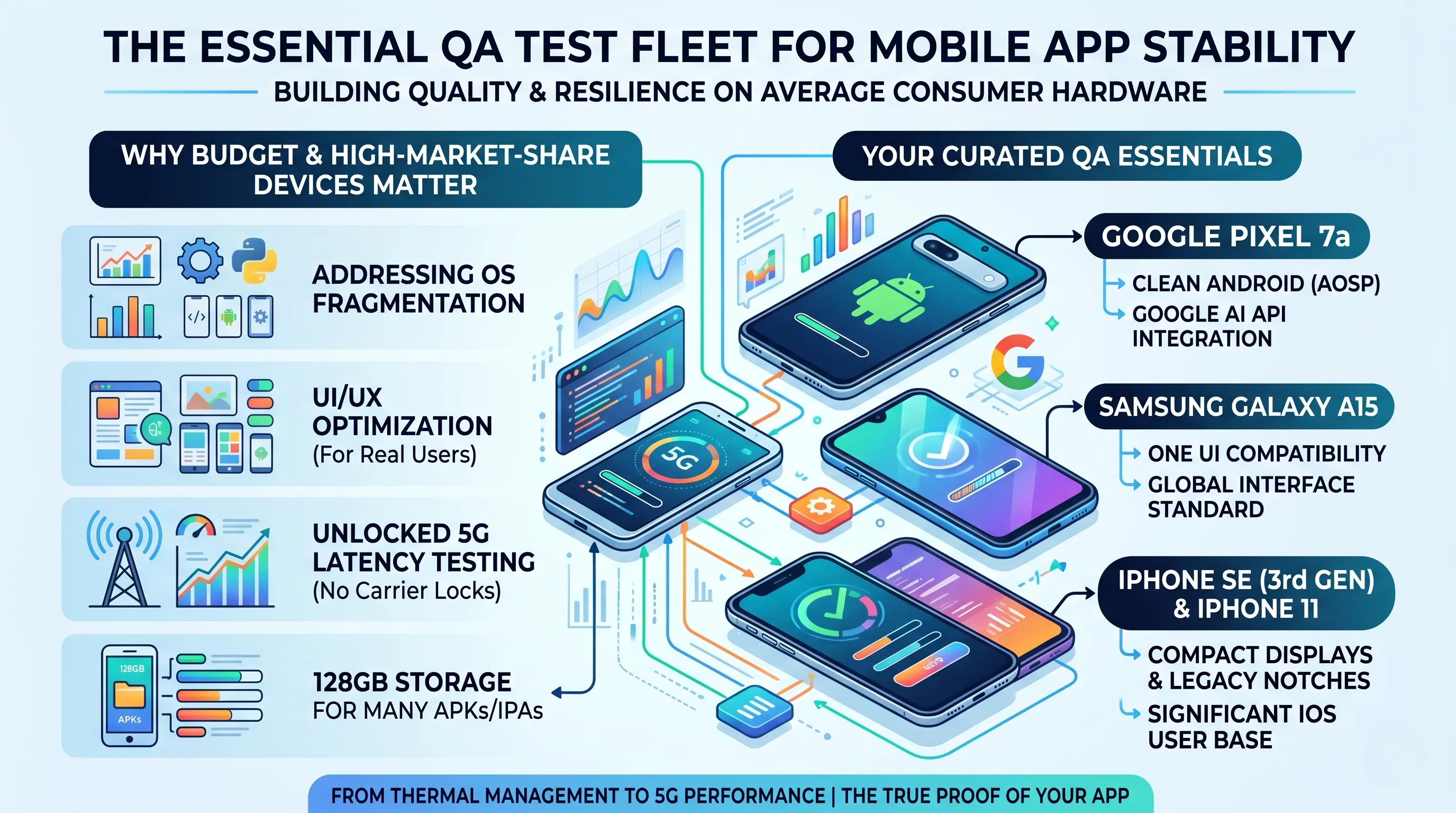
In the competitive landscape of mobile development, stability is the cornerstone of a successful app launch. However, maintaining a fleet of the latest flagship devices is often budget-prohibitive for many teams.
As of 2026, the most effective strategy for addressing OS fragmentation and UI/UX optimization is to secure high-market-share budget devices that represent the hardware used by the average consumer.
Our curated selection of unlocked 5G devices offers the flexibility needed for network latency testing without carrier restrictions.
While seamless performance on flagship models is expected, the true resilience and quality of your app are proven when it runs flawlessly on budget-friendly hardware.
Why These Devices are Essential for Your Lab
These aren't just affordable smartphones; each serves as a critical benchmark for specific testing goals:
- Google Pixel 7a:
The gold standard for testing on a clean Android (AOSP) environment and integrating the latest Google AI APIs. - Samsung Galaxy A15:
An essential device for verifying compatibility with Samsung’s 'One UI', the most prevalent Android interface globally. - iPhone SE (3rd Gen) & iPhone 11:
Crucial for standardizing tests on compact displays and legacy notch designs, which still represent a significant portion of the iOS user base.
Every device in this guide comes equipped with 128GB of internal storage, providing ample space for managing dozens of APK/IPA test builds.
From analyzing 5G connectivity performance to monitoring thermal management on mid-range processors, these devices are the ultimate partners in your QA journey.
1. The Core Testing Trio: Essential Benchmarks for Every Mobile Lab
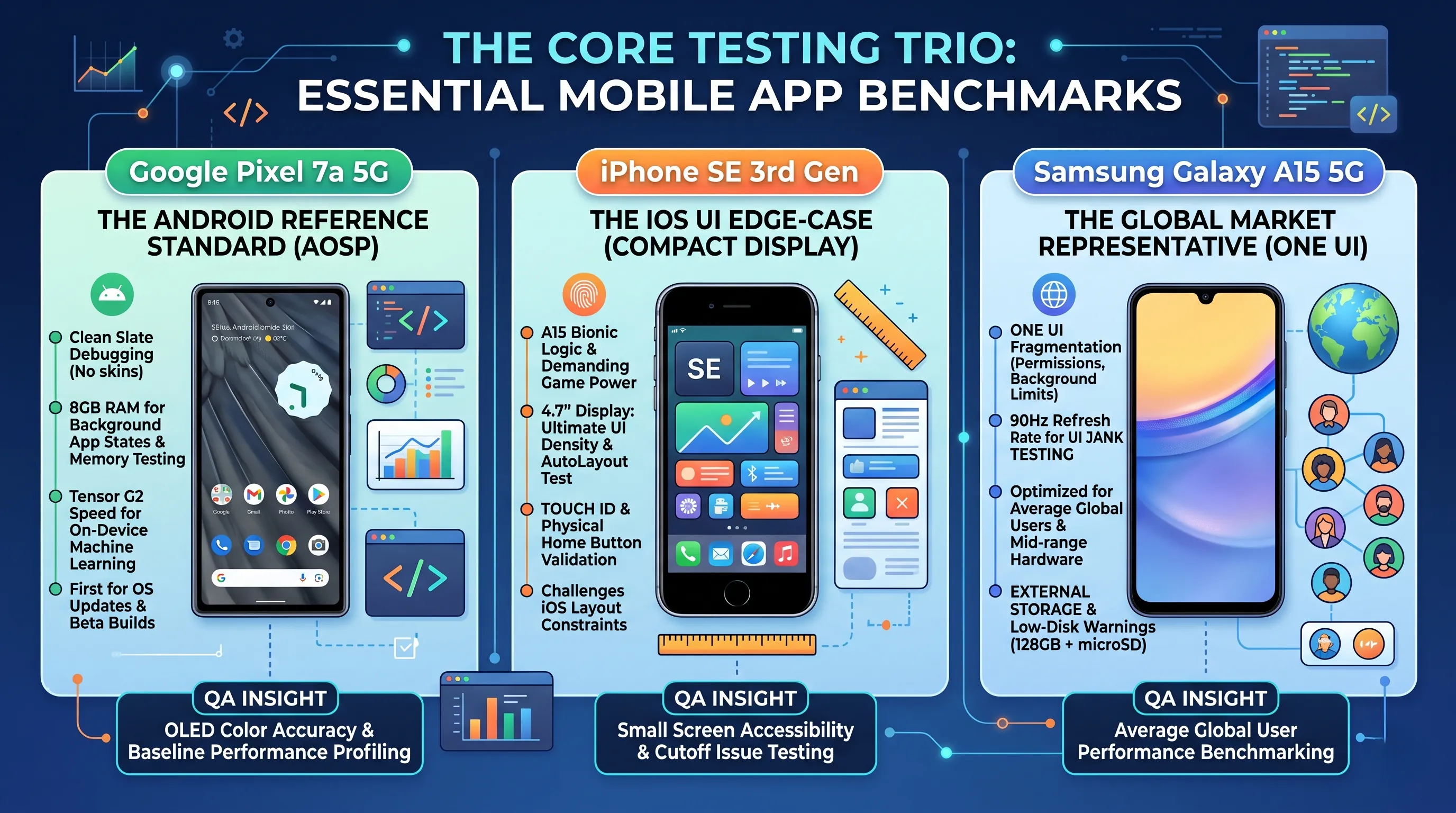
🔹 The Android Reference Standard: Google Pixel 7a 5G
For Android developers, the Google Pixel 7a is the indispensable "clean slate" device. It provides the closest experience to AOSP (Android Open Source Project), ensuring your app's behavior isn't masked by heavy manufacturer skins.
- The Power of Tensor G2 & 8GB RAM:
While consumers love AI features, developers benefit from the 8GB of RAM.
This is the sweet spot for testing high-memory app states and ensuring your background services aren't being prematurely killed by the OS.
The Tensor G2 allows for testing on-device machine learning models (like TensorFlow Lite) with flagship-level speed. - The Cleanest Debugging Environment:
Using a Pixel means you are the first to receive Android OS updates.
It is the primary device for testing Beta builds and ensuring your app is ready for the next Android version before it hits the mass market. - QA Insight:
Use the 6.1-inch OLED to verify color accuracy and HDR rendering.
Since it lacks the aggressive battery management of some third-party skins, it’s the perfect baseline for performance profiling.
🔹 The iOS UI Edge-Case: iPhone SE (3rd Gen)
The iPhone SE 3 is a "Pocket Rocket" specifically because it forces developers to deal with the most challenging iOS layout constraints.
- Flagship Logic on a Legacy Display:
Powered by the A15 Bionic chip, this device can run the most demanding logic and games effortlessly.
However, the true value for QA is its 4.7-inch display.
If your app's UI works here without overlapping elements, it will likely work anywhere.
It is the ultimate test for AutoLayout and UI density. - Hardware Diversity:
In a world of Face ID, the SE 3 remains the standard for testing Touch ID authentication and legacy navigation patterns (like the physical Home Button). - QA Insight:
This is your primary device for testing "Small Screen" accessibility settings and ensuring that your app doesn't suffer from "cutoff" issues on devices with lower vertical resolution.
🔹 The Global Market Representative: Samsung Galaxy A15 5G
If you want to know how your app performs for the "average" global user, the Samsung Galaxy A15 5G is the gold standard for budget testing.
- Testing for Fluidity (90Hz on a Budget):
It features a 90Hz refresh rate, which is critical for testing UI jank. If your animations stutter on this mid-range chipset despite the 90Hz screen, you know your code needs optimization for the millions of users on similar hardware. - One UI Fragmentation:
Samsung is the king of Android market share.
Testing on the A15 ensures your app plays nice with One UI's specific permission handling, background limits, and unique system overlays that differ from stock Android. - QA Insight:
With 128GB of storage and a micro-SD slot, this is a great device for testing how your app handles external storage, large media caches, and low-disk-space warnings—scenarios frequent in the budget segment.
2. Engineering the Benchmarks: A Technical Spec Showdown
🔹 Internal Architecture: Processing Power vs. Testing Overhead
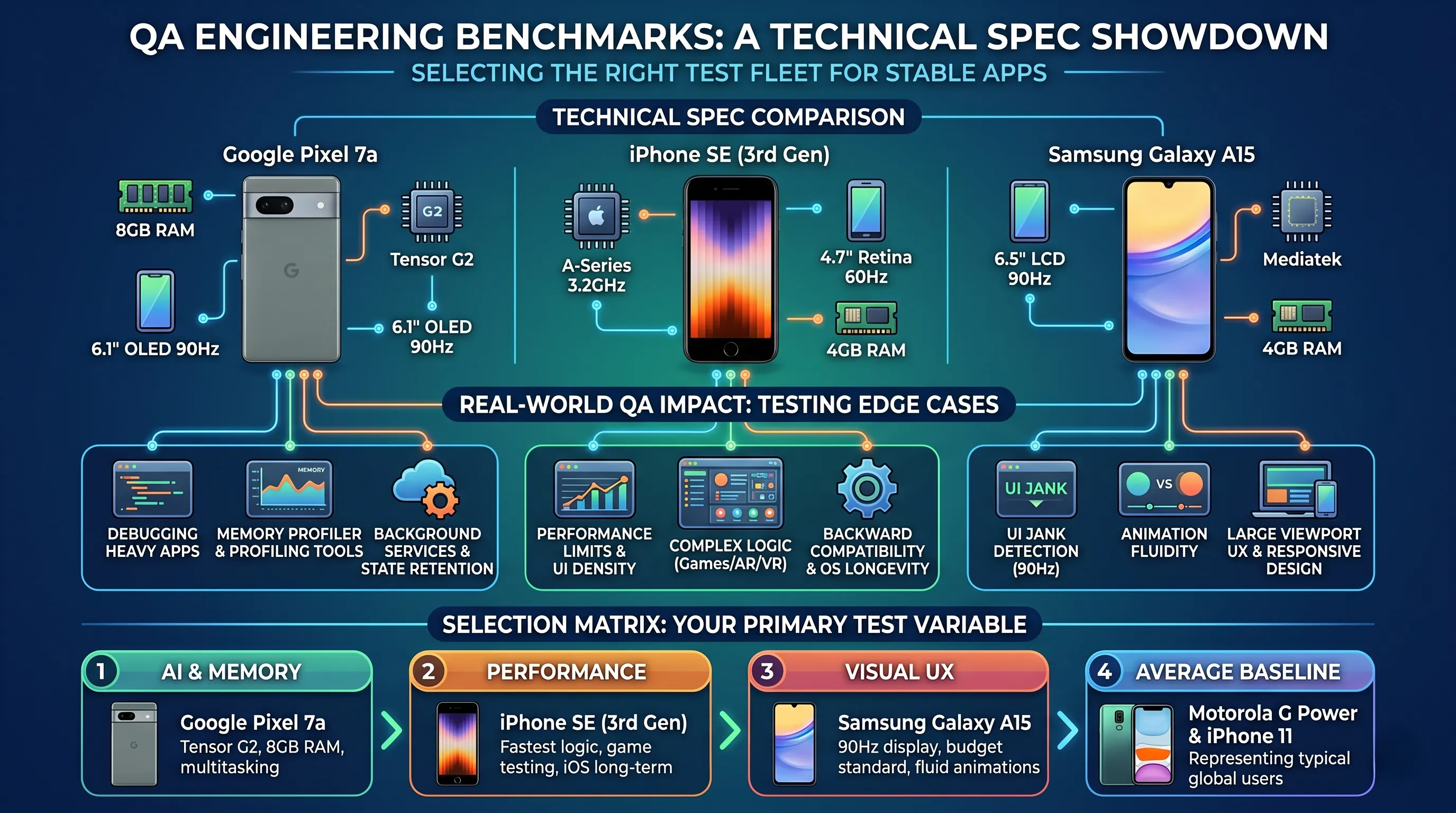
While these devices share a 128GB storage baseline, their internal architectures provide vastly different environments for app performance profiling.
- Memory Management (RAM):
The Google Pixel 7a is the clear winner for heavy debugging, boasting 8 GB of RAM.
In a testing context, this extra memory is crucial for running resource-heavy profiling tools (like Android Studio’s Memory Profiler) alongside your app without the OS killing the process. - Computational Throughput:
The iPhone SE (3rd Gen) remains the "Pocket Rocket" of the lab. Its A-Series chip offers the highest raw clock speed (3.2 GHz), making it the primary device for testing high-frame-rate gaming, complex encryption logic, or AR/VR features on iOS. - Visual Fidelity & Refresh Rates:
The Samsung Galaxy A15 introduces a critical variable: a 90Hz refresh rate.
Testing on this device allows you to identify "jank" (stuttering) in your UI animations that might not be visible on a standard 60Hz screen but would frustrate users with high-refresh-rate displays.
🔹 From Specs to QA Outcomes: Testing the "Edge Cases"
Understanding these numbers allows you to target specific types of bugs during your regression cycles:
- UI Scaling & Responsive Design:
The 6.5-inch displays on the Motorola and Samsung models represent the modern "Large Viewport" standard.
Conversely, the 4.7-inch iPhone SE is your primary tool for testing "Screen Density" issues—ensuring buttons don't overlap and text remains readable on compact resolutions. - OS Lifecycle & Longevity:
The iPhone SE’s powerful CPU isn't just about speed; it guarantees OS version longevity.
It allows you to test your app on the latest iOS versions for several years, ensuring backward compatibility is maintained as Apple’s ecosystem evolves. - Multitasking & Background Services:
With 8 GB of RAM, the Pixel 7a is perfect for testing how your app behaves when the user switches between a dozen open browser tabs, a maps app, and your application.
It helps you verify if your app correctly saves its state during "Process Death" scenarios.
🔹 Selection Matrix: Choosing Your Primary Test Variable
Your ideal test device depends on which bottleneck you need to investigate:
- For High-Memory & AI Testing:
Choose the Google Pixel 7a. Its 8GB RAM and Tensor G2 are built for AI-driven apps and heavy multitasking. - For Performance & Future-Proofing:
Choose the iPhone SE (3rd Gen). It offers the fastest processing speeds for iOS and long-term software support. - For Visual UX & Animation Testing:
Choose the Samsung Galaxy A15. The 90Hz display is the budget-standard for verifying fluid UI transitions. - For "Average Joe" Baseline Testing:
The Motorola Moto G Power and iPhone 11 serve as excellent "Middle-of-the-Road" benchmarks—representing the typical performance level of millions of global users.
3. Samsung Galaxy A15 5G: The Standard for Mid-Range Android & One UI Testing
🔹 Hardware Profile: Testing on a Realistic Baseline
The Samsung Galaxy A15 5G offers a 6.5-inch display with a 1080 x 2340 resolution.
While it runs a 2 GHz CPU with 4 GB of RAM, these specifications are precisely why it belongs in your test lab.
- One UI Fragmentation:
Testing on the A15 allows you to verify how your app interacts with Samsung’s One UI.
This is critical for catching bugs related to Samsung’s aggressive background process management and custom permission dialogues that differ from stock Android. - The 4GB RAM Constraint:
In a QA environment, 4GB of RAM is a "healthy hurdle."
It allows you to test low-memory scenarios and ensure your app handles state restoration correctly when the OS reclaims memory—a common occurrence for users in the budget segment. - Storage & Versatility:
The 128GB of internal storage ensures you can maintain multiple test environments and build versions (staging, UAT, production) simultaneously without storage bottlenecks.
🔹 Animation & UI Testing: The 90Hz Variable
While the 90Hz refresh rate is marketed as a "smooth experience" for consumers, for developers, it is a performance benchmark.
- Detecting Frame-Rate Jank:
Testing animations and transitions on a 90Hz screen with a mid-range processor is the best way to detect UI jank.
If your app’s animations stutter here, you’ll know you need to optimize your main thread logic or simplify your view hierarchy. - High-Refresh Rate Compatibility:
As high-refresh screens become the budget standard, you must ensure your app’s internal timers and animation logic are not hard-coded to 60fps, preventing "speed-up" or "slow-down" bugs. - Network Diversity:
Being fully unlocked, the A15 is a prime candidate for testing how your app handles network switching (from 5G to LTE) and various SIM configurations, which is essential for global app stability.
🔹 The QA Verdict: The Essential Market Representative
For any team targeting a global audience, the Galaxy A15 5G is a non-negotiable addition to the test bed. It represents the median hardware profile of millions of Android users.
Testing on this device ensures that your app isn't just "functional" on high-end hardware, but optimized and performant for the mass market.
It provides a high-resolution, high-refresh-rate canvas that reveals the subtle UI flaws that cheaper, lower-resolution devices might hide.

🛍️ Samsung Galaxy A15 5G, 128GB, Blue Black - Unlocked
Check the latest price and availability on Amazon.
👉 View on Amazon4. Google Pixel 7a 5G: The Gold Standard for AOSP and API Testing
🔹 The Purest Android Environment
At the core of the Pixel 7a is the Google Tensor G2 chip, supported by a generous 8 GB of RAM. While 4 GB is the budget standard, 8 GB is the professional standard for testing.
- Zero-Skin Testing (AOSP):
Testing on the Pixel 7a allows you to verify app behavior on a "Clean Android" environment. This is critical for determining if a bug is rooted in your code or caused by a manufacturer's custom OS (like Samsung's One UI or Xiaomi's HyperOS). - High-Memory Debugging:
The 8 GB of RAM provides the necessary overhead to run your app alongside Android Studio’s Profiler or heavy debugging logs without the system prematurely killing your process due to memory pressure. - First in Line for Updates:
Pixel devices receive the latest Android OS updates and security patches immediately.
This makes the 7a your primary tool for Beta Testing and ensuring "Day 1" compatibility for upcoming Android versions.
🔹 Testing On-Device Intelligence & Hardware APIs
While consumers use the Tensor G2 for "Magic Eraser," developers use it to test the boundaries of on-device machine learning and hardware integration.
- Machine Learning (ML Kit):
If your app uses Google’s ML Kit for features like text recognition, face detection, or barcode scanning, the Tensor G2’s dedicated TPU (Tensor Processing Unit) provides the ideal environment to test these features at peak performance. - CameraX API Compliance:
The Pixel is the benchmark for the CameraX library. Verifying your app's camera implementation on a Pixel ensures that you are following Google's API standards perfectly, providing a baseline to compare against more "problematic" hardware from other brands. - Biometric & Security Testing:
Use the integrated Titan M2 security chip to test secure element interactions, such as biometric authentication flows and encrypted key storage.
🔹 The QA Verdict: The "Ground Truth" Device
Every mobile testing lab must have at least one Pixel.
It serves as your "Ground Truth"—if a feature works on the Pixel 7a but fails on a Samsung or Motorola, you have successfully isolated a fragmentation bug.
With its high-resolution 6.1-inch OLED display and 5G connectivity, it is the perfect device for verifying color accuracy, high-speed data handling, and the most modern Android API features.
It is the smartest investment for anyone who needs to ensure their app is "Google Play Certified" ready.
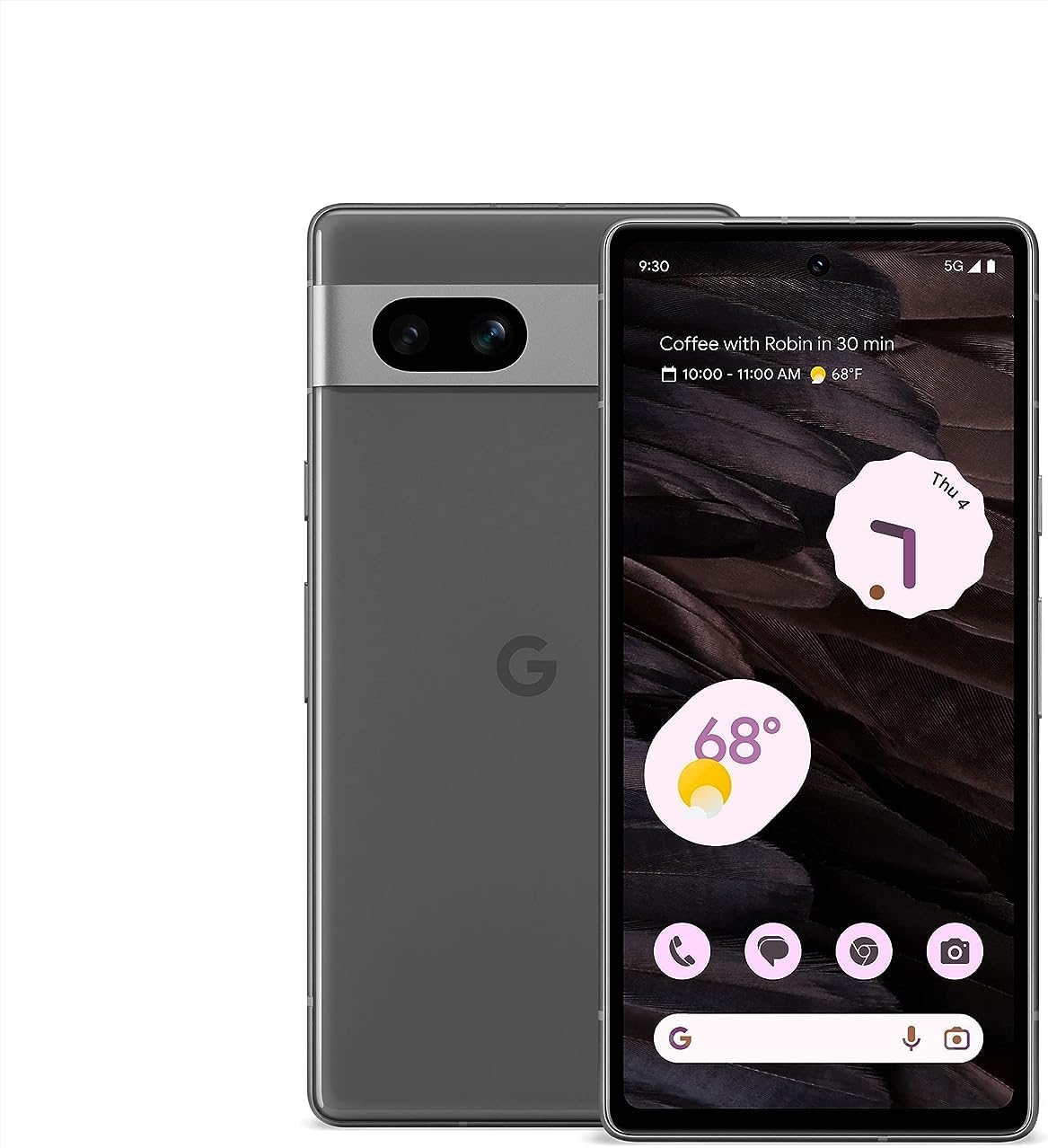
🛍️ Google Pixel 7a 5G, US Version, 128GB, Charcoal - Unlocked
Check the latest price and availability on Amazon.
👉 View on Amazon5. Motorola Moto G Power 5G (2023): The Benchmark for Battery Profiling and Endurance Testing
🔹 The Engine Room: Mid-Range Performance Benchmarking
The Motorola Moto G Power 5G operates on a near-stock version of Android 13.0, driven by a 2.2 GHz Snapdragon-class processor and 4 GB of RAM. In a professional testing environment, this hardware configuration serves a very specific purpose.
- Performance Threshold Testing:
While the Pixel 7a represents the high end of the budget spectrum, the Moto G Power represents the "real-world" mid-range.
It is the ideal device for testing if your app remains performant on standard hardware or if it begins to suffer from frame drops and lag during extended use. - Large-Scale UI Verification:
The 6.5-inch display with a 2400 x 1080 resolution provides a high-density canvas.
Use this to verify that your UI elements scale correctly on larger Android screens without losing clarity or causing layout overflows. - Stock-Like Environment:
Motorola’s "My UX" is remarkably lean.
This makes it an excellent secondary device to the Pixel for verifying AOSP-based features and ensuring that bugs aren't caused by the heavy customizations found in other brands.
🔹 Power Consumption and Thermal Profiling
The "Power" in this device’s name is its greatest asset for a QA engineer.
It is designed for stamina, which makes it the perfect candidate for soak testing.
- Battery Drain Analysis:
Use this device to monitor how your app impacts battery life over several hours.
It is the perfect platform for identifying background processes that fail to sleep or "wakelocks" that prevent the device from entering a low-power state. - Thermal Management Testing:
Because it uses a mid-range chipset, you can effectively monitor the thermal impact of your app.
Test how long it takes for the device to heat up during intensive tasks like video rendering or continuous GPS tracking, and check if the OS throttles your app's performance as a result. - 128GB Build Repository:
The generous internal storage allows you to keep a library of legacy build versions, enabling quick regression testing to see exactly when a performance dip was introduced.
🔹 The QA Verdict: The Endurance Test Specialist
The Motorola Moto G Power 5G is the "marathon runner" of the test lab.
It isn't just about a battery that lasts all day; it's about having a stable, reliable platform to perform long-duration stress tests.
If you need to ensure your app won't drain a user's battery or crash after two hours of continuous use, the Moto G Power is your most valuable diagnostic tool.
It offers a clear window into how your app will survive in the hands of a heavy user on a standard hardware budget.
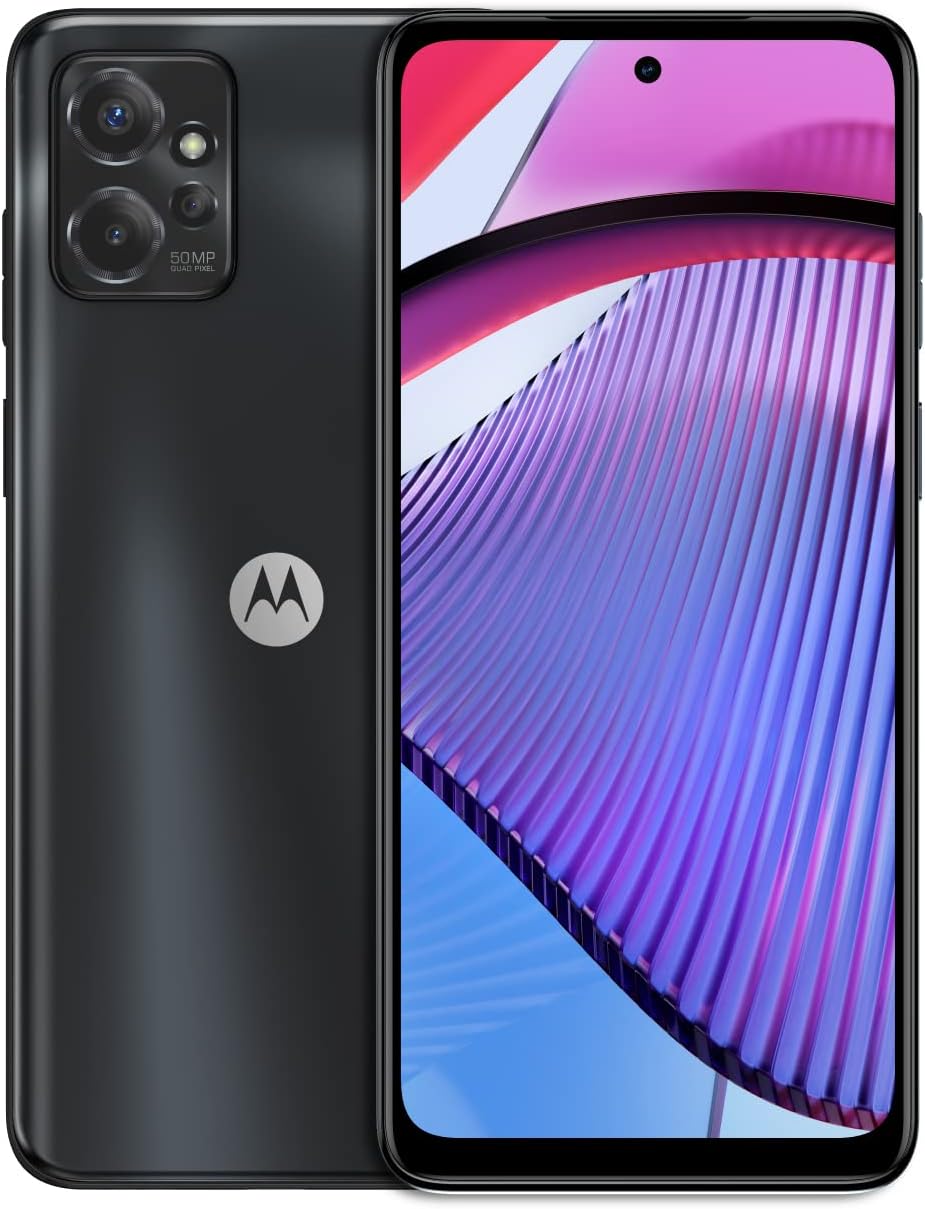
🛍️ Motorola Moto G Power 5G | 2023 | Unlocked | Made for US 4/128GB | 50 MPCamera
Check the latest price and availability on Amazon.
👉 View on Amazon6. Apple iPhone SE (3rd Gen): The Benchmark for Legacy Form Factors and High-Performance iOS Testing
🔹 Technical Profile: Flagship Logic in a Constrained Environment
The iPhone SE 3 remains a unique fixture in any testing lab. It combines the A15 Bionic chip (the same architecture found in the iPhone 13 series) with 4GB of RAM and a 4.7-inch Retina HD display.
- The A15 Bionic Powerhouse:
Despite its price, the A15 Bionic allows you to test demanding computational tasks—such as real-time image processing, complex encryption, or high-fidelity gaming—without the hardware becoming a bottleneck.
It ensures that if your app's logic is slow here, the issue is definitely in the code, not the silicon. - OS Longevity & Compatibility:
In 2026, the SE 3 continues to support the latest iOS versions, making it the most cost-effective way to verify that your app remains compatible with Apple’s newest APIs and security frameworks. - 128GB Build Storage:
The 128GB capacity is vital for QA teams who need to switch between multiple internal testing versions via TestFlight or local builds without constant cache clearing.
🔹 UI & UX Edge-Case Testing: The 4.7-Inch Challenge
The most critical reason to include an iPhone SE 3 in your test bed is its display.
It is the "litmus test" for Responsive Design on iOS.
- UI Density & AutoLayout:
If your UI elements overlap or your "Submit" buttons are cut off on this 1334 x 750 resolution screen, your app will fail for millions of users still on compact devices.
It is the primary tool for testing Dynamic Type (accessibility) and ensuring that enlarged text doesn't break your layout. - Legacy Navigation Patterns:
As the last modern iPhone with a Home Button, it is essential for testing Touch ID authentication and verifying that your navigation logic works for users who don't rely on gesture-based (Face ID) "Home" swipes. - 5G Network Simulation:
With integrated 5G, it allows you to test app behavior during high-speed handoffs and low-latency environments, which is critical for VoIP, streaming, or multiplayer gaming apps.
🔹 The QA Verdict: The UI Stability Champion
The iPhone SE (3rd Gen) is your "Stress Tester" for User Interfaces.
While flagship iPhones provide a large, forgiving canvas, the SE 3 forces your design team to be disciplined.
By ensuring your app is performant and visually perfect on the SE 3, you are effectively "future-proofing" your app for a wider range of users and ensuring that your code is optimized enough to handle Apple's most powerful logic in its most compact form factor.

🛍️ Apple iPhone SE 3rd Gen, 128GB, Midnight - Unlocked
Check the latest price and availability on Amazon.
👉 View on Amazon7. Apple iPhone 11: The Essential Baseline for Notch-Era and LCD Testing
🔹 Technical Profile: The "Legacy High-End" Benchmark
The iPhone 11 remains a critical component of a comprehensive iOS test lab. While it is a few generations older, it serves as the perfect representative for the "Legacy High-End" user—those who hold onto their devices for 5+ years.
- A13 Bionic Performance Baseline:
Powered by the Apple A13 Bionic chip (not an Intel CPU), this device provides a realistic performance floor for modern apps.
If your app feels sluggish on the A13, it will likely be unusable on older iPads or the iPhone XR, making it a vital bottleneck testing tool. - The LCD Testing Variable:
Unlike newer iPhones that use OLED, the iPhone 11 features a 6.1-inch Liquid Retina HD (LCD) display.
This is essential for testing Dark Mode and high-contrast UI elements to ensure they remain legible without the "perfect blacks" of an OLED screen. - iOS Support Lifecycle:
In 2026, the iPhone 11 represents the oldest tier of devices still potentially supporting current or slightly legacy iOS versions, allowing you to test backward compatibility for essential APIs.
🔹 UI & UX Verification: Mastering the Notch
The iPhone 11 is the definitive device for testing the "Standard Notch" layout that defined Apple's design for years.
- Standard Notch Layout:
Before the "Dynamic Island," there was the classic notch.
Testing on the iPhone 11 ensures your status bar content, navigation titles, and top-aligned UI elements are correctly padded and don't get obscured by the hardware notch. - Face ID & Biometrics:
As a mainstream Face ID device, it is your primary tool for verifying LocalAuthentication flows and ensuring your app handles biometric failures or "Look to Authenticate" prompts seamlessly. - Dual Camera API Testing:
The iPhone 11 features a Wide and Ultra Wide camera system.
Use it to test camera-heavy features like document scanning or AR, ensuring your app handles the transition between different lenses without crashing or losing focus.
🔹 The QA Verdict: The Reliable "Middle-Tier" Anchor
The iPhone 11 is your anchor for real-world reliability testing.
It represents a massive portion of the global used-phone market and is a favorite among budget-conscious iOS users.
Testing on this 6.1-inch canvas allows you to verify that your app is "Notch-aware," accessible on LCD screens, and performant on 4GB of RAM.
It bridges the gap between the ultra-compact iPhone SE and the massive Pro Max models, making it a staple for any serious QA repository.

🛍️ Apple iPhone 11, 128GB, Black - Unlocked
Check the latest price and availability on Amazon.
👉 View on Amazon8. The QA Selection Formula: Criteria for a High-ROI Test Lab
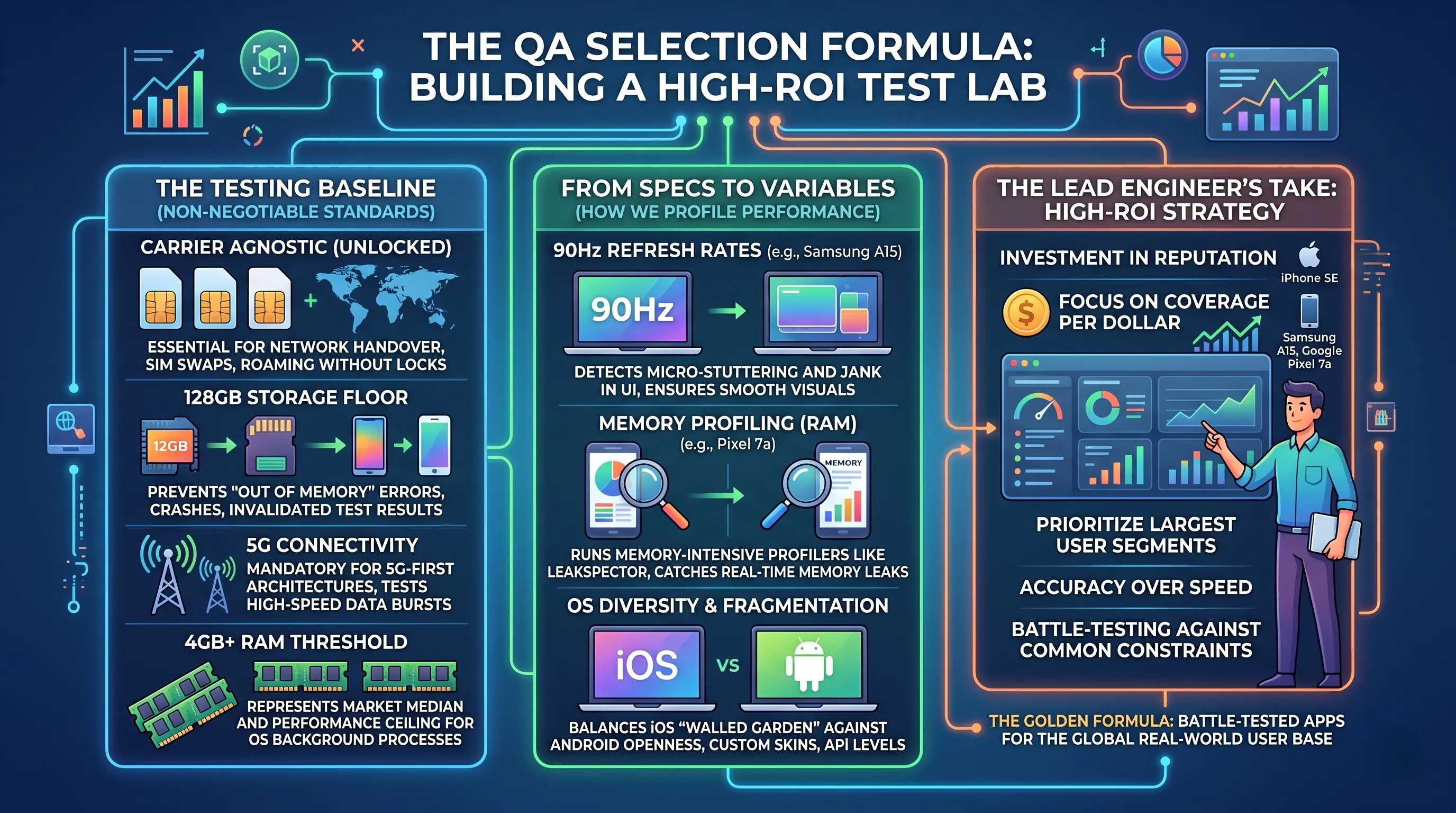
🔹 The Testing Baseline: Non-Negotiable Lab Standards
To ensure a device provides meaningful data for your development cycle, we established a set of professional-grade benchmarks.
Every device in this guide was selected based on its ability to handle modern QA workflows.
- Carrier Agnostic (Unlocked):
Unlocked devices are essential for testing Network Handover scenarios.
They allow you to swap SIM cards to test your app on different provider APNs, roaming environments, and varied signal strengths without software locks. - The 128GB Storage Floor:
Modern testing requires space. Between IDE-linked caches, debug logs, and maintaining multiple concurrent builds (Staging, Alpha, Beta), a 128GB minimum prevents "Out of Memory" errors that can crash the OS and invalidate test results. - 5G Connectivity:
With the world moving to 5G-first architectures, testing your app's behavior during high-speed data bursts and low-latency transitions is mandatory to prevent "Network Request Timeout" bugs. - 4GB+ RAM Threshold:
4GB is the critical point where Android and iOS handle background process management differently.
We chose 4GB to represent the market median and 8GB to represent the performance ceiling.
🔹 From Specs to Variables: How We Profile Performance
We don't look at specs for "enjoyment"; we look at them as testing variables that help you find bugs before your users do.
- 90Hz Refresh Rates:
As seen on the Samsung A15, this allows QA to detect micro-stuttering and jank in UI animations. If an app isn't optimized for high refresh rates, transitions can look broken or "jittery" to the user. - Memory Profiling (RAM):
More RAM (like the 8GB in the Pixel 7a) isn't just for speed—it's for debugging.
It allows you to run memory-intensive profilers like Leakspector or Android Profiler alongside your app to catch memory leaks in real-time. - OS Diversity & Fragmentation:
We balance the "walled garden" of iOS (testing for strict permission handling and Apple’s Human Interface Guidelines) against the "open" nature of Android (testing for OS fragmentation, custom skins like One UI, and varying API levels).
🔹 The Lead Engineer’s Take on Lab ROI
Building a test lab is an investment in your app’s reputation. Our "Golden Formula" focuses on Coverage per Dollar.
We prioritize devices that represent the largest segments of the global user base.
If your budget is tight, the goal is not to buy the fastest phone, but the one that most accurately reflects your target user's hardware.
Whether that’s the compact UI challenge of the iPhone SE or the "mass-market" baseline of the Samsung A15, our criteria ensure that your app is battle-tested against the most common real-world constraints.
9. Building Your Test Lab: A Strategic Guide to Device Procurement
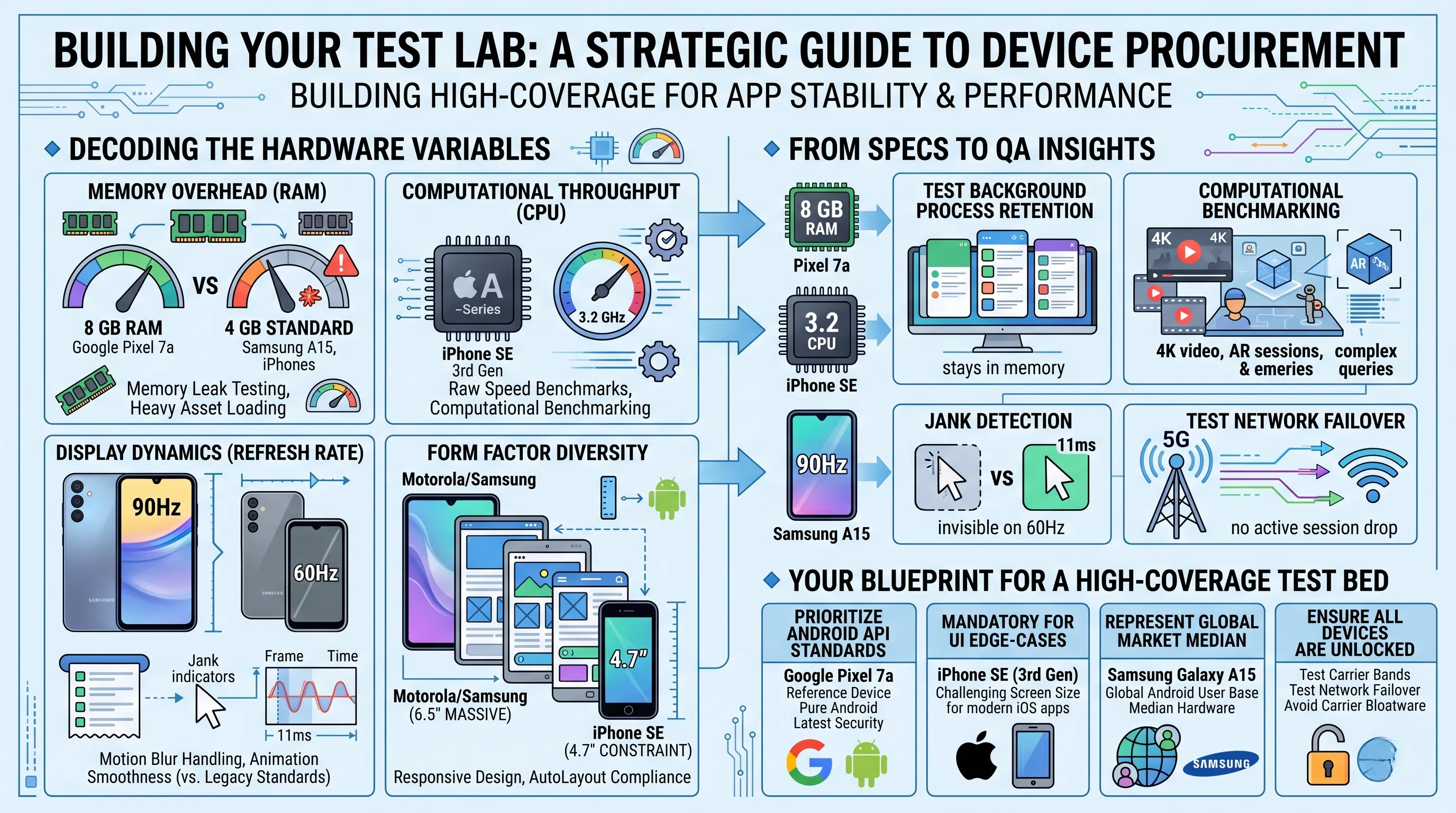
🔹 Decoding the Hardware Variables
When evaluating devices for a testing repository, we look past the marketing "DNA" and focus on how specific hardware architectures affect app stability and performance.
- Memory Overhead (RAM):
The Google Pixel 7a represents the high-water mark for budget testing with 8 GB of RAM.
This is essential for testing "Memory Leak" scenarios and ensuring your app doesn't crash during heavy asset loading.
Compare this against the 4 GB standard found in the Samsung A15 and iPhones, which represents the real-world constraint for the majority of mobile users. - Computational Throughput:
The iPhone SE (3rd Gen) is the benchmark for raw speed.
Its 3.2 GHz A-Series chip allows you to isolate whether a performance lag is due to your code’s logic or hardware limitations. If it lags here, your code requires immediate optimization. - Display Dynamics:
The Samsung Galaxy A15 provides a unique testing variable with its 90Hz refresh rate. In a QA context, this is used to verify "Motion Blur" handling and animation smoothness.
Testing on the 60Hz displays of the Pixel 7a and iPhone 11 ensures your UI remains functional on legacy refresh standards. - Form Factor Diversity:
From the massive 6.5-inch canvases of Motorola and Samsung to the 4.7-inch constraint of the iPhone SE, your lab needs this variety to ensure Responsive Design and AutoLayout compliance across all viewports.
🔹 From Specs to QA Insights
These technical specifications translate directly into actionable bug reports and performance profiles:
- 8 GB RAM (Pixel 7a):
Use this to test Background Process Retention.
Verify if your app stays in memory when the user toggles between a dozen high-intensity applications. - 3.2 GHz CPU (iPhone SE):
Use this for Computational Benchmarking.
It’s the perfect environment for testing high-bitrate video playback, heavy AR sessions, or complex database queries on iOS. - 90Hz Refresh (Samsung A15):
Use this for Jank Detection.
If your UI animations aren't hitting the 11ms frame time required for 90Hz, you'll see micro-stutters that would be invisible on a 60Hz screen. - 5G Connectivity:
Crucial for testing Network Failover.
Use these 5G-ready devices to simulate high-speed data environments and verify how your app handles the transition from 5G to 4G or Wi-Fi without dropping active sessions.
🔹 Your Blueprint for a High-Coverage Test Bed
A well-rounded testing lab should prioritize Coverage over individual device performance. Here is how to allocate your budget:
- For Android API Standards:
Prioritize the Google Pixel 7a.
It is your "Reference Device" for pure Android behavior and the latest security patches. - For UI Edge-Cases:
The iPhone SE (3rd Gen) is mandatory. It is the most challenging screen size for modern iOS apps. - For Global Market Representation:
The Samsung Galaxy A15 represents the median hardware of the global Android user base. - For Network & Longevity Testing:
Ensure all devices are Unlocked. This allows you to test on various global carrier bands and verify that "carrier-specific" bloatware or network configurations don't interfere with your app’s performance.
Ultimately, by selecting devices based on CPU clock speeds, RAM limits, and refresh rate variables, you ensure that your app is battle-tested against the full spectrum of real-world user conditions.
10. Maintaining Your Testing Fleet: Best Practices for Lab Device Longevity
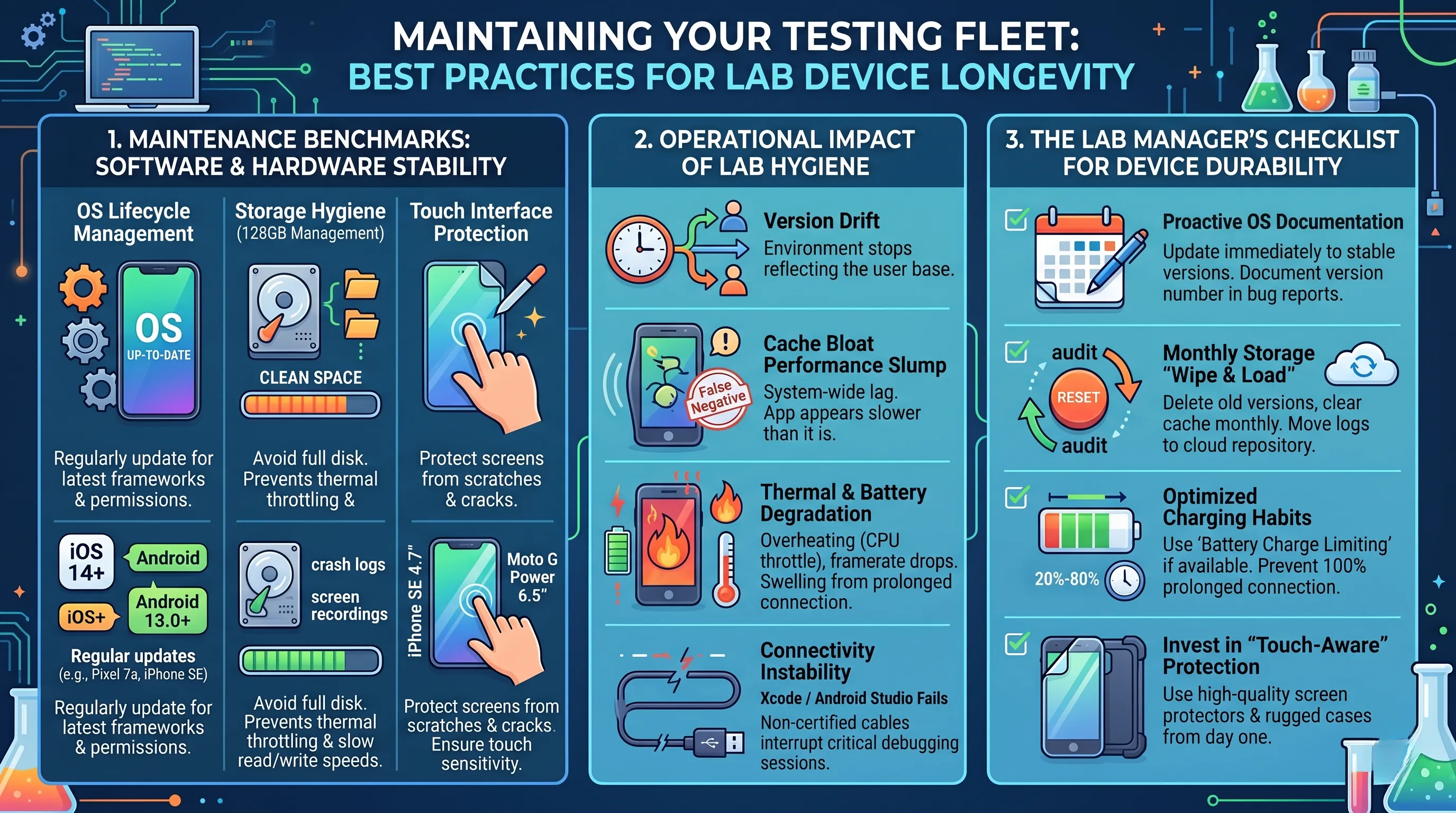
🔹 Maintenance Benchmarks: Software & Hardware Stability
To ensure your devices provide consistent and reproducible test results over the years, you must focus on system hygiene and physical reliability.
Whether you are managing an iOS 14+ environment or Android 13.0+ handsets, the way you maintain these tools directly impacts your QA ROI.
- OS Lifecycle Management:
Keeping your OS up to date is not just about security; it’s about API compatibility.
Regularly updating your Pixel 7a or iPhone SE ensures that you are testing against the latest system frameworks and permission models. - Storage Hygiene (128GB Management):
In a testing environment, 128GB can fill up rapidly with crash logs, screen recordings, and legacy APK/IPA builds. Managing this space is critical, as a near-full disk can lead to thermal throttling and slower read/write speeds, which will skew your app’s performance benchmarks. - Touch Interface Protection:
From the compact 4.7-inch iPhone SE to the 6.5-inch Moto G Power, the screen is your primary input for UI/UX testing.
Scratches or cracks can interfere with touch sensitivity and gesture recognition testing.
🔹 Operational Impact of Lab Hygiene
Poor device maintenance doesn't just "break the phone"—it invalidates your testing environment.
- Version Drift:
Ignoring OS updates creates "Version Drift," where you are testing on an environment that no longer reflects the majority of your user base. - Cache Bloat Performance Slump:
Treating that 128GB of storage like a permanent archive for old builds will eventually lead to system-wide lag.
This makes your app appear slower than it actually is, leading to "False Negative" performance reports. - Thermal & Battery Degradation:
Lab devices are often kept plugged into workstations for hours. This can lead to Battery Swelling or heat-induced degradation.
An overheated device will throttle its CPU, making your app's frame rates drop artificially during testing. - Connectivity Stability:
Using non-certified cables for data transfer can lead to dropped connections with Xcode or Android Studio, interrupting critical debugging sessions or build deployments.
🔹 The Lab Manager’s Checklist for Device Durability
Think of your testing fleet as precision instruments.
Use this checklist to maintain peak performance:
- Proactive OS Documentation:
Update your OS as soon as stable versions are released, but always document the version number in your bug reports to ensure reproducibility. - Monthly Storage "Wipe & Load":
Once a month, audit your 128GB storage.
Delete unused test versions, clear the system cache, and move logs to a cloud repository to keep the hardware nimble. - Optimized Charging Habits:
To preserve battery health for devices that are constantly connected to a PC, use "Battery Charge Limiting" features where available to prevent the cells from staying at 100% capacity for extended periods. - Invest in "Touch-Aware" Protection:
Use high-quality, thin screen protectors and rugged cases from day one.
This ensures that the physical device remains intact through thousands of hours of manual UI testing.
11. The Ultimate Showdown: Mapping Devices to Your Testing Strategy
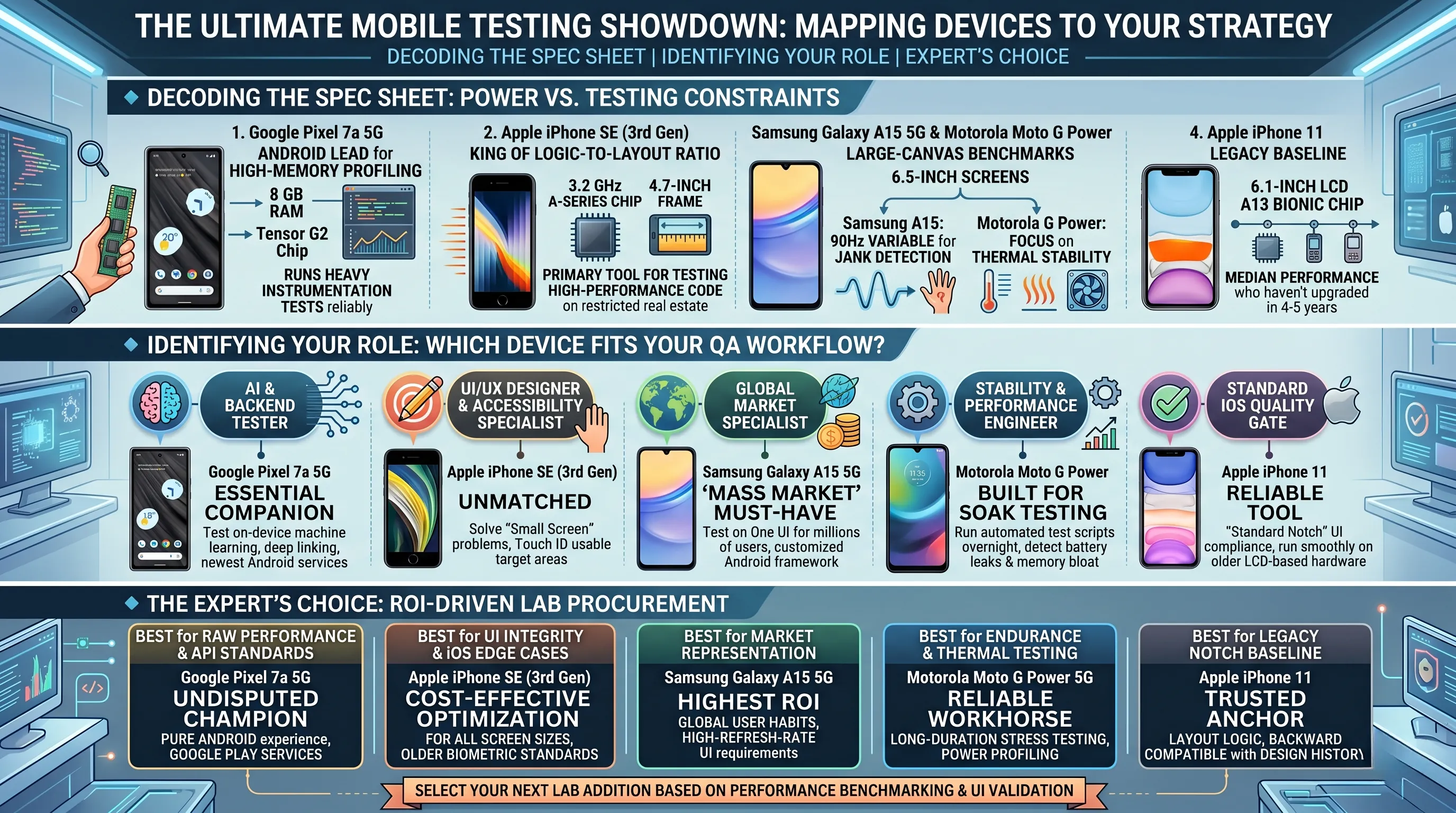
🔹 Decoding the Spec Sheet: Power vs. Testing Constraints
When selecting your next lab addition, look at the specs through the lens of Performance Benchmarking and UI Validation:
- Google Pixel 7a 5G:
The Android lead for high-memory profiling.
With 8 GB of RAM, it is the only device here that can reliably run heavy instrumentation tests alongside the app without system interference. - Apple iPhone SE (3rd Gen):
The king of logic-to-layout ratios.
It packs a 3.2 GHz A-Series chip into a 4.7-inch frame, making it the primary tool for testing high-performance code on restricted screen real estate. - Samsung Galaxy A15 5G & Motorola Moto G Power:
The Large-Canvas Benchmarks.
Both offer 6.5-inch screens for verifying responsive layouts, but the Samsung adds a 90Hz variable for jank detection, while the Motorola focuses on thermal stability. - Apple iPhone 11:
The Legacy Baseline.
Its 6.1-inch display and A13 Bionic chip represent the median performance of users who haven't upgraded in the last 4-5 years.
🔹 Identifying Your Role: Which Device Fits Your QA Workflow?
- For the AI & Backend Tester:
The Pixel 7a is your essential companion.
Use the Tensor G2 and Google's clean API environment to test on-device machine learning, deep linking, and the latest Android system services. - For the UI/UX Designer & Accessibility Specialist:
The iPhone SE is unmatched.
It forces you to solve "Small Screen" problems and verify that your app is usable for those with Touch ID or smaller target areas. - For the Global Market Specialist:
The Samsung Galaxy A15 is the "Mass Market" must-have.
Testing on One UI ensures your app won't crash for the millions of users on Samsung's customized Android framework. - For the Stability & Performance Engineer:
The Motorola Moto G Power is built for soak testing.
Its endurance makes it the perfect platform for running automated test scripts overnight to detect battery leaks and memory bloat. - For the Standard iOS Quality Gate:
The iPhone 11 remains the most reliable tool for testing "Standard Notch" UI compliance and ensuring your app runs smoothly on older LCD-based hardware.
🔹 The Expert's Choice: ROI-Driven Lab Procurement
- Best for Raw Performance & API Standards:
The Google Pixel 7a 5G.
It is the undisputed champion for testing the "Pure Android" experience and the latest Google Play services. - Best for UI Integrity & iOS Edge Cases:
The iPhone SE (3rd Gen).
It is the most cost-effective way to ensure your iOS app is optimized for all screen sizes and older biometric standards. - Best for Market Representation:
The Samsung Galaxy A15 5G.
It offers the highest ROI for testing against real-world global user habits and high-refresh-rate UI requirements. - Best for Endurance & Thermal Testing:
The Motorola Moto G Power 5G.
It is your reliable workhorse for long-duration stress testing and power profiling. - Best for Legacy Notch Baseline:
The iPhone 11.
A trusted anchor for verifying that your app's layout logic is backward compatible with Apple’s design history.
🛒 Featured Products in this Review
- Samsung Galaxy A15 5G, 128GB, Blue Black - UnlockedCheck Price
- Google Pixel 7a 5G, US Version, 128GB, Charcoal - UnlockedCheck Price
- Motorola Moto G Power 5G | 2023 | Unlocked | Made for US 4/128GB | 50 MPCameraCheck Price
- Apple iPhone SE 3rd Gen, 128GB, Midnight - UnlockedCheck Price
- Apple iPhone 11, 128GB, Black - Unlocked Check Price
12. 💡 Tech Talk: Making Sense of the Jargon
- OS Fragmentation
In the Android ecosystem, Fragmentation refers to the thousands of different device models running various versions of the Android OS and manufacturer "skins" (like Samsung’s One UI).
Testing on diverse devices like the Pixel (Pure Android) and the Galaxy A15 (Custom Skin) is the only way to ensure your app is compatible across this fragmented landscape. - AOSP (Android Open Source Project)
AOSP is the "pure" version of Android.
Devices like the Google Pixel 7a run a version of Android very close to AOSP. For a tester, an AOSP-based device is the "Reference Standard"—it helps you determine if a bug is in your app's code or if it’s being caused by a manufacturer's specific modifications. - UI Jank & Frame Budget
Jank refers to visual stuttering that occurs when the device's hardware cannot keep up with the app's demands.- 60Hz Refresh Rate: You have a 16.6ms "Frame Budget" to render each frame.
- 90Hz Refresh Rate: You only have 11.1ms. Testing on high-refresh-rate screens like the Samsung Galaxy A15 helps you identify "UI Jank" that might be invisible on slower screens but would ruin the experience for high-end users.
This occurs when the OS kills your app while it is in the background to save memory for other tasks.
Testing on 4GB RAM devices (like the Moto G Power) allows you to verify if your app correctly saves its state and restores data when the user returns, preventing data loss for users on budget hardware. - Latency & Network Handover (5G)
Latency is the delay between a user's action and the server's response.
5G testing is critical for verifying how your app handles high-speed data transitions.
An Unlocked device allows you to test Network Handover—switching from 5G to Wi-Fi or LTE—ensuring your app doesn't drop active sessions (like a VoIP call or a checkout process). - AutoLayout & UI Density
AutoLayout is the system used to ensure your app's interface scales to fit different screen sizes.
UI Density refers to how much information is packed onto the screen.
Using the 4.7-inch iPhone SE is the ultimate test for these concepts; if your "Submit" button isn't cut off on this small screen, your responsive design is successful. - Thermal Throttling
When a device gets too hot during intensive testing (like a 2-hour stress test), the CPU slows itself down to cool off—this is Thermal Throttling.
Monitoring this on mid-range devices like the Moto G Power helps you identify if your app is "too heavy" for the processor, leading to performance drops during extended use.
🎁 Special Prime Offers
Not an Amazon Prime member yet? Start your free trial today and enjoy fast delivery and exclusive benefits.
📚 Related Posts
Top 10 Best Ultra-Wide Monitors for Coding and Multitasking in the First Half of 2026
🚀 Key TakeawaysExperience unparalleled immersion and expanded workspace with vast screen sizes up to 57 inches and resolutions reaching Dual 4K (7680 x 2160) or 5K2K WUHD, perfect for multitasking and cinematic viewing.Elevate your gaming and entertainm
tech.dragon-story.com
Finding Your Perfect Match: Which Mechanical Keyboard is Best for Your Workflow?
🚀 Key TakeawaysThe market for developers offers highly customizable options like the Keychron K2 V2 and Ducky One 3, alongside ergonomic and premium choices such as the Logitech MX Mechanical Mini and HHKB Professional HYBRID Type-S.Key features enhanci
tech.dragon-story.com
Satechi V3 vs. UGREEN Revodok Pro: Best USB-C Hub for MacBook Air Users
🚀 Key TakeawaysThe Satechi V3 offers significantly more robust display capabilities, supporting up to 8K@30Hz or 4K@144Hz, compared to the UGREEN Revodok Pro's 4K@30Hz HDMI 1.4 output.Satechi V3 provides a more comprehensive port selection, including th
tech.dragon-story.com


