🚀 Key Takeaways
- Googlebook is unveiled as a next-generation laptop platform, deeply integrating Gemini Intelligence to deliver an intelligent computing system designed for the AI era, thereby significantly evolving beyond the traditional Chromebook.
Google has officially unveiled "Googlebook" at Google I/O 2026, introduced by CEO Sundar Pichai.
This groundbreaking device is positioned as a next-generation laptop platform and an "intelligent computing system," meticulously designed for the AI era to fundamentally redefine the laptop market.
It represents a significant evolution from its predecessor, the Chromebook, deeply embedding Gemini Intelligence at its core to orchestrate advanced AI capabilities across all tasks, data, and devices, rather than merely running AI as an application.
At the heart of Googlebook's innovation are its sophisticated AI-powered features.
The "Magic Pointer," a Gemini Intelligence-based AI assistant cursor, provides contextual suggestions by understanding screen content, such as creating meeting schedules from email dates or visualizing furniture placement from photos simply by shaking the cursor.
Furthermore, users can leverage natural language commands to create highly customized widgets, enabling personalized dashboards that display travel itineraries, reservation information, and calendars.
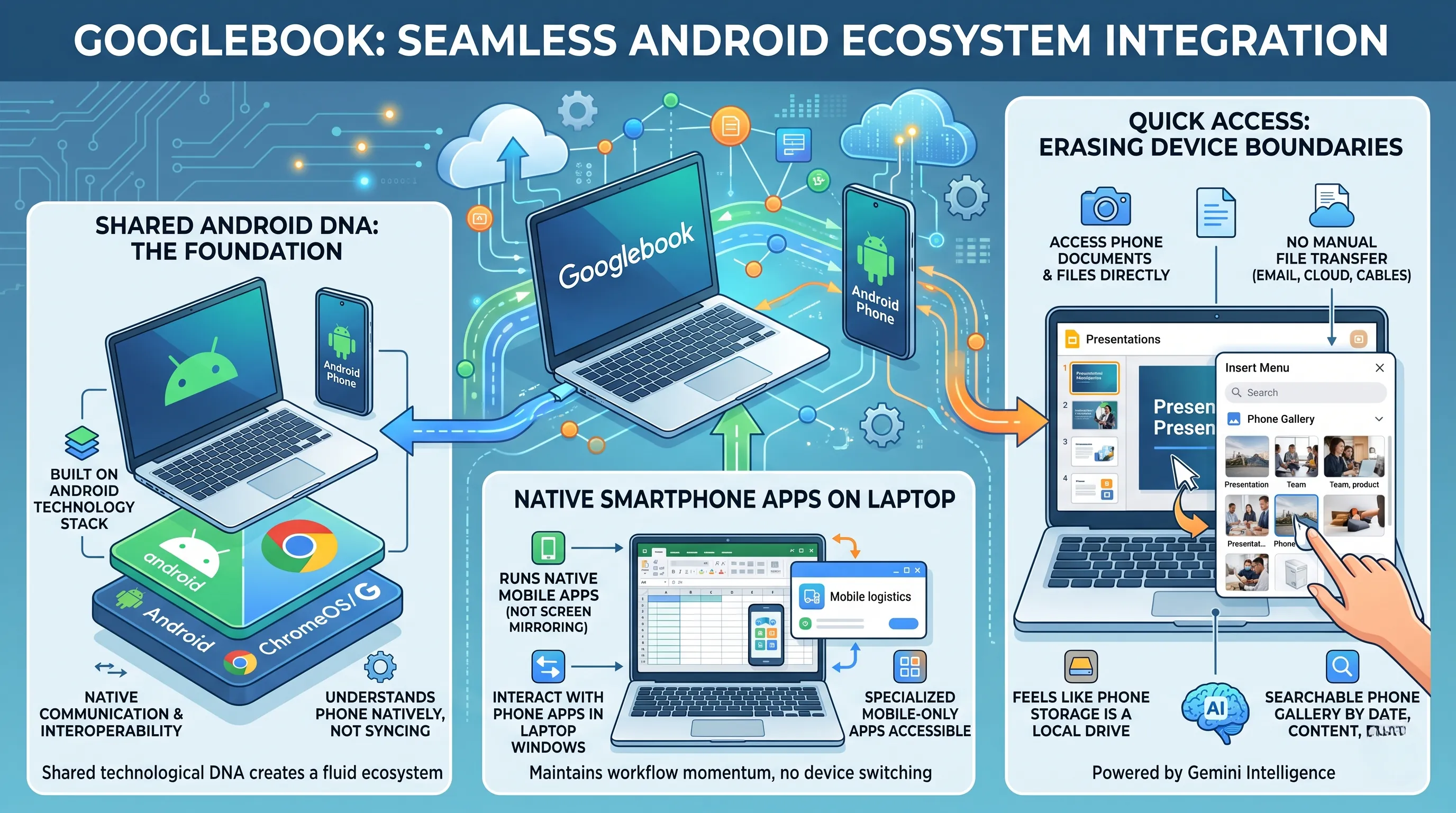
Built on an Android technology stack, Googlebook ensures full and seamless integration with the Android ecosystem, offering greatly enhanced smartphone linkage.
This allows users to quickly run smartphone apps during laptop work and directly access or insert phone documents without file transfer via its "Quick Access" feature, establishing a fluid workflow between devices.
Industry observers view Googlebook, featuring premium materials and a distinctive "Glowbar" design, as Google's ambitious strategy to reorient the entire laptop market towards a future profoundly shaped by artificial intelligence.
Additional information regarding pricing and full specifications is anticipated with the product's official unveiling in Fall 2026.

1. Googlebook: Google's Bold AI Play in the Laptop Market
This section directly addresses the core announcement of "Google Unveils 'Googlebook', Targeting the AI Era" by dissecting the product at the heart of this strategy: the Googlebook itself.
It is a device engineered from the ground up not just to compete in the AI era, but to define it, marking Google's most ambitious attempt to reorient the entire laptop market towards artificial intelligence.
A New Breed of Laptop: The Intelligent Computing System
Google has been clear: the Googlebook is not merely an evolution of the Chromebook.
It represents a clean break, a new category of laptops designed explicitly for the age of Gemini Intelligence.
Officially unveiled by CEO Sundar Pichai at Google I/O 2026, the platform is described as an "intelligent computing system," a term that signals a fundamental shift in purpose.
Unlike traditional laptops where AI is an added feature or a single application, Gemini Intelligence is the foundational layer of the Googlebook.
It is not an app you run; it is the orchestrator that manages tasks, understands data, and works across all your devices, making the hardware a true vessel for AI.
This strategic move is widely seen by the industry as Google's ambitious play to redefine user expectations and force the market to pivot from raw processing power to intelligent, context-aware computing.
The Android Foundation: A Strategic Pivot
Underpinning this new platform is a critical technological decision: the Googlebook is built on an Android technology stack.
This is not simply running Android apps on a laptop; it's a sophisticated fusion that aims to combine the best attributes of both Android and ChromeOS.
From Android, Googlebook inherits the world's largest application ecosystem, seamless mobile integration, and a developer-friendly environment.
From ChromeOS, it likely retains principles of security, simplicity, and cloud-centric operation.
This hybrid approach solves a long-standing challenge for ChromeOS—its limited app library—while leveraging the mobile dominance Google already possesses.
It's a strategic masterstroke designed to create a unified ecosystem where the boundary between smartphone and laptop becomes fluid and intuitive.
Design and Hardware: A Premium AI-First Alliance
Signaling that Googlebook is a top-tier initiative, Google has eschewed a budget-first approach.
The devices are being built with premium materials and an advanced design ethos.
A key distinguishing feature highlighted during the reveal is the 'Glowbar' design, a unique aesthetic element that likely serves as a visual indicator for Gemini's background processes or notifications, giving the AI a physical presence on the device.
Crucially, this is not a solo effort.
Google has secured a powerful coalition of the world's leading hardware partners from day one, including Acer, ASUS, Dell, HP, and Lenovo.
This all-star lineup ensures that Googlebook will have a massive market footprint upon launch, with a variety of form factors and designs, immediately establishing it as a serious contender rather than a niche experiment.
Launch and Availability: The Road to Market
Following its grand unveiling at Google I/O 2026, Google is planning a phased rollout.
The company has stated that additional information and a full product unveiling are expected this fall (Fall 2026), which is when the first devices from its partners will likely be showcased in their final form.
This Fall 2026 event will be the moment of truth where consumers see the complete picture.
However, potential buyers will need to exercise patience, as key details such as pricing and full hardware specifications have not yet been announced.
This withholding of information is typical for a launch of this scale, allowing Google and its partners to build anticipation and finalize their market positioning against competitors.
While a prototype was reportedly used for a first-impressions review, the specifics of that experience remain under wraps, leaving the industry eagerly awaiting the hands-on reveal later in the year.

2. Revolutionizing Interaction: Googlebook's Gemini Intelligence Features
The grand unveiling of the Googlebook is not merely about a new piece of hardware; it is a declaration of intent. This section directly connects to the overarching topic, "Google Unveils 'Googlebook', Targeting the AI Era," by dissecting the very features that define this new AI-centric approach. The Googlebook's purpose is to be an "intelligent computing system," and this intelligence is made tangible not through a single application, but through a fundamental rethinking of user interaction, powered by the core Gemini Intelligence model.
Unlike traditional laptops where the user must actively seek out tools and information, the Googlebook inverts this paradigm. Here, intelligence proactively assists the user, weaving itself into the most basic actions. This is most evident in two groundbreaking features: the Magic Pointer and Custom Widget Creation. These are not just add-ons; they are the primary evidence of Google's strategy to reorient the laptop market around AI, making computing more intuitive, contextual, and deeply personalized.
The Magic Pointer: Your Cursor is Now a Co-pilot
For decades, the cursor has been a simple, passive tool for pointing and clicking.
The Googlebook transforms it into an active, intelligent assistant called the Magic Pointer.
This feature embodies the concept of ambient computing, where the system's AI is always aware and ready to help without being intrusive.
Powered by Gemini Intelligence, the Magic Pointer possesses a deep, contextual understanding of whatever is being displayed on the screen—be it text, images, or data.
The activation is designed to be effortlessly intuitive: a simple shake of the cursor.
This gesture, which is often an idle or frustrated tic for users, is now a summons for a powerful AI co-pilot.
Instead of navigating through menus or opening separate apps, the user can get immediate, relevant suggestions right where their attention is focused. The experiential value is immense, collapsing multi-step processes into a single, fluid action.
Consider these practical examples provided by Google:
- Effortless Scheduling: Imagine reading an email thread discussing potential meeting dates. Instead of manually opening your calendar, copying the dates, creating an event, and adding attendees, the user simply hovers over the relevant text and shakes the cursor. The Magic Pointer, understanding the context of dates and names, would instantly surface a pre-populated calendar event, ready for a single-click confirmation. This transforms a tedious administrative task into a seamless, two-second interaction.
- Instant Visualization: Picture yourself browsing an online store for a new armchair. You have a photo of your living room open in another window. By positioning the cursor over the armchair's product image and giving it a shake, the Magic Pointer could analyze both images and provide an augmented reality visualization, showing how that specific piece of furniture would look in your actual living space. This moves beyond simple assistance into the realm of creative and decision-making tools, directly integrated into the user's workflow.
This feature demonstrates that on the Googlebook, Gemini Intelligence is not an app you run, but an underlying fabric that enhances every interaction.
Personalized Intelligence: Crafting Your Dashboard with Words
The Googlebook extends its AI-first philosophy to system customization, dismantling the rigid structure of traditional widgets and dashboards.
The "Custom Widget Creation" feature allows users to build a personalized information hub using the most natural interface available: human language.
This is a profound shift from the standard library of pre-made, often inflexible widgets found on other operating systems.
A user can simply issue a natural language command to configure their ideal dashboard. The system, orchestrated by Gemini Intelligence, parses the request, pulls data from various sources, and assembles a unique, custom-tailored widget on the fly.
This empowers users to create highly specific and context-aware information panels that perfectly match their immediate needs without needing any technical skill.
The example provided—configuring a personalized dashboard with travel itineraries, reservation information, and a calendar—highlights the power of this system.
A user could type or speak, "Create a dashboard for my trip to London next week."
Gemini Intelligence would then access the user's email for flight confirmations, scan their calendar for booked appointments, and pull up hotel reservation details, consolidating all of this disparate information into a single, cohesive, and visually organized widget.
This isn't just about displaying information; it's about intelligent synthesis, demonstrating Google's vision of an OS that works for the user, proactively organizing their digital life.

3. Seamless Workflow: Googlebook's Deep Android Ecosystem Integration
The Googlebook's ambition to redefine the laptop for the AI era, as announced at Google I/O 2026, is not merely about on-device intelligence like the Magic Pointer.
Its most profound connection to this overarching goal lies in how it leverages Google's AI, specifically Gemini Intelligence, to completely dissolve the barriers between a user's smartphone and their laptop.
This section delves into how the Googlebook's full integration with the Android ecosystem is a core pillar of its AI-centric design, creating a single, fluid workspace that was previously the domain of science fiction.
This isn't just about convenience; it's a fundamental re-imagining of personal computing where AI orchestrates data and tasks across devices, making the "where" of your data an irrelevant question.
The Foundation: A Shared Android DNA
The magic behind this seamless integration is not a superficial software layer or a third-party application; it's baked into the very core of the Googlebook.
The device is built upon an 'Android technology stack', a strategic choice that combines the strengths of Android and ChromeOS.
This shared technological DNA is the critical enabler, allowing for a level of communication and interoperability between phone and laptop that is simply not possible with disparate operating systems.
It means the Googlebook doesn't just "talk" to your Android phone; it understands it on a native level, treating the phone not as a separate, foreign device to be synced with, but as a natural extension of its own computing environment.
Beyond Mirroring: Natively Running Smartphone Apps
One of the most significant pain points in modern workflows is the "app gap" — the need to constantly switch context from a powerful laptop to a handheld phone to use a specific mobile-only application.
The Googlebook directly addresses this by allowing users to quickly run smartphone apps during laptop work.
This is far more advanced than simple screen mirroring, which often suffers from lag, low resolution, and awkward touch-to-mouse translation.
Instead, imagine working on a detailed spreadsheet and receiving a notification from a specialized logistics or banking app that only exists on mobile.
Without taking your hands off the Googlebook's keyboard, you can launch that app in its own window on the laptop's screen, interact with it natively, and close it, all while your primary work remains in view.
This feature transforms the smartphone from a distraction into a directly accessible toolbox, ensuring that workflow momentum is never broken by the need to pick up another device.
Quick Access: Erasing the Boundary Between Devices
Perhaps the most revolutionary feature in Googlebook's integration arsenal is 'Quick Access'.
This completely redefines the concept of file management by allowing users to search or insert phone documents directly without any file transfer.
Consider the current, cumbersome process: you take a photo on your phone that you need for a presentation.
You might have to email it to yourself, upload it to a cloud drive and then download it, or physically connect your phone with a cable.
Each step is a point of friction, a small interruption that collectively drains time and focus.
With Quick Access, this entire multi-step process is obliterated.
When you are in a document on your Googlebook and need that photo, you simply open the insert menu.
The Googlebook's file browser will have a 'Quick Access' location that shows the files on your phone in real-time.
You can search your phone's photo gallery by date, location, or even content—likely powered by Gemini's intelligence—find the image you need, and insert it directly into your presentation.
The file never has to be manually "moved." It feels as if your phone's storage is simply a part of the Googlebook's local drive.
This is a paradigm shift, enabling a truly seamless workflow between laptop and smartphone and turning two separate devices into one cohesive, intelligent system.
📚 Related Posts
Anthropic's Agent View for Claude Code: Master Multi-AI Agents & Transform Developer Productivity
🚀 Key TakeawaysAnthropic's new 'Agent View' for Claude Code significantly boosts developer productivity by centralizing the management of multiple AI agent tasks and conversations on a single, intuitive screen, enabling developers to orchestrate complex
tech.dragon-story.com
OpenAI Codex Mobile Unleashes Ubiquitous AI Coding: Revolutionizing Development Workflow on ChatGPT App with Enterprise Power
🚀 Key TakeawaysOpenAI's Codex, a powerful AI coding agent, is now integrated into the ChatGPT mobile app, enabling software developers to perform and manage coding tasks, monitor progress, and control desktop environments anywhere, anytime from their sm
tech.dragon-story.com
Adobe's Living PDF Revolution: AI-Powered Interactive Documents, Experience Sharing & Enhanced Security Insights
🚀 Key TakeawaysAdobe is transforming static PDFs into dynamic, AI-powered digital experience platforms, enabling conversational interaction, automated content creation, and the innovative concept of experience sharing.The phrase "PDFs coming alive" hera
tech.dragon-story.com


