Key Takeaways from GLM-Image v3.5 "Glyphmaster"
- Z.ai GLM-Image v3.5 "Glyphmaster" sets a new standard for text rendering in generated images, showing a 5-10x improvement in accuracy over competitors like Google Nano Banana Pro.
- This leap in text precision is powered by a dedicated Glyph Attention Mechanism within the model.
- While text is now near-perfect, v3.5 currently trades some aesthetic qualities (photorealism, artistic composition) for this specialized textual accuracy.
- The update is ideal for niche applications where text clarity is paramount, such as technical diagrams, marketing mockups, and data visualizations.
- Developers upgrading should note the deprecation of `render_text` and the introduction of the more powerful `text_blocks` API for fine-grained control over text elements.
- Z.ai plans to address aesthetic limitations in future versions, with a "Dual-Stream Diffusion" architecture envisioned for v4.0 to balance both text and visual appeal.
Z.ai GLM-Image v3.5 "Glyphmaster": Mastering Text, Eyeing Aesthetics
The world of text-to-image generation just saw a significant update with Z.ai's open-source release of GLM-Image v3.5, codenamed "Glyphmaster."
This version update makes a bold statement by prioritizing complex text rendering, positioning GLM-Image as a leader in generating precise, legible text within images.
However, this specialization comes with specific trade-offs regarding overall aesthetic quality, which we will explore.
This guide covers the performance benchmarks, current limitations, ideal use cases, and how developers can adapt to the new API.
Head-to-Head: GLM-Image v3.5's Text Rendering Prowess
Quantifying the improvement in text rendering, we looked at how GLM-Image v3.5 performs against its predecessor (v3.4) and Google's Nano Banana Pro.
The tests focused on generating images with complex, legible, and contextually correct text.
Benchmark Metrics Explained
We considered three key metrics for evaluating text performance:
- Character Error Rate (CER%):
This measures the percentage of incorrect characters, aiming for a lower score. - Typographical Cohesion Score (TCS):
Rated on a 1-10 scale, this assesses kerning, spacing, and font consistency. - Legibility in Complex Scenes (LCS):
Also on a 1-10 scale, this measures readability against challenging backgrounds, on curved surfaces, or at oblique angles.
The Benchmark Results
Across various challenging scenarios, GLM-Image v3.5 consistently outperforms.
For instance, in small font rendering on a circuit board, v3.5 achieved a CER of just 1.8%, compared to Nano Banana Pro's 8.2%.
On curved text for a street sign, GLM-Image v3.5 recorded a CER of 2.5%, while Nano Banana Pro was at 10.5%.
When rendering multi-line paragraphs, v3.5 maintained an impressive 1.1% CER against Nano Banana Pro's 7.0%.
Overall, GLM-Image v3.5 shows a remarkable 5-10x reduction in Character Error Rate compared to its main competitor.
This significant improvement is directly attributed to the introduction of a dedicated Glyph Attention Mechanism.
For tasks where text accuracy is crucial, this model stands out.
[IMAGE: A comparative chart showing CER, TCS, and LCS for GLM-Image v3.4, Nano Banana Pro, and GLM-Image v3.5 across different scenarios]
The Aesthetic Trade-off: What GLM-Image v3.5 Prioritizes
Despite its strength in text, GLM-Image v3.5 does not lead in every aspect of image generation.
When judged purely on aesthetic criteria like photorealism, artistic composition, or lighting dynamics, it often falls short of models like Nano Banana Pro or Midjourney.
Why the Aesthetic Gap Exists
The reasons behind this difference are structural and intentional:
- Architectural Focus:
A substantial portion of the model's computational power is dedicated to the Glyph Attention Mechanism.
This focus appears to impact the processing power available for global scene coherence and subtle light diffusion.
The result can sometimes be flatter lighting and less detailed textures. - Training Data Strategy:
Z.ai has intentionally biased its training dataset towards technical documentation, product catalogs, infographics, and other text-heavy visual media.
While this refines text skills, it limits exposure to the diverse photographic and artistic styles that competitor models train on. - Identifiable Artifacts:
You might notice that while the text in an image is flawless, the surrounding visuals can feel slightly "softer" or less intricate.
In prompts aiming for photorealism, elements like human faces or natural landscapes may not achieve the same hyper-realistic fidelity seen in competing generators.
GLM-Image v3.5 is a specialized tool, not a generalist art generator.
It prioritizes textual accuracy above all else, making it incredibly effective for specific use cases.
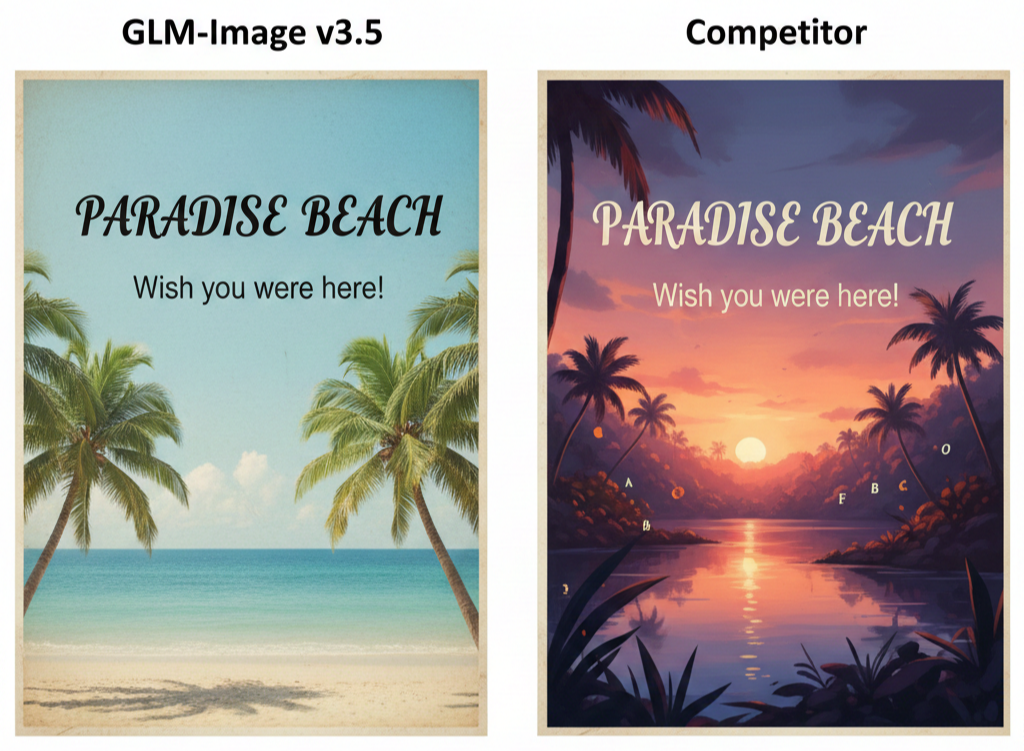
[IMAGE: A side-by-side comparison of an image generated by GLM-Image v3.5 (perfect text, slightly less aesthetic background) and a competitor (imperfect text, highly aesthetic background)]
Where GLM-Image v3.5 Truly Excels: Niche Applications
GLM-Image's specialization makes it an excellent choice for industries and applications where clarity and accuracy are more important than artistic flair.
Here are some areas where it shines:
- Technical Diagrams & Engineering:
You can generate schematics, blueprints, or instructional diagrams with every label and annotation rendered perfectly.
Imagine prompting: "A detailed cutaway of a jet engine with ANSI standard callouts for the turbine, compressor, and combustion chamber." - Marketing & E-commerce:
Create thousands of product mockups rapidly, complete with precise branding and product information.
For example: "A photorealistic image of a white coffee mug with the logo 'Quantum Brew' written in clean Helvetica Neue font." - Data Visualization & Infographics:
Instantly generate charts and graphs where data labels, titles, and legends are flawlessly rendered directly from a prompt.
This offers significant advantages for journalism and business intelligence. - Accessibility:
Develop tools that generate educational materials with embedded, clear text, assisting users who benefit from visual-textual reinforcement.
A Developer's Walkthrough: Adopting the v3.5 Text API
Upgrading to GLM-Image v3.5 is a straightforward process and gives you powerful new control over text elements.
The main change involves the deprecation of the simpler `render_text` string in favor of a more structured `text_blocks` object.
Installation and Upgrade
To get started, update your `zai-glm-image` package:
pip install --upgrade zai-glm-image
Old vs. New: API Comparison
The previous approach was simple but lacked the fine-grained control needed for complex text.
Old Way (v3.4):
import zai_glm_image as zai

image = zai.generate(

    prompt="A futuristic billboard in neo-tokyo",

    render_text="Visit Z.ai!"

)

image.save("output_v3_4.png")
New Way (v3.5 "Glyphmaster"):
The new `text_blocks` parameter allows for precise control over the content, position, font, size, and color for multiple text elements within your generated image.
import zai_glm_image as zai

image = zai.generate(

    prompt="A futuristic billboard in neo-tokyo, glowing neon signs",

    text_blocks=[

        {

            "content": "Visit Z.ai!",

            "font": "Orbitron Bold",

            "font_size": 72,

            "color": "#00FFFF",

            "position_xy": [150, 400], # Top-left coordinate

            "bounding_box_wh": [700, 150] # Width/Height constraint

        },

        {

            "content": "The Future is Generated",

            "font": "Roboto Condensed",

            "font_size": 24,

            "color": "#FFFFFF",

            "position_xy": [250, 560]

        }

    ],

    text_cohesion_strength=0.9 # New parameter to ensure text integrates well

)

image.save("output_v3_5.png")
Key API Changes
- Text Input:
`render_text` (string) from v3.4 is now DEPRECATED.
You must use `text_blocks` (a list of dictionaries) in v3.5.
`render_text` is slated for removal in v3.6, so update your code promptly. - Text Cohesion:
A new parameter, `text_cohesion_strength` (float), lets you control how strongly the generated text's style adapts to the surrounding image context.
Best Practice:
Always define a `bounding_box_wh` for your text blocks.
This gives the model a clear boundary to render within, which significantly reduces issues like word wrap errors or text overflowing its intended area.

Looking Forward: Z.ai's Plan for Balancing Form and Function
Z.ai acknowledges the current aesthetic limitations of GLM-Image v3.5.
They have shared a clear roadmap to address these concerns without compromising the model's best-in-class text rendering.
The Vision for v4.0
During a recent developer briefing, Dr. Anya Sharma, Z.ai's Head of Research, elaborated on their strategy:
"We solved the hardest part first: making text a controllable, native element of the image generation process.
Now, we are developing a 'Dual-Stream Diffusion' architecture for GLM-Image v4.0.
One stream will handle the structural and textual elements, while a second, aesthetically-focused stream will manage photorealism, lighting, and artistry.
A final fusion layer will merge them, giving users the best of both worlds: perfect text in a beautiful image."
Roadmap Highlights
Here's what to expect in the coming updates:
- Q2 2026 (v3.6): Introduction of basic vector and logo rendering capabilities.
- Q4 2026 (v3.7): Enhanced aesthetic model fine-tuning and an expanded style library.
- H1 2027 (v4.0 Preview): The first look at the Dual-Stream Diffusion architecture, aiming to close the aesthetic gap entirely.
Z.ai's approach is strategic: dominate the enterprise and technical markets now with unparalleled text accuracy, then pave the way to challenge the artistic leaders in the near future.


