🚀 Key Takeaways
- The new Google Chrome 'Skills' feature revolutionizes AI interaction by enabling users to save custom prompts as reusable 'Skills', allowing for one-click execution and significantly automating tasks directly within the browser.
- It transforms the web browser into a powerful AI-based automation platform, moving AI beyond simple responses to actively executing actions and analyzing web content across multiple tabs.
- Designed with robust security and privacy measures, 'Skills' requires explicit user confirmation for sensitive tasks, ensuring personal data protection while providing a personalized and efficient AI workflow.
Google is poised to introduce a transformative feature called 'Skills' within its Chrome web browser, fundamentally altering how users engage with artificial intelligence.
This innovative capability aims to revolutionize AI usage by enabling individuals to save their most frequent AI requests as personalized prompts.
These custom 'Skills' can then be executed with a single click, dramatically reducing repetitive input and automating a wide array of daily tasks directly within the browser environment.
The new 'Skills' feature goes beyond simple query-response, allowing for the creation of a custom AI workflow that can automate complex processes.
For instance, users can effortlessly compare multiple products, extract crucial information from lengthy documents, or even automatically adjust recipes to specific dietary needs.
A key strength of 'Skills' lies in its capacity to analyze both the current web page and multiple open tabs simultaneously, providing highly contextual and powerful automation capabilities.
Accessing these functionalities is straightforward, requiring only a quick type of '/' in Chrome's side panel, with Google also supplying a default 'Skills library' for instant utility and seamlessly integrating Gemini prompts for immediate access.
Furthermore, 'Skills' emphasizes personalization, granting users the freedom to modify existing skills or develop entirely new ones tailored to their unique requirements at any moment.
Google has also meticulously designed the feature with a strong focus on security and the protection of personal information, implementing measures such as requiring explicit user confirmation for sensitive tasks like email transmission or schedule additions.
Through continuous automatic updates and rigorous security tests, the platform ensures ongoing safety, evolving the web browser into a sophisticated, AI-based automation platform where AI tools execute actions rather than merely providing information.

1. Chrome 'Skills': Redefining AI Interaction in Your Browser
The entire premise of the main topic, "Chrome 'Skills' Feature Will Change How We Use the Web", rests on the fundamental mechanics of how this new feature operates.
This section deconstructs 'Skills,' revealing how its core design—transforming repetitive AI prompts into single-click, context-aware actions—is the very engine driving this change.
It moves the browser's role from a passive window to the web into an active, intelligent partner in your digital tasks.
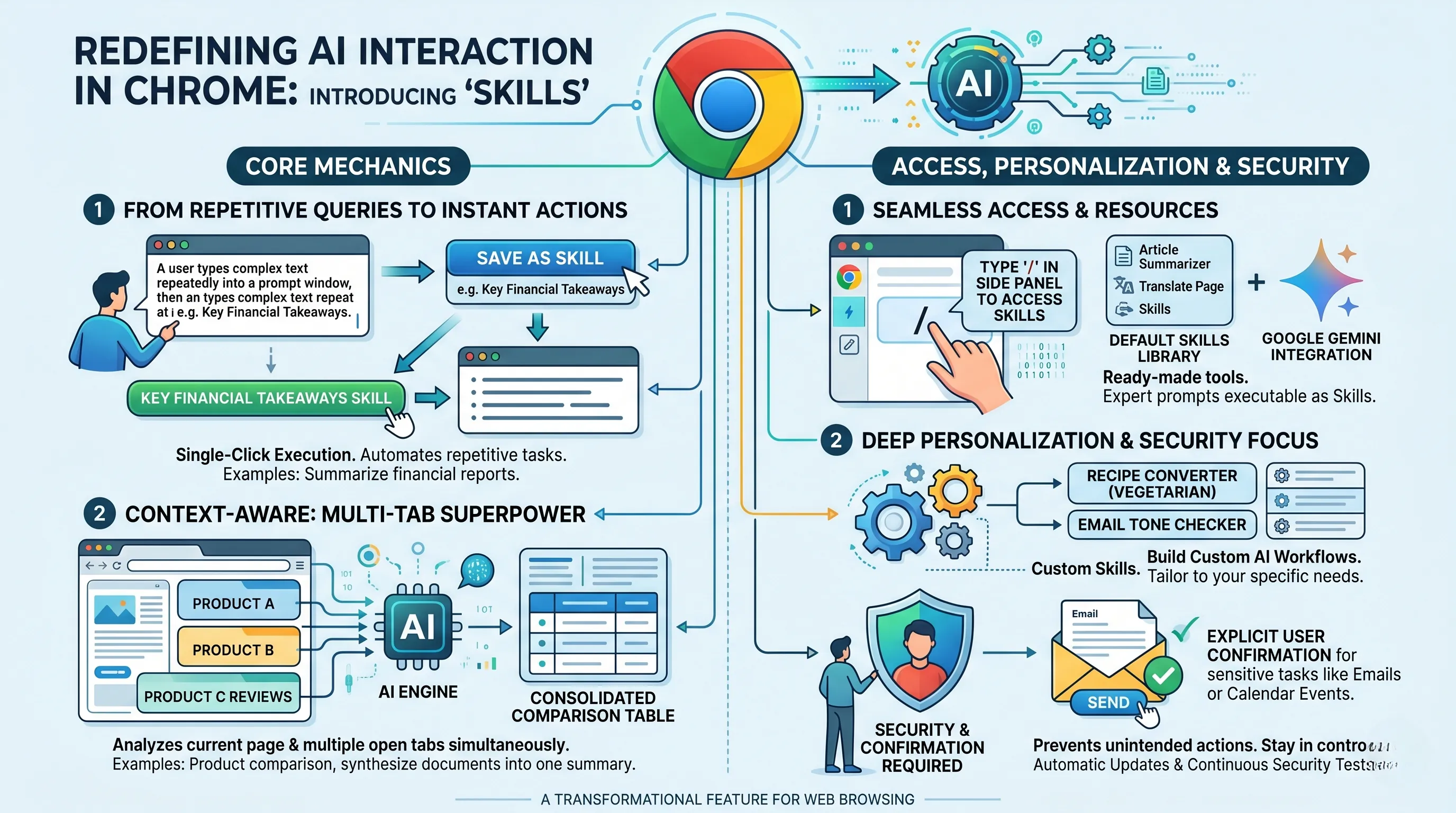
From Repetitive Queries to Instant Actions
At its heart, the 'Skills' feature is engineered to solve a core inefficiency of modern AI usage: the constant, repetitive typing of the same complex prompts.
Google's stated purpose for 'Skills' is to fundamentally alter this dynamic by allowing users to save their frequent AI requests as reusable prompts, which can then be executed with a single click.
This isn't merely a shortcut; it's a paradigm shift.
Imagine crafting the perfect prompt to summarize dense financial reports into five bullet points.
Instead of re-typing or copy-pasting it for every new report, you save it as a 'Skill' named "Key Financial Takeaways."
From that point on, executing this complex analytical task is as simple as clicking a button, directly reducing the hassle of AI interaction and automating a crucial part of your daily workflow.
This one-click execution evolves AI from a conversational partner you must repeatedly instruct into a library of personalized, action-executing tools at your constant disposal.
Context-Awareness: The Multi-Tab Superpower
What elevates 'Skills' beyond a simple prompt-saving utility is its operational capability to analyze context not just on the current web page, but across multiple open tabs simultaneously.
This seemingly simple technical specification is a game-changer for web-based tasks.
Consider the process of online shopping.
Traditionally, you would open several tabs for different products, manually comparing specifications, prices, and reviews by switching back and forth.
With a 'Skill' designed for product comparison, the AI can scan the data across all relevant open tabs at once and generate a consolidated comparison table for you.
This contextual analysis also applies to research, where a 'Skill' could extract key information from multiple long documents or articles, synthesizing them into a single, coherent summary.
The browser is no longer a collection of isolated silos; 'Skills' transforms it into an integrated workspace where information can be cross-referenced and processed holistically.
Seamless Access and a Ready-Made Library
Google has ensured that this powerful functionality is not buried in complex menus.
Accessing 'Skills' is designed for speed and simplicity: a user simply types '/' in the side panel to bring up their saved prompts.
This slash-command interface is a clear signal of intent, borrowing from the efficiency-focused design of developer tools and chat applications to make AI power instantly accessible.
To further lower the barrier to entry, Google provides a default 'Skills library' for immediate use.
This pre-built collection allows users to experience the benefits of task automation from day one, without needing to be an expert in prompt engineering.
Furthermore, the feature is seamlessly integrated with Google's Gemini, making its powerful AI prompts instantly available and executable as 'Skills'.
This ensures that users are leveraging a sophisticated AI model through a highly simplified and actionable interface.
The Core of Personalization and Security
The true potential of 'Skills' is unlocked through its deep personalization.
Users are not limited to the default library; they have the ability to modify existing skills or add entirely new ones at any time.
This allows you to build a completely custom AI workflow tailored to your specific needs, whether it's a 'Skill' to convert a recipe to a vegetarian version, calculate the nutritional components of a meal plan, or run a final check on an important email's tone before sending.
This transforms the browser into a personalized AI-based automation platform.
Recognizing that such powerful automation requires trust, the feature is designed with security and personal information protection in mind.
For any 'Skill' that performs a sensitive task, such as transmitting an email or adding an event to a calendar, the system explicitly requires user confirmation before proceeding.
This critical step ensures the user is always in control, preventing unintended actions.
Google further maintains this safe environment through a commitment to automatic updates and continuous security tests, creating a reliable foundation for this new era of browser-based AI interaction.
2. Beyond Prompts: Custom Workflows and Contextual Automation
The true revolution promised by Chrome's 'Skills' feature, and the core of how it will fundamentally change our web usage, lies in its ability to transcend the single-use, manually-typed AI prompt.
It's a shift from treating AI as a conversational partner you must repeatedly instruct to treating it as a library of personalized, action-executing tools.
This section explores the mechanics behind this transformation: the creation of custom workflows, the efficiency of one-click execution, and the groundbreaking capability of contextual automation that understands your entire browsing session.
From Repetitive Typing to One-Click Execution
At its most basic level, the 'Skills' feature is an elegant solution to the inherent repetition of using AI for common tasks.
Users are no longer required to type or paste the same complex instructions day after day.
The ability for a user to save their own created prompts as a 'Skill' is the foundation of this new paradigm.
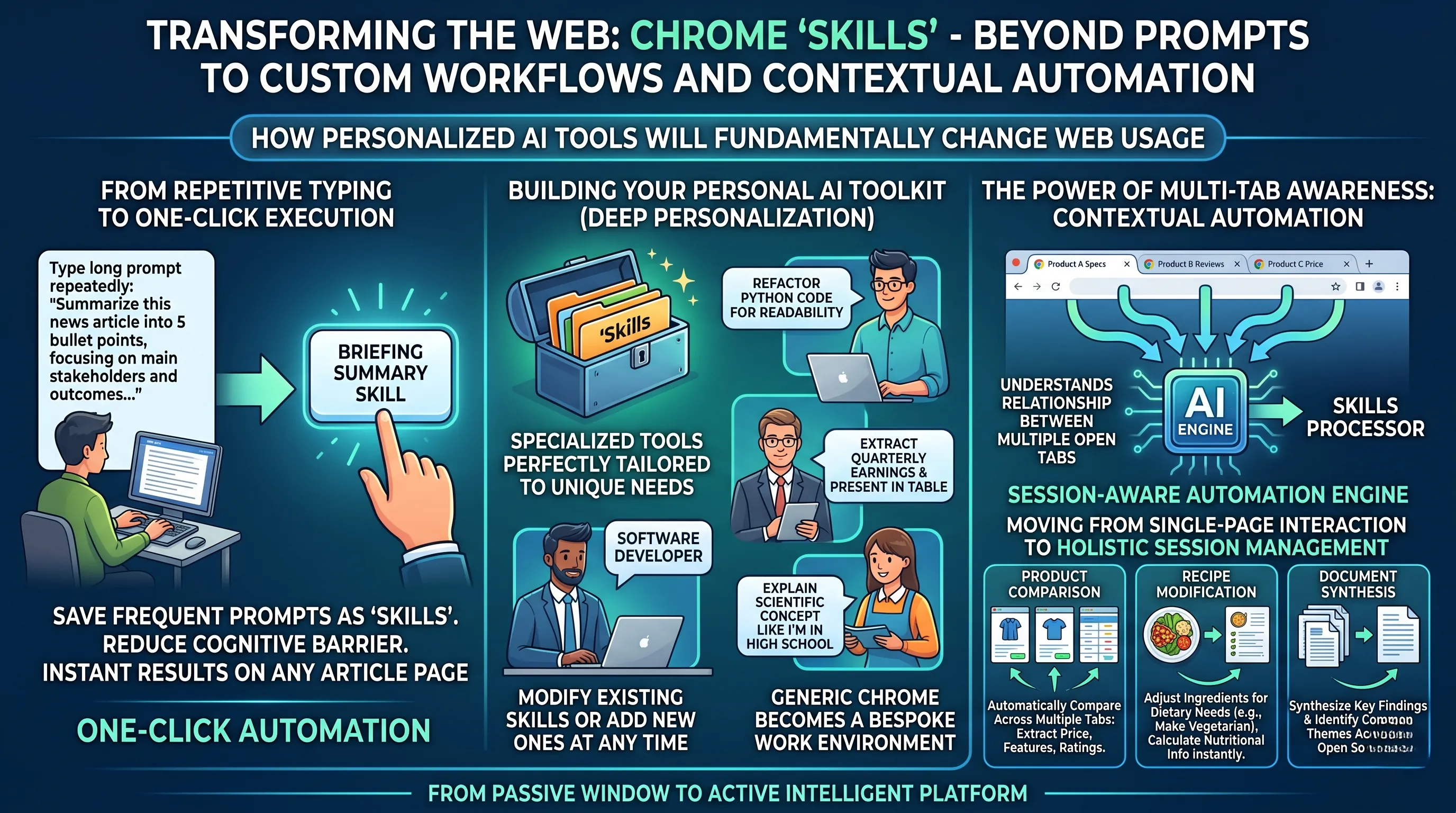
Imagine you frequently need to distill lengthy news articles into five bullet points for a morning brief.
Instead of opening a chat panel and typing, "Summarize this article into five key bullet points, focusing on the main stakeholders and outcomes," you simply create and save this instruction as a 'Skill' named "Briefing Summary."
From that point on, arriving at any article page only requires activating this Skill for an instant result.
This one-click execution does more than just save a few seconds; it fundamentally lowers the cognitive barrier to leveraging AI, making its power as accessible and immediate as bookmarking a page or hitting the 'refresh' button.
This shift from a manual, conversational process to an instantaneous, tool-based action is the first step in reshaping our web habits toward proactive automation.
Building Your Personal AI Toolkit: Deep Personalization
While Google provides a default 'Skills library' to get users started, the feature's transformative power is truly unlocked through its deep personalization capabilities.
Users are not confined to a pre-set menu of actions.
The system is designed to be a living toolkit, with the ability to modify existing skills or add new ones at any time.
This means the browser evolves with you.
A software developer could create a 'Skill' to "Refactor this Python code for readability," while a financial analyst might build one to "Extract all quarterly earnings figures from this report and present them in a table."
A student could have a 'Skill' to "Explain this scientific concept to me like I'm in high school."
This feature allows users to build a highly specialized set of AI tools perfectly tailored to their unique professional, academic, or personal needs, turning the generic Chrome browser into a bespoke work environment.
The Power of Multi-Tab Awareness: Contextual Automation
Perhaps the most powerful and web-altering feature of 'Skills' is its capacity for contextual analysis across multiple open tabs simultaneously.
This elevates the feature from a simple page-specific macro to a true session-aware automation engine.
The AI is no longer blind to the broader context of your work; it understands the relationship between the different pages you have open.
This is what enables complex, automated tasks that were previously manual, tedious, and time-consuming.
This multi-tab awareness is the key that directly connects this feature to the promise of changing how we use the web, moving from single-page interaction to holistic session management.
Transforming Everyday Tasks with Practical Examples
These abstract capabilities come to life in tangible, efficiency-boosting applications.
- Product Comparison: Imagine you are shopping for a new camera and have product pages from three different retailers open in three separate tabs.
Instead of manually switching between them, copying and pasting specifications into a notepad, you could execute a custom 'Skill' called "Compare Cameras."
The Skill would automatically analyze all three open tabs, extract key information like price, sensor size, megapixel count, and user ratings, and then present you with a neatly formatted comparison table on a new page.
This changes online research from a fragmented, manual chore into a seamless, data-driven analysis. - Recipe Modification: You find a complex recipe for a dish you want to make, but it doesn't align with your dietary needs.
A 'Skill' like "Make it Vegetarian" or "Calculate Nutritional Info" could instantly read the entire recipe, intelligently substitute ingredients, adjust cooking instructions, and calculate the estimated calories and macronutrients for the modified version.
This turns the web from a static source of information into a dynamic, interactive assistant. - Document Summarization and Synthesis: For knowledge workers or students, this is a game-changer.
With multiple tabs open containing dense academic papers, financial reports, or legal documents, a user could run a 'Skill' to "Synthesize Key Findings."
This would go beyond summarizing each document individually; it could identify common themes, contrasting viewpoints, and overarching conclusions across the entire set of sources, delivering a comprehensive overview in seconds.
These examples—along with others like running pre-flight checks on an important email before sending it—demonstrate how 'Skills' directly supports the article's central theme.
By empowering users with personalized, context-aware, one-click workflows, Chrome evolves from a window to the internet into an intelligent platform that actively automates and enhances how we gather, process, and use information online.
3. The AI-Powered Browser: Enhanced Productivity with Robust Security
The introduction of Chrome 'Skills' directly addresses the core theme of changing how we use the web by fundamentally transforming the browser from a passive content viewer into an active, intelligent automation platform.
This section explores how this shift is achieved, focusing on the dual pillars of unprecedented productivity gains and a security framework designed for user trust, which together redefine the browser's role in our digital lives.
From Repetitive Friction to Instantaneous Flow
The most immediate benefit of 'Skills' is the drastic reduction in the friction associated with using AI tools.
Previously, leveraging AI for web-based tasks involved a cumbersome, multi-step process: identifying content, opening a separate AI chatbot tab, meticulously crafting a prompt, and then copy-pasting the information back and forth.
'Skills' eradicates this inefficiency.
According to the specifications, users can save frequently used AI requests as prompts that are executed with a single click.
The ability to access these saved commands instantly by simply typing `/` in the side panel means complex, repetitive tasks are reduced to a mere two keystrokes.
This isn't just a time-saver; it's a cognitive-load-reducer.
The seamless integration of Gemini prompts, available on-demand within the browser, ensures that the user's workflow is never interrupted, turning the AI from a separate destination into a native, ever-present capability.
Forging a Personalized AI Toolkit
'Skills' moves beyond a one-size-fits-all AI model by empowering users to become the architects of their own efficiency tools.
The feature allows for the creation and saving of custom prompts, effectively enabling anyone to build a personalized AI workflow tailored to their specific needs.
While Google provides a default 'Skills library' to get started, the true power lies in the ability to modify existing skills or add entirely new ones at any time.
This transforms the browser into a malleable assistant.
A food blogger can create a skill to instantly convert any recipe to a vegetarian version with a single click.
A savvy shopper can design a skill that analyzes and compares product specifications across multiple open tabs, extracting key differences without manual data entry.
A researcher can build a skill to pull out the central arguments from dense academic papers.
This level of personalization means the AI is no longer a generic utility but a bespoke set of 'superpowers' designed by you, for you.
Expanding AI's Domain: From Single-Page Analysis to Multi-Tab Synthesis
A standout capability of 'Skills' is its contextual awareness, which extends beyond the current web page to encompass multiple open tabs simultaneously.
This dramatically expands the scope and sophistication of tasks AI can handle within the browser.
It's the difference between asking an assistant to summarize a single document versus asking them to synthesize a report from an entire folder of research.
This feature unlocks high-level automated tasks that were previously impossible.
For example, a user planning a project can have 'Skills' analyze information from a project management tool in one tab, a budget spreadsheet in another, and team communications in a third to generate a concise status update.
This ability to process and connect information across a user's active session elevates the AI's role from a simple information extractor to a powerful data synthesizer, making it an indispensable tool for complex research, comparison shopping, and multi-faceted project management.
The Evolution to Action-Executing AI
Perhaps the most profound change 'Skills' introduces is the evolution of AI from a passive information provider to an active, 'action-executing' partner.
Traditional AI models respond to queries with text.
'Skills' is designed to go a step further and perform tasks.
The feature is built to automate actions like running final checks before an important email is sent or even adding an event to a user's schedule based on the content of a webpage.
This paradigm shift is central to how the browser experience is changing.
It is no longer just a tool for finding answers; it is becoming a tool for getting things done.
This transition from response to action is what truly transforms the web browser into an AI-based automation platform, where the user's intent is directly translated into a completed task.
Security and Privacy as a Foundational Principle
Such powerful automation capabilities demand an equally robust security and privacy framework, and 'Skills' has been designed with this as a core tenet.
Understanding that direct action-execution requires a high level of user trust, Google has implemented a "security by design" philosophy.
The system is explicitly engineered to protect personal information.
Crucially, for any sensitive tasks—such as transmitting an email or adding an entry to a personal schedule—the feature requires explicit user confirmation before proceeding.
This acts as a critical failsafe, ensuring that the user is always in ultimate control and that the AI operates as an assistant making suggestions, not an autonomous agent making decisions.
This deliberate, permission-based interaction model is key to building user confidence.
Furthermore, the platform's safety is not static; it is actively and continuously maintained through a regimen of automatic updates and rigorous security tests, ensuring the system remains resilient against emerging threats and protecting the user's digital environment.

📚 Related Posts
Google Gemini macOS App: Always-On AI Revolutionizes Desktop Workflow with Native Integration & Screen Understanding
🚀 Key TakeawaysGemini for macOS acts as an "always-on" AI assistant, deeply integrating into your workflow with a native macOS experience and providing instant, contextual assistance.Leveraging the powerful Gemini 3 model, it uniquely understands screen
tech.dragon-story.com
Claude Code: The AI Orchestration Platform Redefining Development with Parallel AI & Doubled Autonomy
🚀 Key TakeawaysClaude Code revolutionizes the development workflow by enabling parallel AI tasks, fundamentally shifting the developer's role to an AI orchestrator.The platform offers an integrated and highly customizable development environment with fe
tech.dragon-story.com
OpenAI Codex Unleashed: Autonomous AI Agents Take Direct Computer Control & Reshape Software Development with LLMs, Copilot & AI
🚀 Key TakeawaysOpenAI Codex has undergone a major transformation, evolving into a sophisticated AI agent capable of direct computer control, autonomous task execution, and managing entire development lifecycles, thus becoming a true collaborator rather
tech.dragon-story.com


