🚀 Key Takeaways
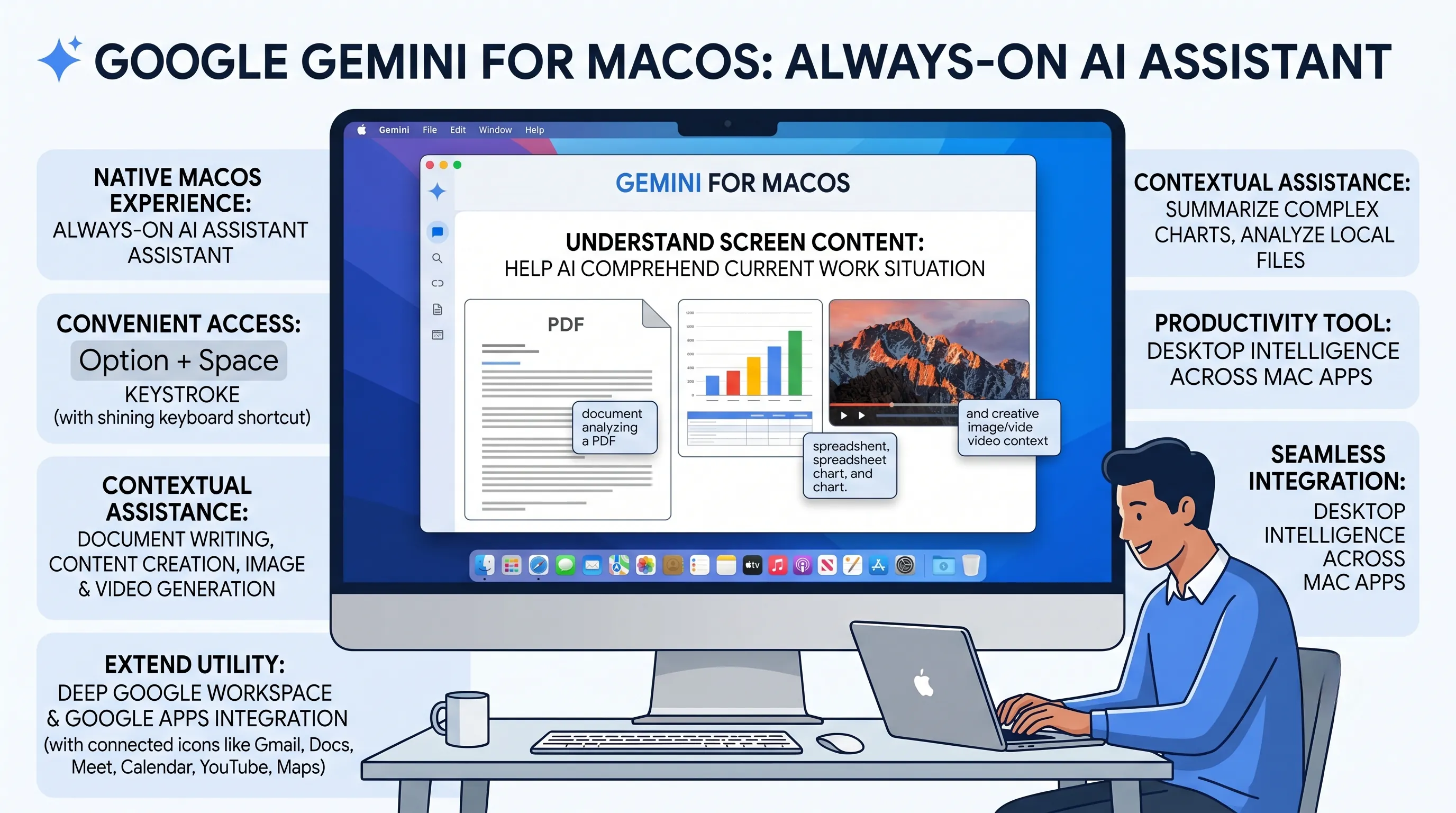
- Gemini for macOS acts as an "always-on" AI assistant, deeply integrating into your workflow with a native macOS experience and providing instant, contextual assistance.
- Leveraging the powerful Gemini 3 model, it uniquely understands screen content directly, allowing for smart summaries, analysis of local files, and unprecedented productivity boosts across various applications.
- Accessible via a simple keyboard shortcut, it offers broad capabilities including content creation, image generation, and seamless integration with Google Workspace, other Google apps, and existing Mac applications.
Google has officially brought Gemini, its most intelligent AI model, directly to the desktop environment with the launch of the new Gemini macOS app.
This groundbreaking application is designed to be an "always-on AI assistant", providing a native macOS experience that naturally integrates into the user's workflow without interruption.
It aims to transform how users interact with their computers by offering immediate and contextual assistance across various tasks.
Powered by the advanced Gemini 3 model, this application enhances reasoning and multimodal capabilities, allowing it to understand the user's current work situation.
A standout feature is its ability to understand screen content directly, meaning Gemini can aid AI in comprehending what you are currently viewing and working on.
Access is incredibly convenient, available via a simple keyboard shortcut (Option + Space) or a user-set shortcut, ensuring that powerful AI is just a keystroke away to maximize productivity.
Beyond basic assistance, Gemini for macOS is a comprehensi+ve productivity tool, capable of summarizing complex charts, analyzing local files, and supporting tasks from document writing to content creation, including image and video generation.
It seamlessly integrates with other Mac apps through its Desktop Intelligence feature and extends its utility across Google Workspace (Gmail, Docs, Meet) and other Google apps (Calendar, YouTube, Maps), truly embedding AI intelligence deeply into the macOS ecosystem.
1. Gemini for macOS: Native Integration and Advanced AI Foundation
The introduction of a dedicated Gemini application for macOS is the most definitive evidence supporting the main theme of "Gemini, Enters the Desktop Era in Earnest."
This move signifies a crucial strategic pivot from a web-based, browser-bound service to a deeply integrated, always-on operating system companion.
It's a declaration that Gemini is no longer just a destination you visit, but a foundational layer of intelligence woven directly into the user's primary computing environment.
This section will deconstruct the core components of the Gemini macOS application, revealing how its architecture, intelligence, and accessibility lay the groundwork for this new desktop-centric era of AI.
A Truly Native Experience: Beyond the Browser
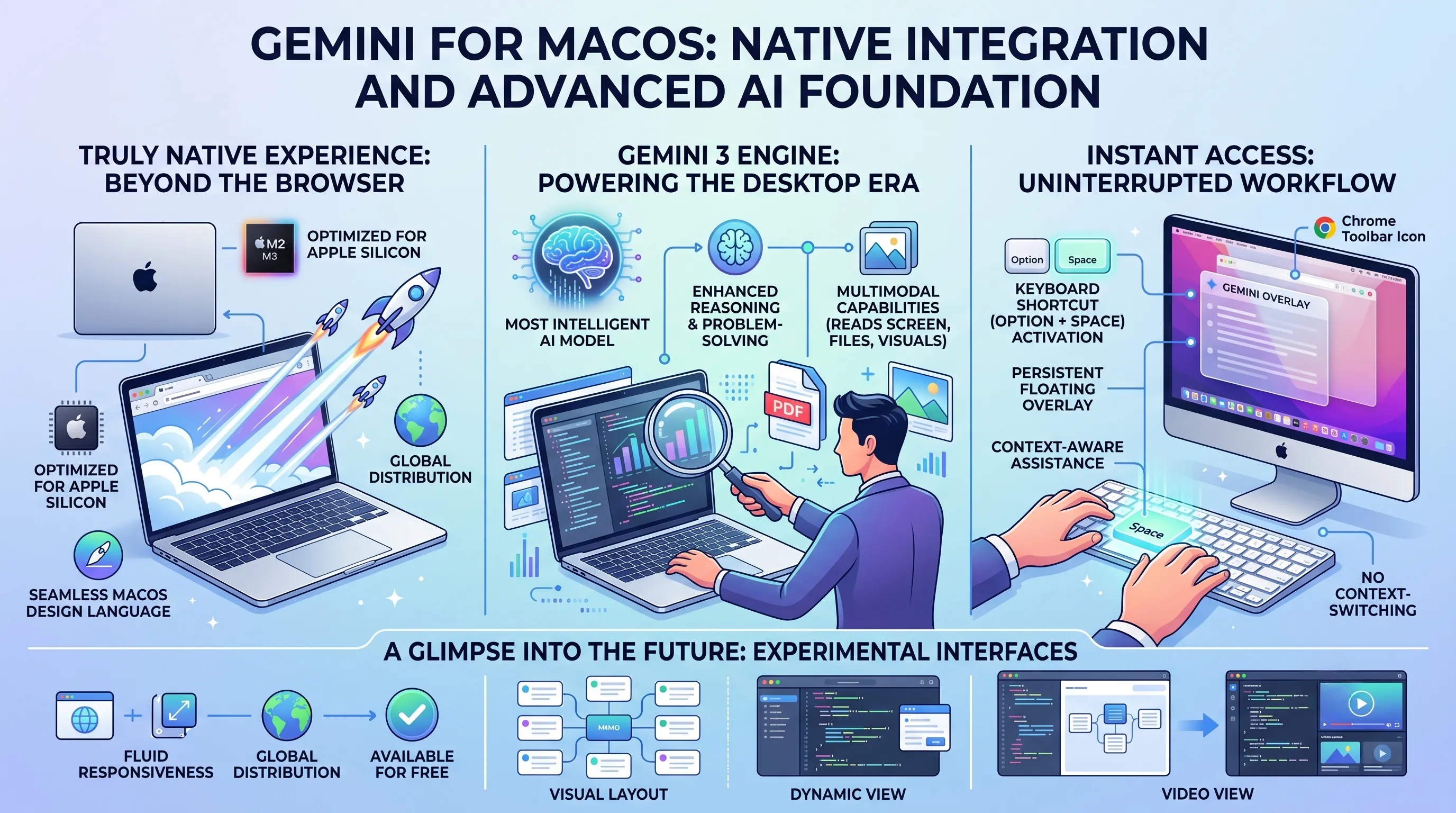
At its core, the Gemini app is engineered to be a first-class citizen on macOS.
Unlike a simple web wrapper that merely packages a website into a window, this application is built for the "Latest macOS environment," delivering a genuine "native macOS experience."
The experiential value of this cannot be overstated.
It means the application is optimized for Apple silicon, resulting in faster launch times, lower resource consumption, and a fluid responsiveness that feels completely at home on the platform.
Users will notice that interface elements, animations, and system interactions—like drag-and-drop or notifications—adhere to Apple's established design language, creating a seamless and intuitive user journey.
This native integration is fundamental to its role as a desktop assistant; it must feel like part of the OS, not a foreign entity running on top of it.
Further accelerating its entry into the desktop world is its availability: the application is being offered for free and is being "globally distributed."
This strategy removes all barriers to entry, encouraging mass adoption and positioning Gemini not as a niche professional tool, but as a ubiquitous utility for every Mac user.
The Powerhouse Within: The Gemini 3 Engine
The sophisticated user experience is powered by Google's "Gemini 3," described in the source material as its "most intelligent AI model."
This isn't just an incremental update; it represents a significant leap in capability that directly enables its desktop functionality.
The model's "enhancing reasoning and multimodal capabilities" are the technical underpinnings of its real-world utility.
Enhanced Reasoning translates to an AI that can go beyond simple query-response and engage in complex problem-solving.
It can understand the context of a user's screen, analyze intricate data within a local file, or help structure a multi-part document, demonstrating a cognitive ability that feels less like a tool and more like a collaborator.
Multimodal Capabilities are arguably the most critical feature for a desktop environment.
Gemini is not limited to text.
It can perceive and understand visual information on the screen, process documents, and generate new content like images, all within the same conversational flow.
This allows it to perform tasks that were previously impossible for a text-only chatbot, such as summarizing a chart in a PDF or offering suggestions based on the layout of a design application.
Instant Access, Uninterrupted Flow: Redefining the AI Workflow
A key aspect of Gemini's desktop integration is its focus on immediate accessibility without disrupting the user's workflow.
This is achieved through several clever activation methods.
The primary method is a simple keyboard shortcut: Option + Space.
This shortcut is a masterstroke of user experience design, instantly summoning the Gemini overlay on top of any active application.
The user doesn't need to switch windows, open a browser, or even move their hands from the keyboard.
This frictionless access transforms Gemini from an application you open to a function you call, much like Spotlight search, fundamentally altering how a user interacts with AI.
For users who prefer customization, the application also allows for a "user-set shortcut," providing flexibility.
Additionally, for those who live within the browser, a "Chrome toolbar icon" offers another persistent and easily accessible entry point.
These methods collectively ensure that Gemini is always just a keystroke or a click away, reinforcing its role as an "always-on AI assistant" ready to provide immediate, contextual help.
A Glimpse into the Future: Experimental Interfaces
Looking ahead, the macOS application is also a testbed for next-generation user interfaces, with experimental features like "Visual layout" and "dynamic view" being explored.
While the source facts are brief, we can safely extrapolate the immense potential here.
A "Visual layout" could suggest an interface that moves beyond the traditional linear chat log, perhaps presenting information in more structured formats like cards, mind maps, or tables depending on the query.
A "dynamic view" hints at an interface that is not static but intelligently adapts its form and function based on the user's current task or the content being analyzed.
For example, when analyzing a video, the interface might display a timeline and transcription tools; when writing code, it might present a side-by-side diff view.
These experimental features underscore the long-term vision: to create an AI assistant whose interface is as intelligent and context-aware as the model that powers it, solidifying Gemini's deep and dynamic presence on the desktop.
2. Revolutionizing Desktop Workflows: Gemini's Expansive Capabilities and Ecosystem Integration
Gemini's official entry into the desktop era is not marked by a simple application icon, but by a fundamental rethinking of how an AI integrates into a user's daily workflow. The capabilities and deep ecosystem integration of the new Gemini macOS app are the very mechanisms driving this transition, transforming the AI from a destination you visit into a constant, context-aware companion that lives within your operating system. This section explores the expansive feature set that makes Gemini a revolutionary force on the desktop.
The 'Always-On' Assistant: A Paradigm Shift in User Interaction
The core philosophy behind the Gemini macOS app is to eliminate friction and context-switching, the primary enemies of productivity.
It achieves this by establishing itself as an 'always-on AI assistant' that integrates naturally into the user's workspace.
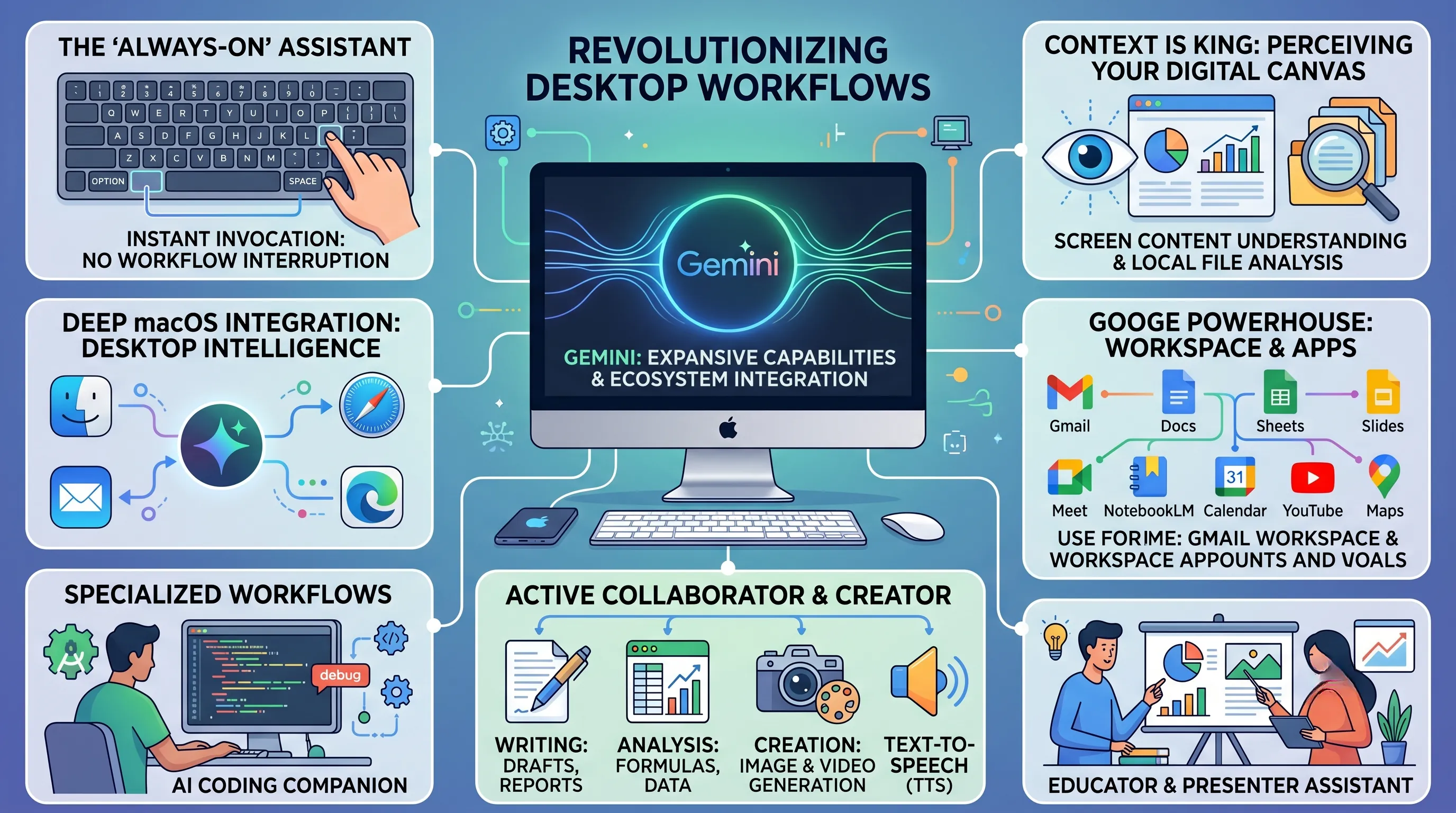
The most powerful manifestation of this is the instant access provided by a simple keyboard shortcut, Option + Space (or a user-set alternative).
This isn't merely a launcher; it's an invocation.
The experiential value is profound: a user deep in thought while analyzing a complex financial report no longer needs to break their focus, open a browser, navigate to a separate AI tool, and paste in a query.
Instead, with a single, fluid keystroke, Gemini's interface overlays their current work, ready to assist.
This design is a deliberate choice to prevent the interruption of workflow, ensuring that the AI serves the user's momentum rather than breaking it.
Built as a native macOS application for the latest environment, it feels responsive and integrated, not like a detached web portal, which is critical for making it a true desktop intelligence.
Context is King: Understanding Your Digital Canvas
What truly elevates Gemini beyond a simple chatbot on the desktop is its ability to perceive and understand the user's current context.
The feature allowing it to understand screen content directly is a game-changer.
This empowers the AI to grasp what you are currently viewing, whether it's a web page, a code editor, or a design application.
Imagine struggling to decipher a dense data visualization on a news site; instead of screenshotting and uploading, you can simply summon Gemini and ask, "Summarize the key takeaways from this chart for me."
This capability extends to local files, allowing Gemini to analyze documents, PDFs, and other data stored directly on your machine without the cumbersome process of uploading them to a cloud service first.
This evolution transforms the AI into a tool that understands the "now" of your work situation, providing assistance that is not just accurate but immediately relevant. It’s the difference between asking a colleague for help and having to explain the entire project from scratch versus having them look over your shoulder and instantly get it.
From Passive Tool to Active Collaborator: Redefining Productivity Tasks
Powered by the Gemini 3 model, which boasts enhanced reasoning and multimodal capabilities, the desktop app becomes an active partner in creation and analysis.
Its support for diverse tasks is extensive.
For document writing, it can help draft emails, generate reports, or refine prose.
In spreadsheets, it can assist with formula creation and data analysis.
Beyond text, its content creation abilities are a significant leap, including sophisticated image generation and even video creation functionalities, directly accessible from the desktop.
This turns the AI into a creative suite, capable of producing assets for a presentation or social media post on command.
Furthermore, its built-in Text-to-Speech (TTS) functionality adds another layer of utility, whether for proofreading documents aloud or creating audio content. Gemini is no longer just processing user input; it is actively collaborating on the output.
The Ecosystem Advantage: Seamless Integration Across Applications
Gemini's arrival on the desktop is cemented by its deep and pervasive integration with the software ecosystem users already inhabit.
This integration operates on multiple levels, creating a web of intelligence that spans the entire user experience.
Deep within the macOS: Desktop Intelligence
Through a feature aptly named 'Desktop Intelligence', Gemini is designed to integrate with other Mac apps.
While the specifics are evolving, the promise is an AI that can interact with and leverage the functionalities of other native programs, breaking down the silos that typically exist between applications. This OS-level awareness is a cornerstone of a true desktop AI.
The Google Powerhouse: Workspace and Apps
Unsurprisingly, the deepest integrations are within Google's own ecosystem. Gemini is not just "in" Google Workspace; it is transforming it.
In Gmail, it helps draft and summarize emails.
In Docs, Sheets, and Slides, it becomes a collaborative partner, assisting with everything from brainstorming content to analyzing data and designing layouts.
Its presence in tools like Google Meet can provide summaries and action items, while its integration with NotebookLM turns research and source material into an interactive knowledge base.
This network of intelligence extends to other essential Google apps like Calendar, YouTube, and Maps, allowing users to coordinate schedules, find information, and plan routes through a conversational AI interface that understands the interplay between these services.
Specialized Workflows: Empowering Developers and Educators
Finally, Gemini proves its desktop prowess by embedding itself into highly specialized, professional workflows.
For developers, it acts as an AI-powered coding companion directly within Android Studio. This goes far beyond simple autocompletion, offering help with debugging complex code, generating boilerplate, and explaining unfamiliar APIs, thereby accelerating the development cycle.
For educators and presenters, Gemini is an invaluable assistant.
It can help create detailed lesson plans from a simple prompt or bring presentations to life by suggesting content, generating relevant images, and structuring narratives.
This ability to cater to specific professional needs demonstrates that Gemini's entry into the desktop era is not just about general convenience but about delivering targeted, high-impact productivity enhancements for experts in their respective fields.
3. Uninterrupted Productivity: Gemini's Contextual Assistance for the Modern Desktop
This section directly addresses the core thesis of "Gemini Fully Enters the Desktop Era" by examining its most strategic feature: the elimination of workflow interruptions.
Gemini's arrival on the desktop is not merely about launching another application; it's about fundamentally re-engineering the user's relationship with their work by embedding an intelligent assistant directly into the flow of thought, making the act of seeking help as seamless as the work itself.
The Tyranny of the Context Switch
For decades, the primary tax on digital productivity has been the "context switch."
Every time a user needs to find a piece of information, get a quick calculation, or rephrase a sentence, they are forced to break their concentration.
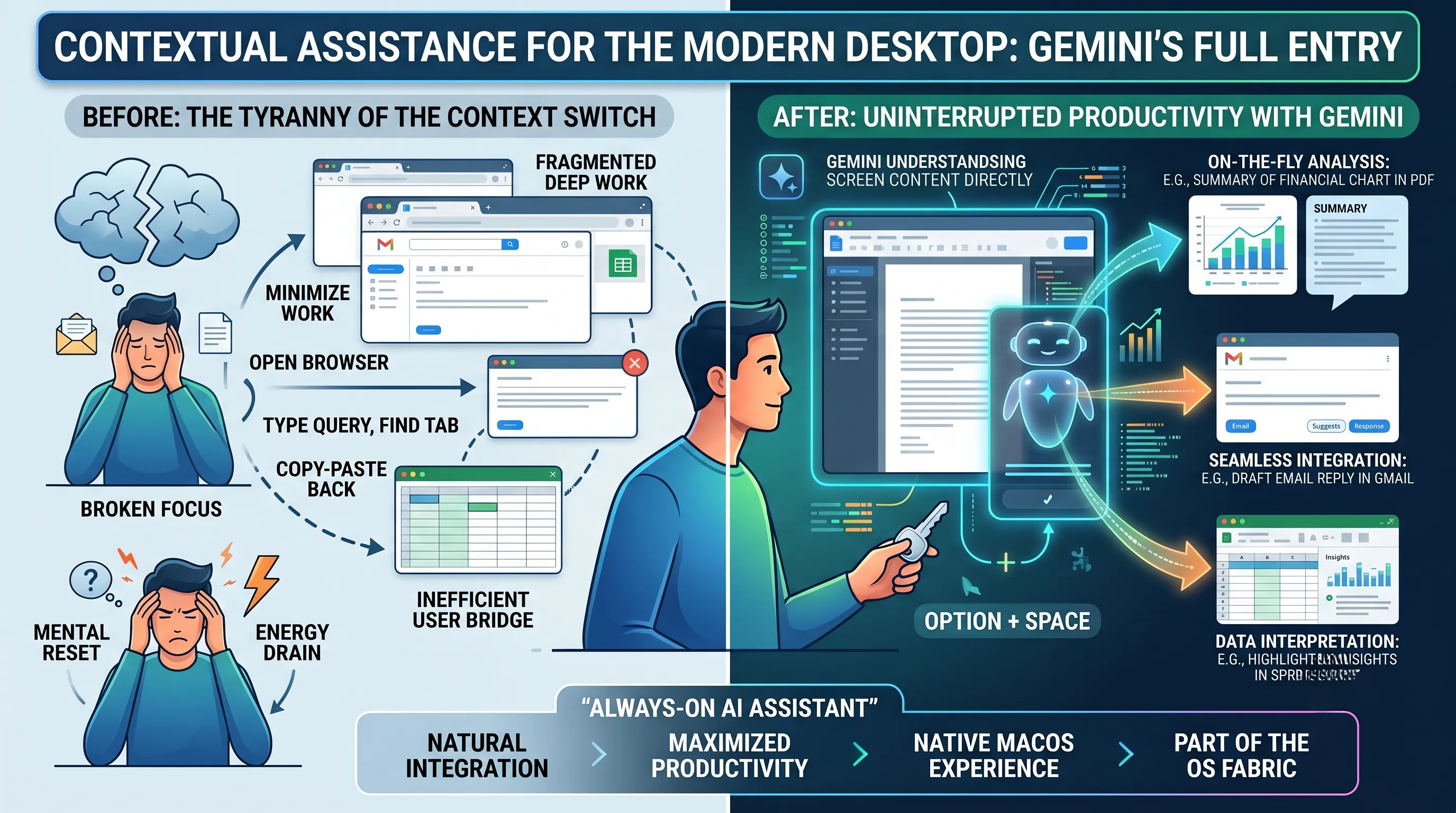
This involves minimizing their current window, opening a web browser, typing a query, finding the right tab, and then copying the information back.
Each step is a small tear in the fabric of focus, a mental reset that cumulatively drains energy and fragments deep work.
The modern desktop, for all its power, has remained a landscape of isolated application silos, forcing the user to be the inefficient bridge between them.
Gemini's Answer: The Instant, Context-Aware Overlay
Gemini confronts this problem head-on by transforming itself from a destination you must travel to into an assistant that comes to you.
The primary mechanism for this revolution is the simple, yet profound, keyboard shortcut: Option + Space (or a user-set alternative).
This is not just a shortcut to launch an app; it is an invocation of an intelligent overlay that appears on top of your current task.
The experiential value of this is immense.
You are no longer leaving your work; you are momentarily augmenting it.
Your document, spreadsheet, or code editor remains visible in the background, anchoring your focus while you interact with the AI.
This design choice is a clear statement of intent: Gemini is engineered from the ground up to prevent the interruption of your workflow, aiming for maximized productivity through immediate assistance.
From Chatbot to true Work Partner: Understanding Your Screen
What elevates this instant access from a convenience to a paradigm shift is Gemini's ability to understand the user's current work situation.
A key feature of the Gemini macOS App is that it understands screen content directly.
This is the critical evolutionary step that allows Gemini to provide truly contextual assistance.
When you summon Gemini, it doesn't just present a blank text box; it arrives with an awareness of what you are looking at.
This capability, powered by the advanced reasoning and multimodal power of the underlying Gemini 3 model, unlocks a new class of productivity enhancements:
- On-the-Fly Analysis: You can be viewing a complex financial chart in a PDF and ask Gemini to summarize its key trends without ever leaving the document.
- Seamless Integration: While writing an email in Gmail, you can ask Gemini to help draft a reply based on the content of the message already on your screen.
- Data Interpretation: You can highlight a section of a local spreadsheet and ask for calculations or insights, turning Gemini into an instant data analyst.
This is the fulfillment of the promise of an "'always-on AI assistant' that naturally integrates into the user's workspace."
It moves beyond responding to explicit commands to proactively understanding the context of the user's needs, making the interaction feel less like a query and more like a conversation with a knowledgeable collaborator who is looking over your shoulder.
This deep, contextual integration within a native macOS experience is how Gemini makes its definitive entry into the desktop era, not as a guest application, but as an indispensable part of the operating system's fabric.
📚 Related Posts
Google Gemini Notebooks: Transform AI into Your Personal Knowledge Base & Project Hub for Unrivaled Productivity
🚀 Key TakeawaysGoogle's new Gemini 'Notebook' feature transforms the AI app into a personal knowledge base and continuously learning assistant, providing a unified, organized space to manage complex projects and tasks, which leads to more accurate and p
tech.dragon-story.com
Claude Agents: Accelerate AI Development from Months to Days – Automating Infrastructure, Boosting Collaboration & Business Pr
🚀 Key TakeawaysClaude Managed Agents dramatically accelerate AI agent development from months to days by automating complex technical infrastructure challenges and significantly improving task success rates, enabling developers to focus purely on core s
tech.dragon-story.com
GLM-5.1: Unveiling the 754 Billion Parameter AI's Shocking 8-Hour Self-Evolution & 6x Performance Leap
🚀 Key TakeawaysGLM-5.1 represents a significant leap in AI, emphasizing continuous self-evolution and sustained performance improvement over long durations, shifting the paradigm from mere task completion to persistent optimization through long-term rea
tech.dragon-story.com


