🚀 Key Takeaways
- The deep integration of Anthropic's Claude AI, including the powerful Claude Opus 4.8, into the Microsoft 365 Copilot ecosystem significantly enhances business productivity by offering advanced cross-application contextual understanding and automated workflows across Excel, PowerPoint, Word, and Outlook, all while providing more AI power within Copilot at the same existing cost.
Anthropic's advanced Claude AI is now fully integrated across the Microsoft 365 ecosystem, marking a significant leap in enterprise productivity.
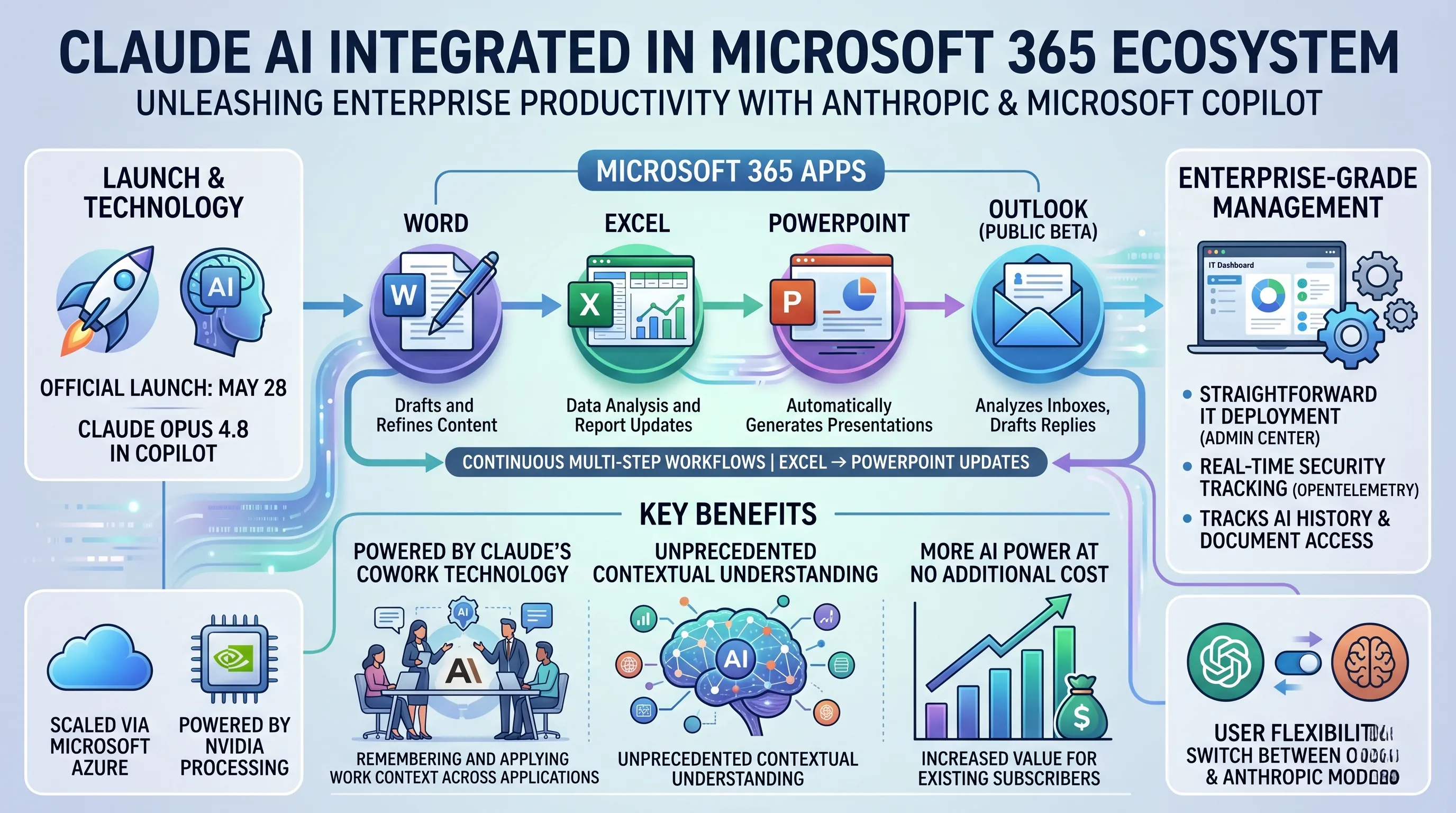
This powerful collaboration, officially launched on May 28 with Claude Opus 4.8 in Copilot, sees Claude's Cowork technology embedded directly into Microsoft 365 Copilot, making its capabilities accessible within essential applications like Excel, PowerPoint, Word, and Outlook.
This move aims to redefine how businesses interact with their productivity suites, offering a more intelligent and streamlined workflow.
The strategic integration, which leverages Microsoft Azure for scalability and NVIDIA for processing power, empowers users with an unprecedented level of contextual understanding.
Claude AI can now remember and apply work context across various applications, enabling continuous, multi-step workflows without repetitive explanations, such as automatically updating PowerPoint charts from Excel changes.
Crucially, this enhancement provides more AI power within Copilot at the same existing cost, making advanced AI more accessible and impactful for businesses.
Enterprise users benefit from robust management features, including straightforward IT deployment via the Microsoft Admin Center and real-time security tracking of AI work history and document access through OpenTelemetry.
Furthermore, the integration into Copilot offers users the flexibility to choose between OpenAI's and Anthropic's latest AI models, ensuring a customizable and powerful AI experience tailored to specific task requirements. While Claude for Outlook is in public beta, its features like analyzing inboxes and drafting replies promise substantial efficiency gains for email management.
1. Claude's Deep Integration with Microsoft 365 Copilot: Core Mechanics and Launch
The very essence of Claude's full-scale integration into Microsoft 365 is not merely about adding another application to the suite; it's about embedding its core intelligence directly into the central AI engine, Microsoft 365 Copilot.
This section details the mechanics of this pivotal integration, which transforms Copilot from a single-engine assistant into a multi-model powerhouse, fundamentally altering the user's relationship with AI in their daily workflow.
The May 28 Launch and 'Claude Cowork' Technology
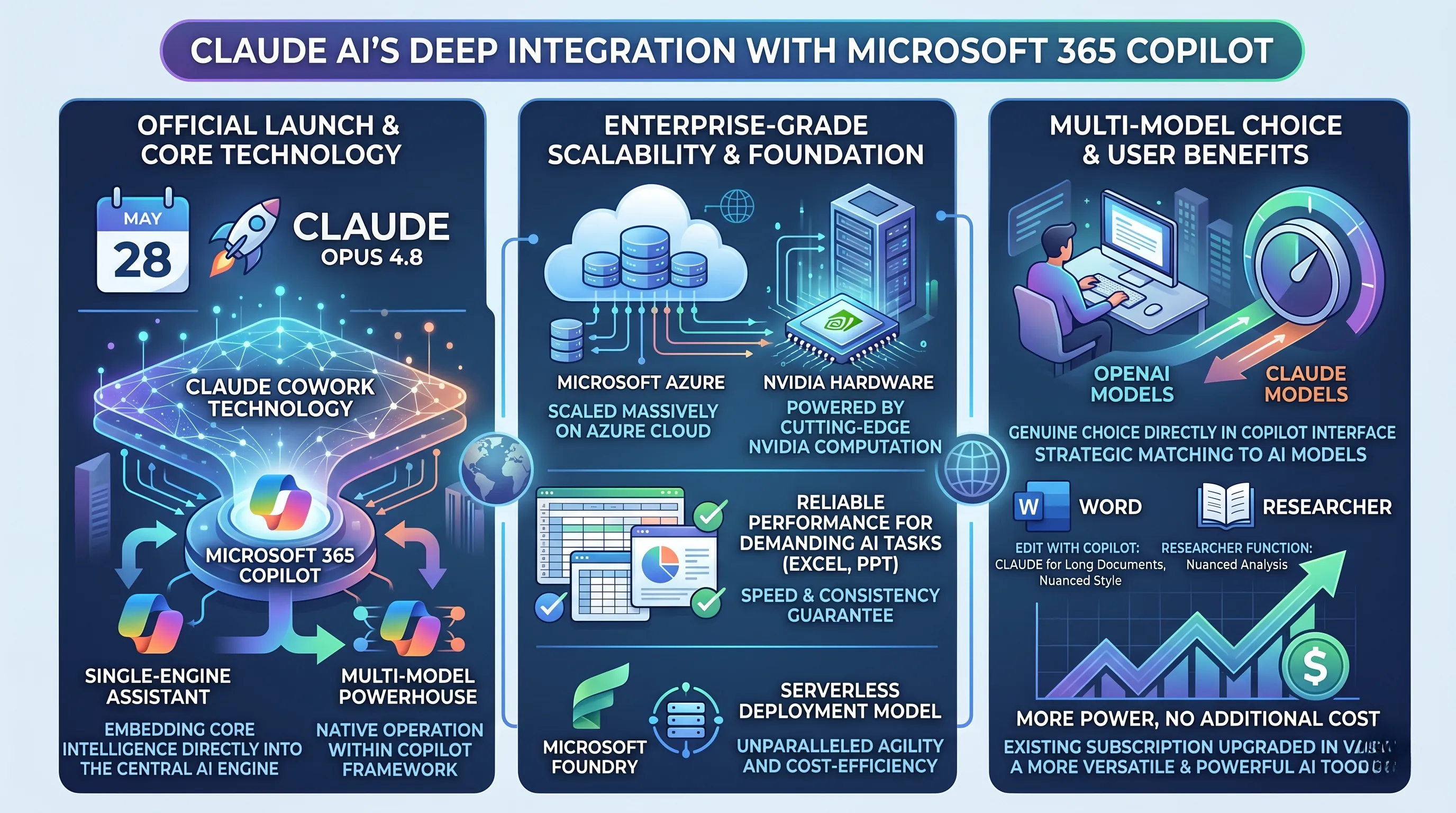
The strategic partnership between Anthropic and Microsoft reached a critical milestone on May 28 with the official launch of Claude Opus 4.8 within the Microsoft 365 Copilot environment.
This is far more than a simple API connection; it represents a deep technological fusion facilitated by Anthropic's 'Claude Cowork' technology.
This specialized integration layer is the key that allows Claude’s sophisticated reasoning and contextual understanding to operate natively within Copilot's framework.
Instead of being a separate, siloed tool, Claude becomes an alternative "brain" that Copilot can leverage, providing users with a direct choice of the industry's leading AI models for their specific business productivity tasks.
The Azure-NVIDIA Foundation for Enterprise-Grade Scalability
To deliver this power reliably and at the immense scale required by Microsoft 365's global user base, the integration rests on a robust infrastructure foundation.
The Claude AI model is engineered to scale massively on Microsoft Azure, powered by cutting-edge NVIDIA hardware.
This isn't just a hosting decision; it’s a performance guarantee.
The combination of Azure's enterprise-grade cloud infrastructure and NVIDIA's computational prowess ensures that even the most demanding AI tasks—from analyzing sprawling spreadsheets to generating complex presentations—are executed with speed and consistency.
Furthermore, Claude's availability in Microsoft Foundry via a serverless deployment model revolutionizes how IT departments can provision this capability.
Serverless architecture means that enterprises can access Claude's intelligence on-demand without the complexity and cost of managing dedicated servers, offering unparalleled agility and cost-efficiency.
Multi-Model Choice: More Power, No Additional Cost
The most significant immediate benefit for users is the introduction of a genuine multi-model choice directly within the Copilot interface.
Microsoft 365 Copilot now offers access to the latest, most powerful AI models from both OpenAI and Anthropic, placing two of the world's premier AI systems at the user's fingertips.
This is a tangible choice, not a background process.
Users can now explicitly select Claude when invoking specific Copilot capabilities, such as using the 'Edit with Copilot' feature in Word or the 'Researcher' function for data gathering.
This allows them to strategically match the AI model to the task—perhaps choosing Claude for its renowned proficiency in handling long, complex documents or its nuanced, creative writing style.
Critically, this dramatic increase in capability comes with a compelling financial advantage: users get more power with Claude for the same cost.
The existing Microsoft 365 Copilot subscription is instantly upgraded in value, providing a more versatile and powerful AI toolkit without an associated price increase, solidifying the platform's position as a central hub for business productivity.
2. Enhancing Productivity: Claude's Cross-Application Contextual Intelligence in Microsoft 365
The full-scale integration of Claude into Microsoft 365 is not merely about placing an AI assistant inside individual applications; it is about creating a unified, intelligent workspace where the boundaries between applications dissolve.
This is most powerfully demonstrated by Claude's cross-application contextual intelligence, a core feature that fundamentally redefines productivity by allowing the AI to remember, understand, and act upon your work context as you move seamlessly across the entire M365 ecosystem.
This capability transforms a collection of separate tools into a single, cohesive project environment, directly fulfilling the promise of a deep and comprehensive integration.
The foundation for this revolution in workflow is now firmly in place, with Claude being officially launched for Excel, PowerPoint, and Word.
This core suite is complemented by a public beta for Claude for Outlook, positioning the email client as the central hub for initiating many workstreams.
Furthermore, to ensure comprehensive data access, free connectors for Outlook, OneDrive, SharePoint, and Teams are available for all plans, allowing Claude to draw context from conversations, files, and collaborative spaces.
A Continuous Workflow: From Idea to Presentation
The true power of this integration lies in how the AI perceives your work.
Claude understands the entire process as a single conversation flow, a persistent dialogue that doesn't reset every time you switch applications.
This means the AI remembers your work context across multiple applications, eliminating the redundant and time-consuming task of re-explaining your objectives at each stage.
Consider a common business workflow:
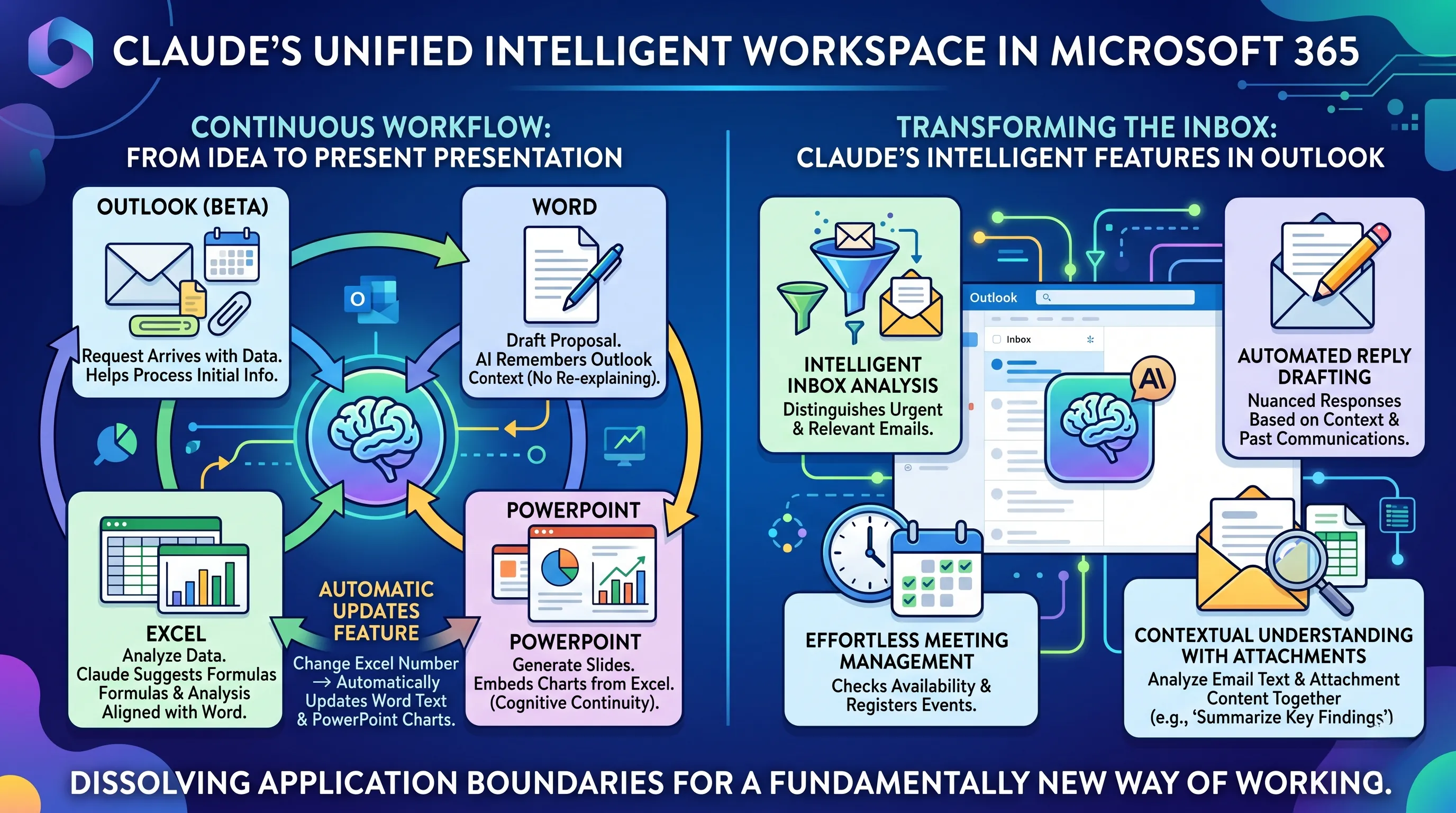
1. Outlook: A project request arrives via email with initial data attached.
Claude understands the request and helps you process the initial information.
2. Word: You move to Word to draft a project proposal based on the email.
Claude, remembering the context from Outlook, assists in structuring the document, pulling key details and objectives without needing to be prompted again.
3. Excel: Next, you open Excel to analyze the data provided in the initial email.
Claude is already aware of the project's goals and can suggest relevant analysis, create formulas, and generate data tables that align with the proposal you just drafted in Word.
4. PowerPoint: Finally, you create a presentation to summarize the findings.
Claude can automatically generate slides based on the Word proposal and embed charts directly from your Excel analysis.
This is not just automation; it is cognitive continuity.
The most significant productivity gain comes from the automatic updates feature.
If you make a change to a number in the source Excel sheet, that modification is automatically reflected in the corresponding PowerPoint charts and any referenced data points in your Word document.
This creates a living ecosystem of documents, ensuring consistency and accuracy while enabling seamless collaboration where team members can work across files with confidence, knowing the information is always synchronized.
Transforming the Inbox: Claude's Intelligent Features in Outlook
Given that many workflows begin in the inbox, Claude's capabilities within the Outlook public beta are designed to turn email from a productivity bottleneck into a streamlined command center.
The AI's primary function is to simplify email tasks through a deep, contextual understanding of your communications.
Key features include:
- Intelligent Inbox Analysis:
Claude actively analyzes your inbox to distinguish important from unnecessary emails.
It moves beyond simple keyword filtering to understand urgency and relevance, helping you focus on what truly matters. - Automated Reply Drafting:
For emails that require a response, Claude can draft replies automatically.
Leveraging the context of the email thread and your past communications, it proposes complete, nuanced responses that often only require a quick review and your final approval before sending. - Effortless Meeting Management:
When meeting invitations are received, Claude can check your availability on your calendar and register the events on your behalf, reducing the manual clicks needed to manage your schedule. - Contextual Understanding with Attachments:
This is a standout feature demonstrating Claude's advanced intelligence.
When you open an email with an attachment, Claude immediately processes both the email's text and the attachment's content.
It comprehends the sender's request in the context of the attached file, allowing you to ask questions like "Summarize the key findings from this report" or "Extract the Q3 sales data from this spreadsheet" the moment you open the email.
This eliminates the need to manually open, read, and interpret files before you can even begin to act on them.
Through this deep, cross-application intelligence, Claude's integration into Microsoft 365 offers more than just another AI tool.
It delivers a fundamentally new way of working, where context is preserved, manual updates are eliminated, and the friction between applications is removed, unlocking a new echelon of business productivity.
3. Enterprise Management, Security, and Interoperability of Claude in Microsoft 365
The full integration of Claude into Microsoft 365 is not merely about adding another AI model; it's about embedding it into the very fabric of enterprise IT governance.
This section delves into the critical backend components that make this integration viable for large-scale corporate adoption, focusing on how IT administrators can deploy, secure, and interconnect Claude within their existing technology stacks.
These enterprise-grade features are what elevate the integration from a simple feature update to a strategic platform enhancement.
Centralized Deployment via Microsoft Admin Center
For any technology to be successful in an enterprise, it must be manageable at scale, and Claude's integration delivers precisely that.
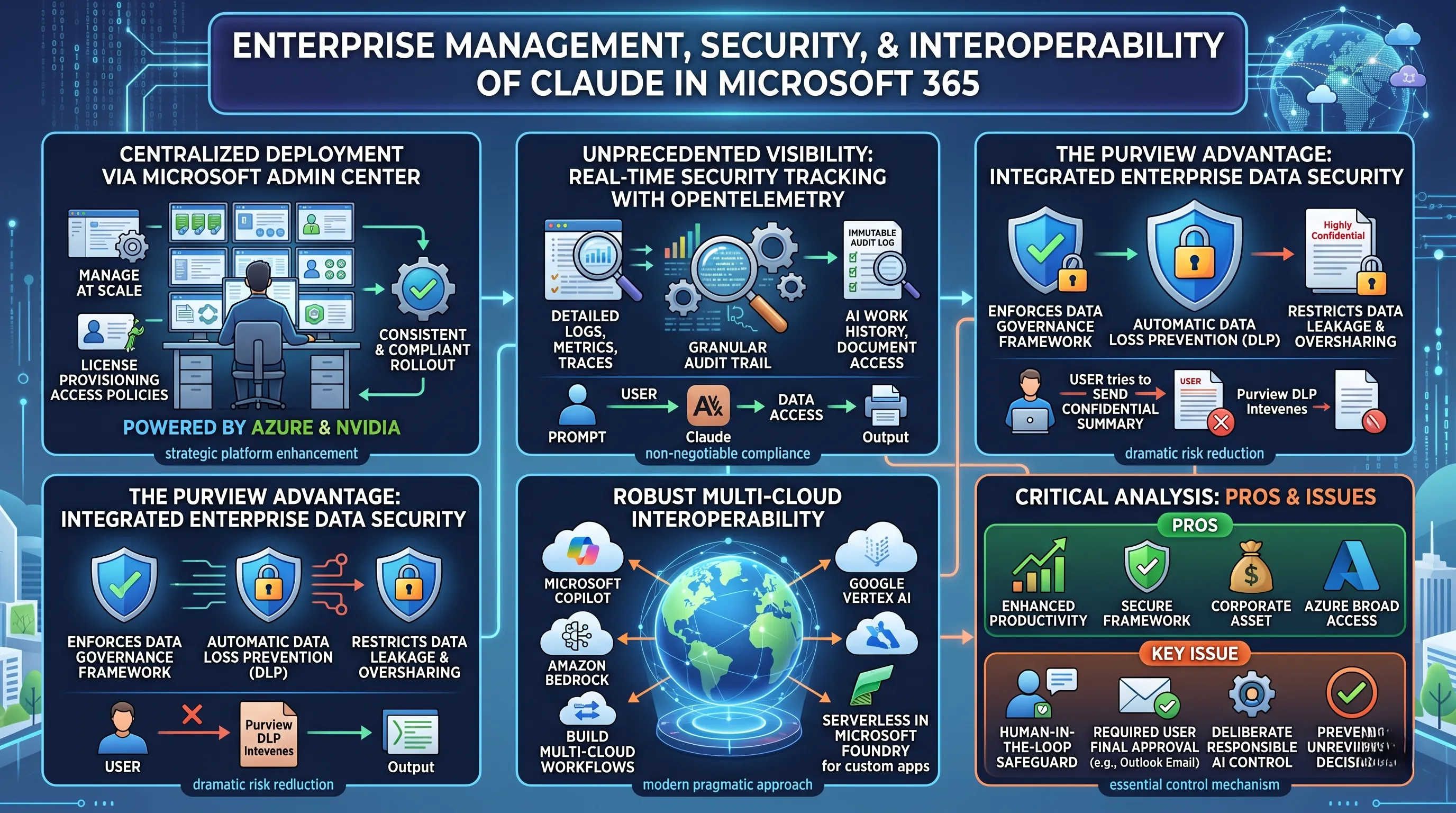
IT departments can distribute and manage Claude across the entire organization directly from the Microsoft Admin Center, the central nervous system for Microsoft 365 administration.
This represents a monumental shift from the "shadow IT" problem, where employees might use personal or unmanaged AI accounts, creating data silos and security risks.
With centralized deployment, administrators can control license provisioning, set user- or group-based access policies, and ensure a consistent and compliant rollout.
This managed approach is underpinned by Claude's ability to scale on Microsoft Azure, leveraging powerful NVIDIA hardware, ensuring that performance and availability meet enterprise-level service agreements.
Unprecedented Visibility: Security Tracking with OpenTelemetry
A primary concern for any CISO considering AI adoption is the "black box" problem: what is the AI doing with our data?
The integration addresses this head-on by using OpenTelemetry for real-time tracking of AI work history and document access.
OpenTelemetry is a powerful, vendor-neutral observability framework that provides detailed logs, metrics, and traces.
In this context, it creates an immutable audit trail for every action Claude takes.
Security teams can now answer critical questions for compliance and incident response: Which user prompted the AI?
What documents did the AI access to generate its response?
What was the final output?
This level of granular visibility is not just a feature; for regulated industries like finance, healthcare, and government, it is a non-negotiable requirement for adopting generative AI.
The Purview Advantage: Closing the Enterprise Security Gap
The most significant security benefit of this integration lies in its relationship with Microsoft's own data governance framework.
A critical issue with using a standalone version of Claude in a corporate setting was its inability to enforce enterprise security policies.
It operated outside the corporate data perimeter, meaning it could inadvertently access and expose sensitive information, bypassing all the carefully crafted rules set up by the organization.
In stark contrast, Claude integrated within Microsoft 365 Copilot operates under the full protection of Microsoft Purview.
This means that all existing enterprise protections for data loss prevention (DLP) are automatically enforced.
If a user prompts Claude to summarize a document labeled "Highly Confidential - Internal Use Only" and include the summary in an email to an external address, Purview's DLP policies will intervene to block the action, just as they would if the user tried to do it manually.
This enforcement dramatically reduces the risk of data leakage and oversharing, ensuring that the power of Claude is wielded safely within the boundaries of corporate data governance.
Beyond the Microsoft Ecosystem: A Multi-Cloud Interoperability Strategy
Recognizing that modern enterprises are not monolithic, the integration provides robust interoperability.
Claude within the Microsoft ecosystem is not a walled garden.
It features the ability to connect with services from other major cloud providers, including Amazon Bedrock and Google Vertex AI.
This allows organizations to build sophisticated, multi-cloud AI workflows, leveraging models or data sources from different platforms without being locked into a single vendor.
Furthermore, Claude is available for serverless deployment in Microsoft Foundry, offering developers a flexible, scalable way to build custom applications that leverage Claude's power without managing underlying infrastructure.
This interoperability is a testament to a modern, pragmatic approach to enterprise architecture, acknowledging that value comes from connection, not isolation.
Critical Analysis: Pros and Issues for the Enterprise
Pros:
The advantages from an IT and security perspective are clear.
The integration provides enhanced productivity through cross-application contextual awareness, but crucially, it does so within a secure and manageable framework.
The broad access facilitated by the Azure and NVIDIA backend ensures performance at scale.
Most importantly, the suite of enterprise-grade management features—centralized deployment, security tracking, and inherited Purview policies—transforms Claude from a consumer tool into a trusted corporate asset.
Cons or Issues: The Human-in-the-Loop Safeguard
One of the most discussed "issues" is a feature that is, by design, a critical safeguard: in Outlook, all AI-assisted actions like email sending and schedule registration require the user's final approval.
The AI can draft the perfect reply or find the ideal meeting time, but it cannot act autonomously.
While this may seem like a friction point that slows down pure automation, it is an essential "human-in-the-loop" control mechanism for the enterprise.
It ensures that accountability remains with the user and prevents the AI from making an un-reviewed decision that could have contractual, financial, or reputational consequences.
This deliberate limitation is not a flaw in the technology but a cornerstone of responsible AI implementation in a high-stakes business environment.
📚 Related Posts
Microsoft Copilot: The Agentic AI Colleague Revolutionizing Productivity & Delivering 353% ROI Across Microsoft 365
🚀 Key TakeawaysMicrosoft Copilot is fundamentally ushering in the 'AI Colleague' era, transforming how work is done across productivity tools like Word, Excel, and PowerPoint by enabling agent-type AI functionality that performs complex multi-step tasks
tech.dragon-story.com
xAI Grok 4.3 Unveiled: Elon Musk's Ultra-Low Cost AI with 1M Token Context, Agentic Power & Custom Voices
🚀 Key TakeawaysxAI's Grok 4.3 is set to redefine the AI market by offering an ultra-low-cost, high-performance agentic AI model, featuring an always-on reasoning structure and a vast 1 million token context window, making advanced AI capabilities signif
tech.dragon-story.com
Hyundai's $26B US Robotics Hub: Mass-Producing Atlas Humanoids by 2028
🚀 Key TakeawaysHyundai Motor Group is making a colossal $26 billion investment in the U.S. to establish a robotics hub (RMAC), targeting the mass production of advanced humanoid robots like Atlas by 2028, with an ambitious annual capacity of 30,000 unit
tech.dragon-story.com


